
Yes, you can send legally binding e-signature requests by SMS when the signing workflow provides a secure link and a verifiable audit trail. Two outcomes make this worth setting up: approvals move faster because SMS gets opened almost immediately, and signers complete the document from their phone without hunting for a login. Small businesses use this for quote approvals, deposit collection, waivers, and job sign-offs.
TL;DR:
- Sending e-signature requests via SMS speeds up approvals and increases signers’ convenience by allowing mobile-optimized, login-free signing from their phones.
- Using templates and dynamic fields streamlines message personalization, while short, clear wording improves conversion rates for quotes, deposits, and waivers.
- An audit trail recording timestamp, device, and view history is essential for legal enforceability, with simple identity verification sufficient for routine contracts.
- Choosing between platform-integrated SMS or external gateways depends on volume, with link formatting and carrier filtering affecting deliverability and message effectiveness.
- Prioritizing clean, short forms and concise workflows makes SMS signing genuinely effective, rather than simply replicating lengthy email documents on mobile screens.
Table of Contents
- What are the benefits of using SMS for e-signature requests?
- How do you send an e-signature request via SMS, step by step?
- What makes SMS templates and wording actually convert?
- How do audit trails and identity checks support legal enforceability?
- How do you handle SMS delivery, providers and integrations?
- How does Ksign handle SMS signing in practice?
- What actually matters when businesses adopt SMS signing?
- Ready to combine SMS signing with form-to-contract automation?
- Sources
- FAQ
What are the benefits of using SMS for e-signature requests?
SMS wins on speed. A signing link buried in an inbox competes with fifty other emails; a text message sits alone on a lock screen. That difference shows up directly in SMS open rates outperforming email, which is why tradies chasing a same-day quote approval increasingly default to text over email.
The mobile experience matters just as much as the speed. A signer tapping a link from a text goes straight to a mobile-optimised signing page, no app download, no password reset, no “check your spam folder” phone call. For a customer standing in their driveway deciding whether to approve a $4,000 fencing quote, that friction (or the lack of it) decides whether they sign now or forget by dinner.
SMS also lifts conversion on payments. Attach a short payment link to a deposit request and you are asking for one action, not two separate follow-ups. That said, SMS isn’t the right channel for everything:
- Quotes and approvals: ideal, because the decision is quick and mobile-first.
- Deposits and invoices: strong, especially with an embedded payment link.
- Waivers and consent forms: good, provided the language is short enough to read on a small screen.
- Multi-party legal contracts: better suited to email or in-person signing, where all parties need time to review clauses together.
Pro Tip: If a document needs more than two minutes of reading before signing, send it by email first and use SMS only for the reminder nudge.
How do you send an e-signature request via SMS, step by step?
Sending a signing request by text follows a predictable sequence, whether you use a dedicated e-signature platform or a business texting app layered on top of one.
- Prepare the document. Use a template with signature fields already placed, so you are not manually dragging fields onto a PDF every time a new quote goes out.
- Confirm the mobile number and consent. Check the number is current and that the recipient has agreed to receive texts for signing, not just marketing messages.
- Generate the request and choose “send via SMS.” Most platforms follow the same pattern: upload the document, add the signer, select the SMS delivery option, enter the number, and send.
- Write a concise message. State what needs signing, add a deadline if one applies, and keep your sign-off short.
- Send a test message to yourself first. Check how the link preview renders and confirm the message hasn’t split into two texts.
- Monitor and follow up. Track delivery status, send one reminder if needed, then download the signed document with its audit trail once complete.
Pro Tip: Test messages catch problems you won’t see until it’s too late. Checking a link preview before sending to fifty customers takes thirty seconds and saves you fifty confused phone calls.
What makes SMS templates and wording actually convert?
Templates work best when they collect every piece of information the contract needs before the document is even generated. That is the logic behind a form-to-contract flow: a customer fills in job details once, the system builds the correct quote or waiver from those answers, and the SMS request goes out the moment it is ready. No re-typing, no version mismatches.
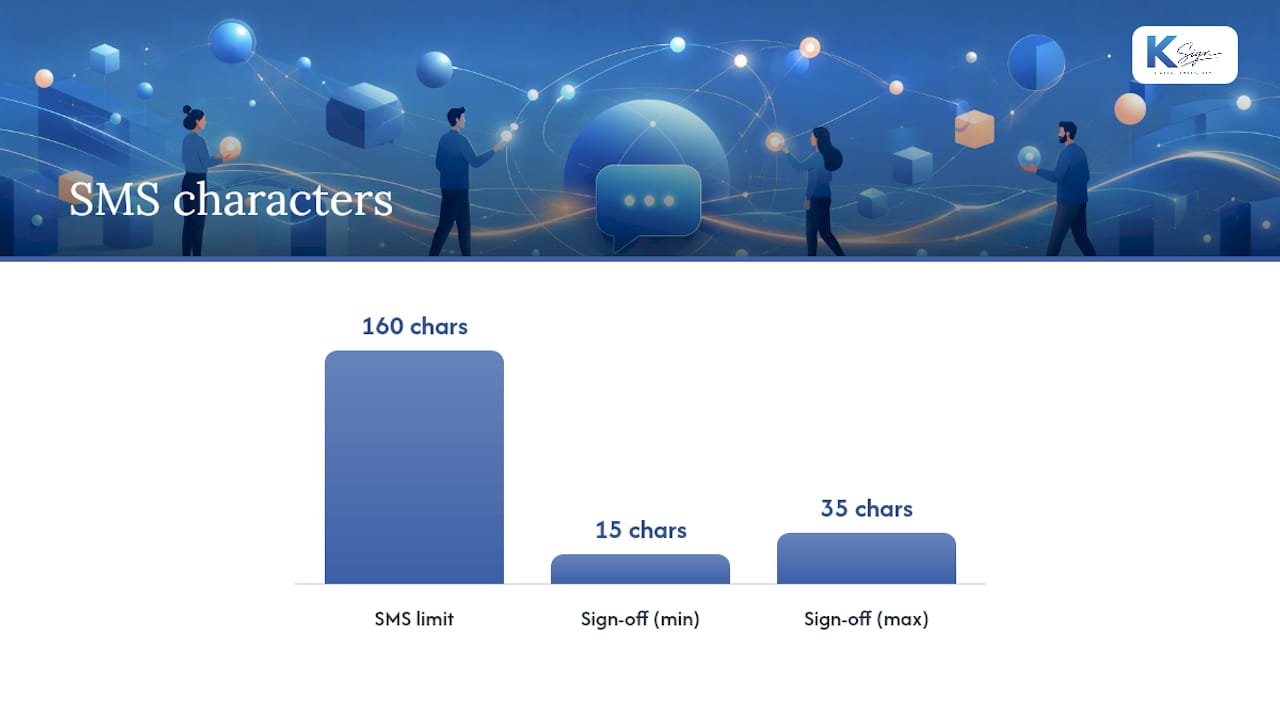
The wording itself has to respect SMS’s constraints. A text message signature adds recognition and trust but eats into the 160-character limit, so every word in the sign-off needs to earn its place. Aiming for a sign-off of roughly 15 to 35 characters, something like “Thanks, Dave, Bright Spark Electrical,” keeps the message intact as a single SMS rather than splitting into two.
A few examples of wording that works:
- Quote approval: “Hi Sam, your quote is ready to review and approve: [link]. Valid till Friday. Dave, Bright Spark Electrical.”
- Deposit request: “Hi Sam, please confirm your booking and pay your $200 deposit here: [link].”
- Waiver: “Please review and sign the consent form before your appointment: [link].”
Dynamic fields (customer name, job reference, amount) let you personalise every message without editing anything by hand, and business messaging apps make it straightforward to insert consistent signatures and templates across a team.
How do audit trails and identity checks support legal enforceability?
An audit trail is the record that proves who signed what, when, and how. At minimum it should capture the timestamp of each action, the device or IP address used, and a full history of views, opens, and the final signature event. Without that trail, a signed document is just a claim, not evidence.
Identity verification for SMS signing doesn’t need to be expensive to be effective. For routine quotes and deposits, SMS one-time passcodes or simple knowledge checks strike a reasonable balance between cost and risk, while higher-value contracts warrant stronger identity verification.
In the US, enforceability under the ESIGN Act and UETA hinges less on the channel and more on intent: did the signer knowingly consent to sign electronically, and can you produce a paper-equivalent record afterward? Electronic signatures are legally recognised broadly, but the burden sits on the business to prove that consent and that record.
A few non-negotiables for the underlying platform:
- Encryption of documents both in transit and at rest.
- Retention of signed records and their full audit history, not just the final PDF.
- Clear, logged consent to receive and sign via SMS, separate from general marketing consent.
How do you handle SMS delivery, providers and integrations?
Two paths exist for sending signing links by text: use the SMS delivery built into your e-signature platform, or connect your own SMS gateway. The built-in option is simpler and usually cheaper for low volume; a dedicated gateway gives more control over branding and sender ID once you’re sending hundreds of messages a month.
Link behaviour deserves attention too. Carriers preview shortened links differently across iOS and Android, and a poorly formatted short link can look suspicious enough that recipients ignore it. Stick to vendor-hosted signing links or a reputable shortener rather than a generic one nobody recognises.
Length matters for cost as much as readability: messages that exceed 160 characters get converted to MMS or split into multiple segments, which affects both your SMS credit spend and how the message displays. A few practical habits help:
- Budget SMS credits for reminders, not just the initial send.
- Watch for carrier filtering, particularly for international numbers.
- Connect webhooks or CRM integrations so a signed status automatically triggers the next task, whether that’s scheduling a job or issuing an invoice.
Field service businesses often extend this further by tying signed approvals into dispatch and automation systems built for contracting workflows, so a signature doesn’t just close a document, it kicks off the next job.
How does Ksign handle SMS signing in practice?
Ksign’s workflow starts with the form, not the document: a customer answers a guided form, the answers auto-generate the contract, and the signing link goes out by SMS with a payment step attached where needed. That form→contract→sign→pay sequence removes the manual re-typing that usually delays small business paperwork.
Every SMS stays short by design, while the audit trail and consent record sit behind the link, not inside the text itself. Businesses building their own send flows can start from the mobile signing guidance and field service form examples on the Ksign blog.
What actually matters when businesses adopt SMS signing?
Most advice on this topic treats SMS as a delivery trick, a faster envelope for the same PDF you’d otherwise email. That misses the real shift. The businesses getting genuine value from text signing aren’t just swapping channels, they’re rebuilding the request itself around what a phone screen can handle: shorter forms, tighter wording, one clear action per message.
The conventional wisdom of “just add an SMS option to your existing e-signature tool” undersells how much the wording and the workflow need to change to make that option worth using. A 400-word waiver that reads fine in an email client turns into an unreadable wall of text on a lock screen notification.
If you’re prioritising one thing first, prioritise the front end: fix the form that feeds the contract before worrying about SMS phrasing. A clean form produces a clean, short document, and a short document is the only kind that genuinely benefits from being signed on a phone. Get that sequence backwards and SMS just becomes a faster way to deliver a document nobody wanted to read in the first place.
— Josh
Ready to combine SMS signing with form-to-contract automation?
Most e-signature tools stop at the signature. Ksign is built to start earlier, turning a customer’s form answers straight into a contract, then out to their phone by SMS for signing, with a deposit or invoice collected in the same flow. That matters for a tradie or clinic owner who currently juggles a Word template, a separate signing tool, and a third app for taking payment.

For a fencing quote, a cleaning contract, or a allied health intake form, that means one workflow instead of three disconnected tools, and no per-envelope pricing surprises. Ksign’s Standard plan runs $24 per month per seat, and Professional sits at $40 per month per seat, both built around the same form→contract→sign→pay sequence described throughout this guide. If SMS-first signing and built-in payment collection sound like what your business is missing, check the plans on the pricing page and see which tier fits your team’s volume.
Sources
- What is a text message signature — why it matters
- Sending a signature request via SMS
- How businesses can use text signatures
FAQ
How do I send an e-signature request by text?
Upload or generate your document in your e-signature platform, add the signer’s mobile number, and choose the SMS delivery option instead of email. The usual flow sends an initial signing link, a reminder if needed, and a completion notification once the document is signed.
Can I send a signature request via text message legally?
Yes, provided the platform captures consent to sign electronically and keeps an audit trail of the signing event. Enforceability under US law depends on proving intent and keeping a paper-equivalent record, not on which channel delivered the link.
Why would a document be sent as SMS instead of email?
SMS is opened faster than email and lets a signer complete a document from their phone without logging into anything. It suits quick decisions like quote approvals and deposit requests better than lengthy multi-party contracts.
How do I set up a text message signature?
Keep your sign-off short, ideally 15 to 35 characters, since it counts toward the 160-character SMS limit. Business texting apps let you save this as a template so every team member sends a consistent, on-brand signature automatically.
What if a customer’s phone can’t open the signing link?
Most signing links are built to work in any mobile browser without an app, but very old handsets or heavy carrier filtering can occasionally block delivery. Resending as MMS or emailing the same link as a backup usually resolves it.