
The fastest way to get quotes approved and deposits paid is an integrated form-to-contract workflow that combines e-signature and embedded payments in one mobile session. Rather than separate tools for forms, contracts, signing, and invoicing, the customer fills in a form, reviews an auto-generated agreement, signs it, and pays a deposit before they put the phone down. Eighty-two percent of small businesses have told researchers they want exactly this kind of all-in-one platform, and Ksign was built around that demand.
TL;DR:
- Using an integrated sign-and-pay workflow ensures deposits are collected immediately after quote approval, reducing delays and the risk of losing customers.
- Embedded payment fields within contracts support popular gateways like Stripe and PayPal, lowering drop-off rates during mobile transactions.
- Small businesses prefer platforms that combine form-to-contract automation, native payment processing, and a no-account signing experience for efficiency.
- Setting up the system requires only linking a payment gateway, customizing industry-specific forms, and testing on a phone, with minimal technical skills needed.
- Many competitors already adopt integrated workflows due to high SMB demand, making it essential to switch or upgrade to stay competitive in fast-paced markets.
Table of Contents
- Why an integrated sign-and-pay workflow helps your business
- How a sign-and-pay session actually works
- What should you look for in a sign-and-pay tool?
- Your 30-minute setup checklist
- Why we built Ksign around forms first
- Get quotes signed and deposits paid in one link
- Sources
Why an integrated sign-and-pay workflow helps your business
Every extra step between “yes” and “paid” is a chance for a customer to change their mind. A separate invoice sent a day after signing gives the job time to lose priority in someone’s inbox, or worse, gives a competitor a window to underquote you. Folding payment collection into the signing session removes that gap entirely. The customer is already convinced, already holding their phone, already in a “yes” frame of mind. That is the moment to ask for the deposit, not three days later.
The research backs this up plainly. Six in ten SMBs say all-in-one payment systems save them time on receivables work, and two-thirds are willing to pay a bit more for a tool if the time saved offsets the cost. That is a business case, not a nice-to-have.
Small business demand for combined workflows is not niche: Strong interest in all-in-one payment platforms means many of your competitors are either already using one or actively looking.
For a tradie, consultant, or photographer, the practical upside looks like this:
- Deposits land the same day the quote is approved, not a week later
- No more chasing a signature by text and an invoice by email separately
- Jobs get scheduled sooner because payment is confirmed upfront
- Fewer no-shows and cancellations, since a paid deposit signals real commitment
- One digital record instead of three scattered files
Mobile matters here more than most software categories admit. Tradies sign things standing in a driveway, not sitting at a desk. A workflow that assumes a laptop and a printer is already the wrong tool for a huge share of the small-business market.
How a sign-and-pay session actually works
A sign-and-pay workflow has five moving parts, and understanding the order matters because getting it wrong (say, sending a payment link before the contract exists) is exactly the fragmented process this approach replaces.
- Build a guided intake form. Capture the job details that matter, such as site address, scope, materials, and payment terms, using fields specific to your industry rather than a generic contact form.
- Auto-generate the contract from the answers. The customer’s responses populate a quote, waiver, or service agreement without anyone retyping a single line. Contract automation turns a five-minute admin task into something that happens instantly.
- Embed signature and payment fields directly in the document. No separate payment page, no redirect to a different app. The signature block and the deposit field sit on the same screen.
- Send one secure link. The customer opens it on their phone, reads the agreement, signs, and pays the deposit in the same session, typically without creating an account or downloading anything.
- Receive the signed record and receipt together. Both land in your dashboard with a timestamped audit trail attached, so there is no ambiguity later about what was agreed and when.
Pro Tip: Keep the payment field visible on the same screen as the signature, not on a separate step. Every extra screen a customer has to click through is a chance for them to close the tab and think about it later.
From the signer’s side, the experience should feel closer to approving a delivery notification than filling out a legal form. They tap the link, scroll the agreement, sign with a finger, enter card details once, and get a confirmation. Removing the need for an account or app download is what keeps completion rates high on mobile, since asking a customer standing on a job site to register for a portal is where most digital workflows quietly lose people.
What should you look for in a sign-and-pay tool?
Not every e-signature platform was built with payments in mind, and that distinction shows up fast once you start using one for actual quotes. Here is what separates a genuine sign-and-pay tool from a signature tool with a payment link bolted on.
- Form-to-contract mapping. The tool should turn form answers into contract text automatically, with templates suited to your industry rather than one generic legal document.
- Native payment fields, not redirects. Look for embedded payment collection that supports gateways like Stripe or PayPal directly inside the document, since embedded payments that live inside the same workflow cut down on drop-off and reconciliation headaches.
- A no-account signer experience on mobile. If your customer has to download an app or create a login just to sign a quote, you will lose some of them before they finish.
- A proper audit trail. Timestamps, IP data, and a stored copy of exactly what was signed matter if a dispute ever comes up.
- Transparent, SMB-friendly pricing. Watch for per-envelope or per-signer fees that punish you for growing.
SMBs consistently favour providers that balance breadth of features with affordability, according to eMarketer’s analysis of small-business payment behaviour. A platform stacked with enterprise features you never touch, priced like enterprise software, is not solving your problem. Neither is a bare-bones signature tool that forces you to bolt on a second app for payments.
On the compliance side, check that the provider addresses the ESIGN Act and eIDAS standards for signature validity, and that any card processing runs through a PCI DSS-compliant gateway. These are not marketing terms, they are the baseline that makes a signature enforceable and a payment secure.
Your 30-minute setup checklist
Getting a sign-and-pay workflow live does not require a developer or a week of onboarding calls. Here is a realistic run-through for a solo operator or small team.
- Pick a plan and connect your payment gateway. Link Stripe or PayPal to your account so payments settle straight into your existing setup.
- Build or adapt an intake form. Add fields for job scope, site details, and payment terms, using an industry-specific template if one is available for your trade.
- Map form answers into your contract template. Add the signature block and payment field to the same document so both actions happen on one screen.
- Run a test session on your own phone. Fill in the form as if you were a customer, sign it, and pay a small test amount to confirm the whole flow works end to end.
- Save it as a reusable template and brief your team. One person should own the workflow so quotes go out the same way every time, whether it is you or an apprentice sending it.
Businesses that manage staged payments, like builders handling variations or consultants on retainer, can extend this same checklist to progress claims and milestone invoices once the basic flow is proven. The profitability gains from tighter cash flow in field service businesses compound quickly once deposits stop lagging behind approvals.
Why we built Ksign around forms first
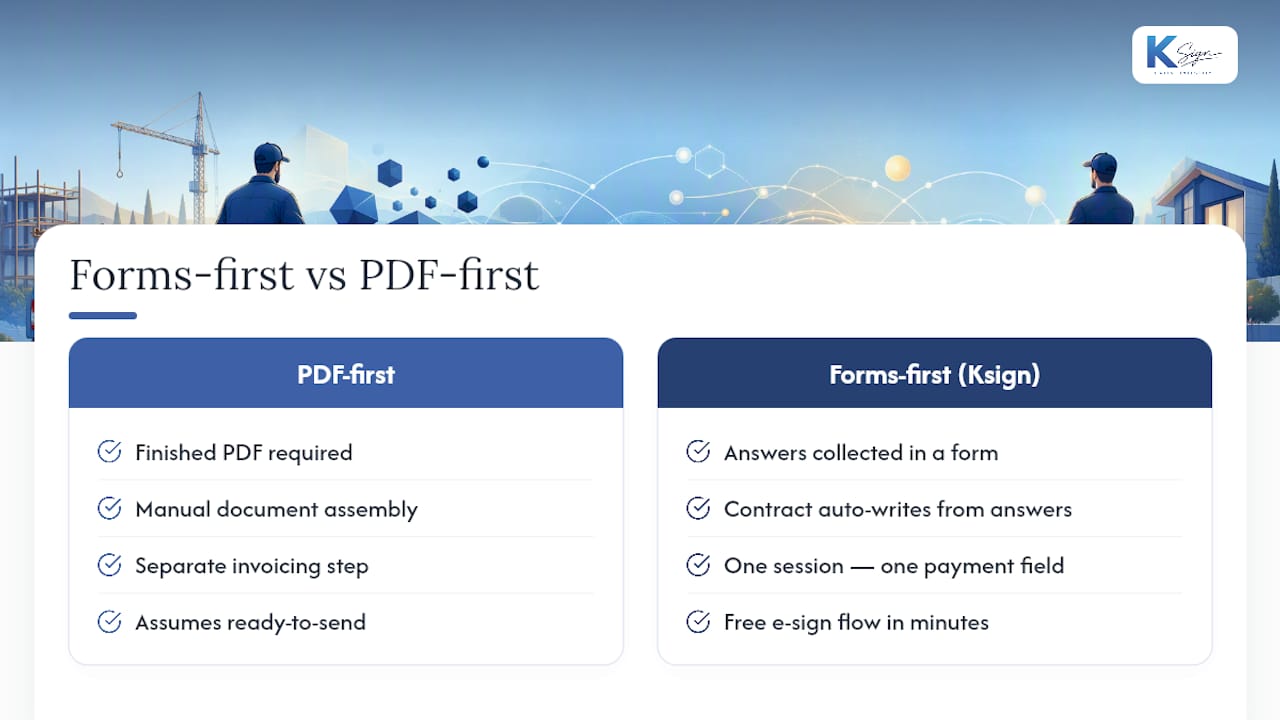
Most e-signature platforms assume you already have a finished PDF ready to send. In our experience talking to tradies and small service businesses, that is rarely true. The document does not exist yet; the information needed to build it is still sitting in someone’s head or scrawled on a job sheet. That is the gap Ksign was designed to close.
Starting with a form rather than a document means the contract writes itself from real answers, which is where most of the admin time actually gets saved for a small team. Removing a second invoicing step also matters more than it sounds. One session, one payment field, one signature, no follow-up chase. If you want to see it working on a real quote, the free e-signature flow takes a few minutes to try.
— Josh
Get quotes signed and deposits paid in one link
Ksign brings the whole workflow together in a single mobile session: a guided form generates the contract, the customer signs it, and the deposit lands the same moment they approve the job. That is the difference between chasing payment for a week and having it confirmed before you leave the driveway.

If you are still juggling a Word template, a separate signing tool, and a payment link sent after the fact, start with the contract automation feature to see how form answers turn into a ready-to-sign quote. Pair it with embedded payments so the deposit is collected in the same session, or check the e-signature solution page for the signer-side experience. Right now you can try the 50% off e-signature offer to get your first templates live this week.
Sources
- Payments Journal | What embedded payments can solve for small businesses
- PYMNTS | 82% of SMBs interested in all-in-one platforms
- eMarketer | Small-business payment providers must invest in all-in-one solutions