
E-signatures are secure when four things are true: the document is sealed with tamper-evident hashing, every signing action is captured in an auditable trail, transport and storage rely on proper encryption, and the signer’s identity is verified to a level matched to the document’s risk. Miss any one of those, and you have a signature that looks legitimate but cannot survive a dispute. Get all four right, and an electronic signature is often harder to forge than a pen on paper. The checklist below shows you exactly what to look for before you trust a platform with a contract that matters.
TL;DR:
- Electronic signatures are most secure when they incorporate cryptographic hashing, an auditable trail, proper encryption, and verified signer identity matching the document’s risk level.
- Hashing with algorithms like SHA-256 makes any post-signature document alteration detectable, providing tamper evidence that paper signatures cannot match.
- Correctly applying encryption, audit trails, and validated identity verification procedures at each layer of the security stack prevents most disputes before they occur.
- Medium- and high-risk transactions should use stronger verification methods like PKI-backed certificates and notarization, while low-risk processes can rely on simpler authentication.
- For field-based signing, encrypt locally cached data, enforce device authentication, and treat mobile devices as sensitive as laptops to mitigate mobile-specific risks.
Table of Contents
- E-signature security checklist: five things to verify in three seconds
- Why e-signatures can be more secure than a wet signature
- The security stack behind every trustworthy e-signature
- Matching verification methods to the risk of the document
- Hardening your e-signature security in practice
- What the ESIGN Act actually requires from your business
- How Ksign’s form-to-contract workflow handles these requirements
- Security implications and best practices for mobile e-signature applications
- Common threats: phishing, interception, and impersonation
- eIDAS versus US standards: how e-signature rules differ internationally
- Biometric authentication in e-signature security
- What to do when an e-signature security breach happens
- Getting the balance right between security and usability
- Get form-to-contract security without the enterprise complexity
- Sources
E-signature security checklist: five things to verify in three seconds
Before you sign anything of consequence, or before you choose a platform for your business, run through this list. It takes less time than reading the terms and conditions, and it tells you more.
- Document hashing (SHA-256 or stronger): the platform generates a cryptographic fingerprint of the file at signing, so any later edit is detectable.
- A genuine audit trail: timestamps, IP addresses, authentication events and signer actions are logged and locked to the document, not stored separately where they could drift out of sync.
- Encryption in transit and at rest: TLS protects data moving between browser and server; AES protects it once it’s sitting in storage.
- Identity assurance matched to risk: email confirmation is fine for a newsletter opt-in, but a high-value contract deserves stronger checks.
- Retention and access controls: signed records stay accessible, reproducible and protected from unauthorised viewing for as long as you need them.
Simpler methods are appropriate for low-stakes paperwork. A staff acknowledgement form doesn’t need PKI-backed certificates. A property transfer or a six-figure supplier agreement does. The US legal framework that governs all of this is worth understanding properly, and we unpack it further down.
Why e-signatures can be more secure than a wet signature
A handwritten signature on paper proves almost nothing on its own. Anyone can trace it, and once it’s on the page there’s no record of when it was added, who was in the room, or whether the document was altered afterwards. Cryptography closes that gap.
When a document is hashed with an algorithm like SHA-256, the result is a fixed-length string unique to that exact file. Change a single character, a comma, or even invisible metadata, and the hash changes completely. That’s what NIST’s cybersecurity glossary describes as tamper evidence: the seal doesn’t just record a signature, it makes any post-signing edit mathematically obvious.
A paper contract can be altered and re-photocopied with no trace. A hashed electronic document cannot be edited without breaking its own fingerprint, which is a different order of proof entirely.
Audit trails add the second layer. A properly built e-signature captures who signed, from what IP address, on what device, using what authentication method, and at what precise timestamp. Try reconstructing that level of detail from a signature scrawled on a printed page.
Storage matters too. A filing cabinet can flood, burn, or simply get misplaced by a departing employee. A signed PDF stored with role-based access controls and encrypted backups doesn’t have that failure mode.
One misconception trips people up constantly: a scanned image of a signature pasted into a Word document is not a secure electronic signature. It has none of the hashing, none of the audit metadata, and none of the tamper evidence that makes cryptographic signing defensible. If a platform lets you drag a signature image onto a PDF and calls that “signed,” ask what’s actually happening underneath.
The security stack behind every trustworthy e-signature
Four layers work together, and understanding each one helps you ask sharper questions when evaluating a platform.
- Transport security. Every interaction between your browser and the signing platform’s servers should run over TLS 1.2 or 1.3. This is the same protection your bank uses, and it stops anyone intercepting form data or documents mid-transmission.
- Document integrity. SHA-256 hashing creates the tamper-evident seal. For PDFs specifically, the signature is often embedded using the /ByteRange method, which cryptographically binds the signature to the exact bytes of the file, so the certificate travels with the document rather than sitting in a separate database that could fall out of sync.
- Identity linkage. This is where the audit trail and authentication method connect. One-time passcodes sent by SMS, two-factor authentication, or a full PKI-backed digital certificate all tie a specific, verifiable identity to the signing event.
- Long-term validation. Certificates expire. A signature applied today using a certificate valid until 2027 shouldn’t become unverifiable in 2030. Embedding RFC 3161 timestamps and OCSP or CRL revocation responses at the time of signing means the document can still be validated offline years later, even after the original certificate has lapsed.
Most disputes over e-signature validity come down to one of these four layers being weak or absent, not to some exotic hacking scenario. A platform that can explain each layer clearly is one worth trusting. One that gives you a vague “bank-level security” answer usually can’t.
Matching verification methods to the risk of the document
Not every document deserves the same level of identity checking, and over-engineering low-stakes paperwork just frustrates signers for no real security gain.
- Low-assurance methods (email verification, simple click-to-sign) suit low-risk transactions: internal acknowledgements, newsletter consents, low-value service agreements where the cost of fraud is minimal.
- Medium-assurance methods (SMS one-time passcodes, knowledge-based authentication questions, a government ID selfie check) fit contracts carrying genuine but moderate risk, such as most client agreements, deposit approvals, and standard service contracts.
- High-assurance methods (PKI-backed digital signatures, qualified electronic certificates, in-person or remote notarisation) belong on high-value or regulated transactions: property transfers, large financial commitments, or anything where a court challenge is a realistic possibility.
Digital signatures backed by PKI provide cryptographic identity binding that basic e-signatures simply cannot match, which is why regulated industries default to them for high-stakes paperwork.
The decision rule is straightforward: match the verification level to what you’d lose if the signature were later disputed or forged. A $200 invoice and a $2 million property contract are not the same risk category, and treating them identically either wastes everyone’s time or leaves you dangerously exposed.
Hardening your e-signature security in practice
Choosing the right platform is half the job. How you configure and use it is the other half.
When selecting a platform, check for:
- AES-256 encryption at rest, not just TLS in transit.
- Persistent, exportable audit trails that survive even if you cancel your subscription.
- Clear certificate handling, including how expired or revoked certificates are treated.
- Independent attestation such as ISO 27001 or SOC 2, which shows a third party has actually reviewed the provider’s security controls rather than taking their word for it.
Operationally, put these controls in place:
- Role-based access so only the people who need to see a contract can open it.
- Documented key management and rotation policies for anyone using API integrations.
- Retention and deletion schedules that match your legal obligations, not just “keep everything forever.”
- Regular, tested backups stored separately from the primary system.
For individual users:
- Keep the device you sign on updated and free of malware.
- Treat any signing request that arrives unexpectedly, especially by text or a shortened link, as suspicious until verified.
- Check the sender and the document context before clicking through, every time.
For anyone integrating via API:
- Use signed, secure webhooks rather than open callback URLs.
- Rotate API keys on a schedule, not only after an incident.
- Verify signatures on ingest rather than assuming a payload is legitimate because it arrived on the expected endpoint.
Pro Tip: Don’t apply your strongest verification method to every document by default. Reserve PKI-backed signing and notarisation for the handful of high-value contracts where a dispute would actually cost you something, and use lighter methods everywhere else. Security that nobody can be bothered using isn’t security.
What the ESIGN Act actually requires from your business
The legal baseline in the United States is 15 USC §7001: electronic records and signatures cannot be denied legal effect purely because they’re electronic. That’s the good news. The obligations attached to that protection are where businesses often trip up.
Consent and disclosure sit at the centre of it. According to FDIC guidance on the ESIGN Act, a valid e-signature process must give the signer clear disclosures covering hardware and software requirements, the right to receive a paper copy instead, and a straightforward procedure for withdrawing consent. Critically, the process must reasonably demonstrate the signer can actually access the electronic information, not just tick a consent box.
That obligation doesn’t end at signing. If a platform’s technical requirements change in a way that could impair a signer’s access, the FDIC’s own examination guidance makes clear the business must notify affected users and obtain fresh consent. Retention rules follow the same logic: records need to stay accessible and accurately reproducible for as long as the relevant retention period runs, not just archived somewhere that technically counts as storage.
A practical compliance checklist:
- Confirm your signing platform presents ESIGN disclosures before consent, not buried in fine print afterwards.
- Offer a genuine paper-copy alternative and a working withdrawal process.
- Document what happens if you change platforms or file formats, and whether that requires re-consent.
- Keep signed records in a format you can reproduce accurately years later, not just open once and forget.
How Ksign’s form-to-contract workflow handles these requirements
Ksign builds audit trails, encrypted storage and configurable identity verification into every workflow, because those are the same protections this article has walked through, not separate add-ons bolted on afterwards.
The form-native approach helps in a way that’s easy to underrate. When a contract auto-generates from a customer’s own form answers, there’s no manual re-typing step where errors creep in, no separate document to accidentally attach the wrong version of. That single workflow, form to contract to signature to payment, keeps the record chain intact and easier to audit.
Configurability matters just as much as the defaults. A cleaning business collecting a job sign-off doesn’t need the same assurance level as a builder locking in a $180,000 renovation contract, and Ksign lets that verification step scale up or down with the stakes involved.
Where to escalate beyond standard e-signature:
- Property transactions or statutory declarations, where notarisation may be a legal requirement rather than a nice-to-have.
- High-value contracts where PKI-backed qualified electronic signatures provide stronger identity binding than a standard click-to-sign flow.
- Any document where the counterparty’s own compliance team requires a specific assurance standard.
The honest answer is that most day-to-day small business paperwork doesn’t need that ceiling. Knowing when to reach for it is the actual skill.
Security implications and best practices for mobile e-signature applications
Field-based businesses sign more documents on a phone than on a desktop, and that shifts the risk profile in ways worth understanding. A tradie approving a variation on-site, or a customer signing a job completion form on the technician’s tablet, introduces device and network variables a desktop signing flow doesn’t face.
Public Wi-Fi is the obvious risk, but it’s rarely the biggest one. Unlocked devices left in a van, apps that cache document data locally without encryption, and signing links sent over unsecured SMS all create more realistic exposure. A properly built mobile signing workflow should encrypt any locally cached data, require device-level authentication before opening a pending signature request, and avoid storing completed documents unencrypted on the device itself.
Screen visibility matters more on mobile than people assume. A signature captured on a shared tablet in a customer’s kitchen is still legally valid, but the audit trail needs to correctly attribute the device and session, not just the account logged in. Look for platforms that log device fingerprints and session details alongside the signature itself.
The practical rule for field teams: treat the phone or tablet as you would a laptop with sensitive files on it. Enable device lock screens, use app-level authentication where the platform offers it, and never leave a signing session open and unattended on a device that changes hands between customer and technician multiple times a day.
Common threats: phishing, interception, and impersonation
Most e-signature security incidents don’t involve breaking cryptography. They involve tricking a human into signing something they shouldn’t, or intercepting a signing link before the real signer sees it.
Phishing is the dominant threat. An attacker sends a convincing fake signing request, styled to look like a legitimate platform notification, hoping the recipient clicks through and enters credentials on a spoofed page. The defence is procedural as much as technical: verify the sender’s actual email domain, and treat any unexpected signing request, especially one demanding urgency, as suspicious until confirmed through a separate channel.
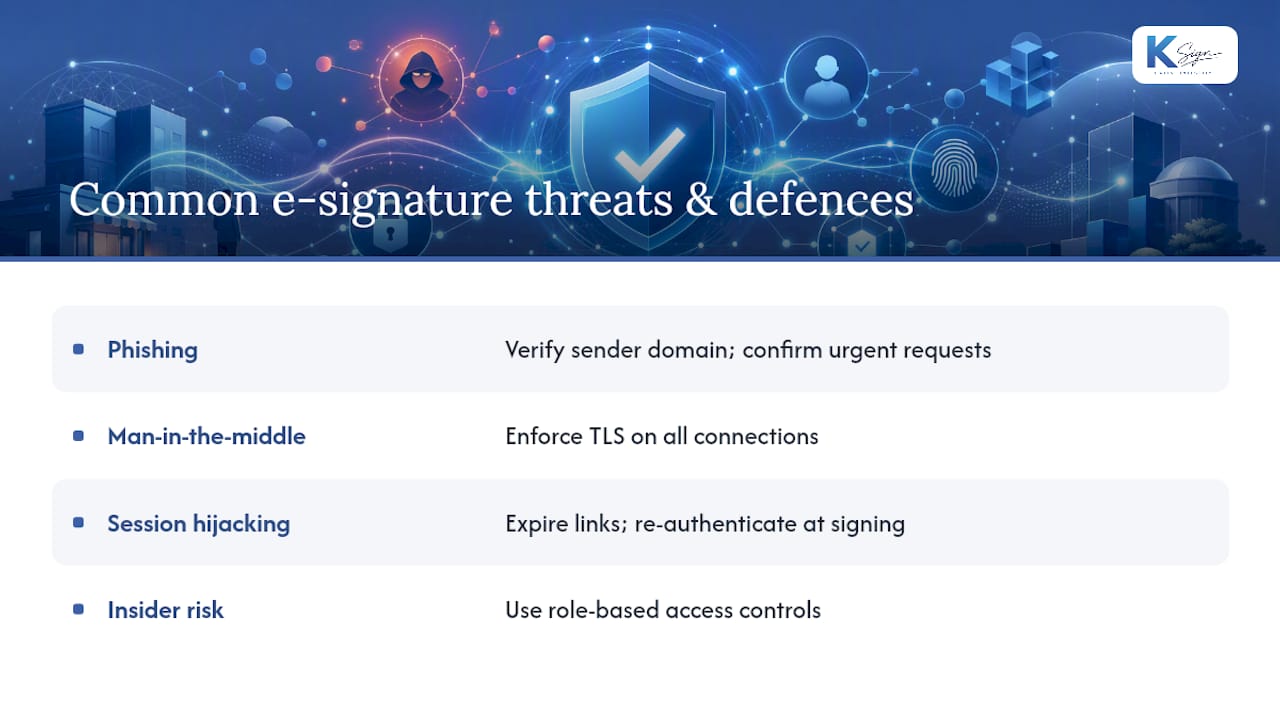
Man-in-the-middle attacks intercept traffic between the signer’s device and the platform’s servers, potentially altering document content or capturing authentication details mid-transmission. Properly enforced TLS across every connection closes most of this door, which is exactly why transport encryption sits at the base of the security stack described earlier in this piece.
Session hijacking and link reuse are less discussed but genuinely dangerous. A signing link sent by email can end up forwarded, screenshotted, or left open on a shared device long after the intended signer has finished with it. Platforms that expire links after use, or that re-authenticate the signer at the moment of signing rather than relying on a single email click, close this gap significantly.
Insider risk deserves a mention too. Someone with legitimate platform access misusing audit logs or altering retention settings is a real, if less glamorous, threat category, which is exactly why role-based access controls matter as much as any cryptographic layer.
eIDAS versus US standards: how e-signature rules differ internationally
The United States and the European Union approach e-signature security from genuinely different starting points, and that difference matters if your business signs contracts with international counterparties.
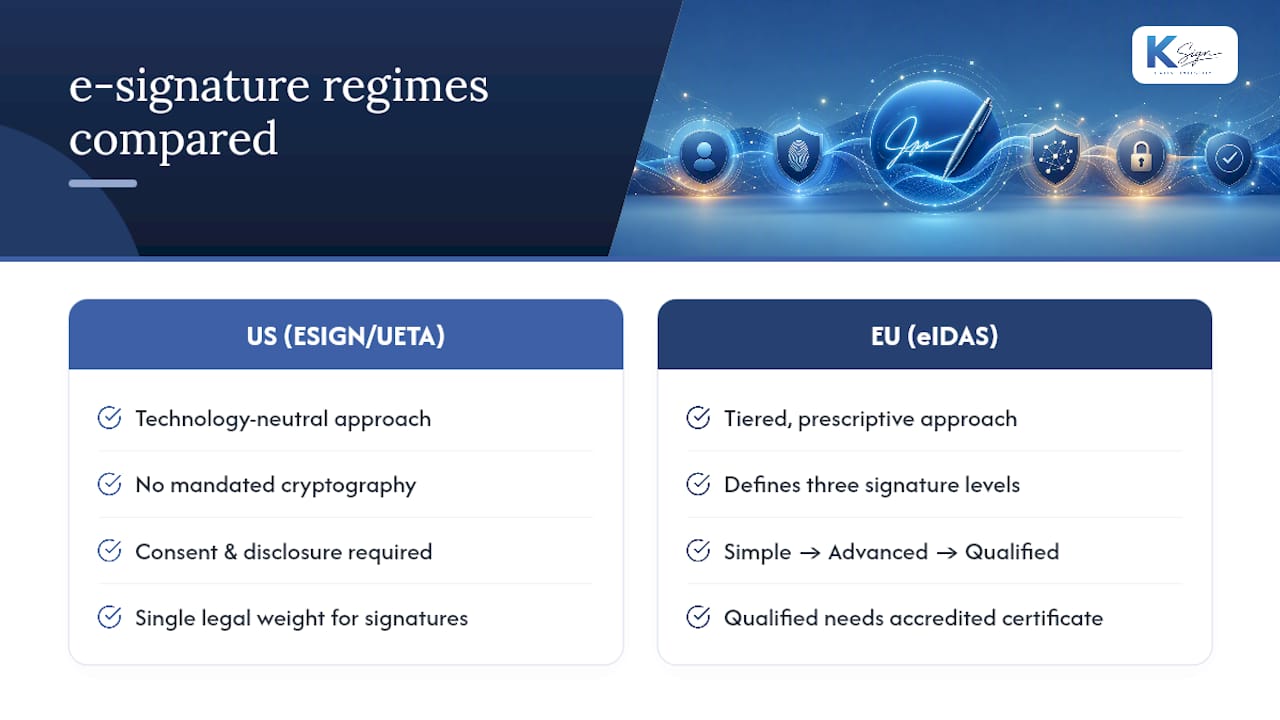
US law, under the ESIGN Act and the complementary Uniform Electronic Transactions Act (UETA) adopted by most states, takes a technology-neutral approach. It doesn’t mandate specific cryptographic methods; it simply says electronic signatures carry the same legal weight as ink, provided consent and disclosure requirements are met. This is often summarised as the ESIGN Act versus UETA question, but the two work together rather than against each other: UETA governs state-level contract law, while ESIGN provides the federal floor and covers interstate and international commerce.
The EU’s eIDAS regulation takes a tiered, prescriptive approach instead. It defines three specific signature levels: simple electronic signatures, advanced electronic signatures (which require identity linkage and tamper detection), and qualified electronic signatures (which require a qualified certificate issued by an accredited provider and carry the strongest legal presumption). Only the qualified tier gets automatic cross-border recognition throughout the EU.
The practical difference: a US business relying on a basic click-to-sign flow is fully compliant domestically, but that same signature may carry less automatic legal weight in an EU court than an eIDAS qualified signature would. If you regularly contract with European counterparties, it’s worth checking whether your platform can produce a qualified-equivalent signature when the relationship demands it, rather than assuming your standard US workflow travels internationally without friction.
Biometric authentication in e-signature security
Biometric checks, fingerprint scans, facial recognition and behavioural biometrics like signature pressure and stroke pattern, are increasingly layered into e-signature platforms as an identity verification method, particularly on mobile devices where the hardware already supports it.
The appeal is obvious: a fingerprint or face scan is harder to phish than a password, and it ties the signing action to a specific physical person rather than just an email inbox or phone number. Many mobile signing apps now offer device-level biometric unlock as a gate before a pending document can even be opened.
The limitation is equally real. Biometric data captured through a device’s native authentication (Face ID, Android biometric unlock) confirms the device was unlocked by its owner. It doesn’t, by itself, create the kind of cryptographically verifiable identity binding that a PKI certificate does. Treat device biometrics as a strong access control layer, not a replacement for the audit trail and hashing that actually make a signature legally defensible.
Behavioural biometrics, which analyse the unique pressure and rhythm of a hand-drawn signature on a touchscreen, add a further signal but remain a supplementary check rather than a standalone security layer. Where biometric methods genuinely earn their place is in reducing friction for medium-assurance signing, letting a returning customer confirm their identity with a fingerprint rather than typing an OTP code, while the underlying hashing and audit trail do the heavier evidentiary work underneath.
What to do when an e-signature security breach happens
A breach involving signed documents, whether that’s unauthorised access, a compromised account, or a forged signing session, needs a response plan before it happens, not during.
Immediate steps:
- Revoke access credentials and API keys tied to the affected account immediately.
- Pull the audit trail for the affected document or account to establish exactly what happened, when, and from where.
- Notify affected signers promptly, particularly if personal or financial information was exposed.
- Preserve logs rather than clearing them, even under pressure to “clean up” the account; that audit data is what proves or disproves fraud later.
Recovery and containment:
- If a certificate was compromised, revoke it and reissue, then re-verify any documents signed with it during the exposure window.
- Check whether retention obligations under ESIGN mean you must preserve the compromised record rather than delete it, even if it’s embarrassing to keep.
- Review whether the breach originated from a phishing vector, a platform vulnerability, or an insider, because the fix differs substantially depending on which.
Longer-term response:
- Update your incident response documentation with what actually happened, not a generic template.
- Reassess whether the assurance level used on the affected document type was appropriate, and escalate it if not.
- If the platform itself was compromised, confirm its own certifications, ISO 27001 or SOC 2 attestation status, and ask directly what changed as a result.
The businesses that recover fastest from these incidents are the ones that already had an audit trail robust enough to answer “what exactly happened” within minutes rather than days.
Getting the balance right between security and usability
Sensible defaults matter more than maximum security everywhere. If every document demands PKI-grade verification, signers get frustrated and workflows stall, which pushes people back toward the paper habits we’re trying to replace.
For most small businesses, one-time passcodes paired with a solid audit trail cover payment approvals, deposits and standard service agreements comfortably. Save PKI-backed signatures for the exceptions, property transfers, statutory declarations, contracts where six figures or a legal dispute is genuinely on the table.
Run the checklist earlier in this piece against whatever platform you’re using now. If it can’t answer those five questions cleanly, that’s worth fixing before the next contract, not after a dispute forces the issue.
— Josh
Get form-to-contract security without the enterprise complexity
Ksign builds the protections this article has walked through directly into the signing workflow: tamper-evident hashing on every document, a persistent audit trail that survives account changes, and identity verification you can configure per document rather than applying one setting to everything.

What sets it apart from a standalone e-signature tool is the sequence. A customer fills in a guided form, that data auto-generates the contract, the signature captures the audit trail this article has described in detail, and a deposit or payment collects in the same flow, without exporting to a separate invoicing tool or copying details by hand into a template. Fewer manual steps means fewer places for errors, and fewer places for a dispute to find a weak link.
If your business is still stitching together Google Forms, a Word template, a separate e-signature tool and a payment link, that’s four systems where the audit trail can break. Ksign’s contract automation keeps it as one. Start a trial and run your next quote, contract or deposit through it to see where the current process actually loses time.
This article is general information, not a substitute for advice from a qualified lawyer. Consult a qualified legal professional about your own circumstances before acting on anything here.
Sources
- FDIC Consumer Compliance Examination Manual — X–3.1 Electronic signatures (ESIGN) guidance
- CHAPTER 96—Electronic Signatures in Global and National Commerce (US Code)