
Use a short intake form to collect three essentials, contact details, project scope, and a payment trigger, before any work begins. That single form should feed directly into your contract, e-signature, and deposit collection process. Skip the back-and-forth emails: a well-built client onboarding form does the qualifying, scoping, and authorising in one pass.
TL;DR:
- Using a well-designed onboarding form that triggers contract signing and deposit payment significantly reduces administrative delays and clarifies project expectations.
- Limiting form fields, using conditional logic, and positioning the deposit request early increase completion rates and client commitment.
- Integrating the form with CRM and project tools streamlines data transfer, automates notifications, and accelerates project initiation.
- Collecting sensitive information requires encrypted platforms, clear consent statements, and PCI-compliant payment processing to ensure privacy and compliance.
- Sending automated reminders and simplifying industry-specific questions help address client stalls and improve overall onboarding efficiency.
Table of Contents
- What is a client onboarding form and when should you use one?
- Essential fields to include (the fields checklist you can copy)
- Ready-to-use mini-templates for common services
- How to write questions that don’t scare clients off
- Form to contract to signature to payment: a practical workflow
- Best practices for keeping client data secure and private
- Connecting onboarding forms to your CRM and project tools
- What to do when a client is slow to complete the form
- Customising forms for different industries and client types
- Follow-up strategies that lift completion rates
- Author perspective: common mistakes and quick fixes from the field
- Turning your onboarding form into a signed, paid agreement
- Sources
What is a client onboarding form and when should you use one?
A client onboarding form, also called a new client intake form, is a structured questionnaire that gathers the information you need before quoting, contracting, or scheduling work. It replaces the scattered phone call, follow-up email, and half-finished PDF that most small businesses still rely on. A properly built intake form gathers context, expectations, and logistics upfront, which is exactly what stops projects sliding sideways once they start.
You need one whenever:
- A new client approaches you for a quote or consultation
- The job involves a deposit or upfront payment
- The project has enough moving parts (scope, timeline, access, files) that verbal agreement isn’t enough
- You want a written record before work starts, for compliance or dispute protection
The payoff is straightforward. Less admin chasing details by phone, a documented trail from first contact to signed agreement, and clearer expectations on both sides before a dollar changes hands.
Essential fields to include (the fields checklist you can copy)
Most onboarding forms fail for one reason: too many fields, not enough structure. Client intake templates commonly capture company name, main contact, email, phone, service needed, project description, decision maker, budget, and start date. That’s your baseline. Build from there.
- Contact and billing details: name, business name, email, phone, billing address
- Decision-maker contact: who signs off if it isn’t the person filling out the form
- Scope and deliverables: a plain-language description plus a short “I accept this scope” checkbox
- Timeline and availability: preferred start date, deadline, blackout dates
- Budget and payment: estimate range, deposit amount, accepted payment method
- File uploads and credentials: reference photos, property access codes, existing documents, with a note on file size limits and how the files are stored
- Consent and privacy: an acknowledgement statement and a short line on how their data will be used
Fields that let a client upload files, tick a terms box, and trigger a payment step convert faster because they remove the follow-up steps that usually stall a project before it starts.
Pro Tip: Put the deposit field near the top of your form, not the bottom. Clients who commit to a payment trigger early are far less likely to drop off before signing.
Keep the total field count limited wherever you can. Every optional field is a chance for someone to abandon the form halfway through, and the FEC’s own public filing forms show that precise field lists with clear instructions cut down on errors, a lesson that applies just as well to a five-minute client intake as it does to a government filing.
Ready-to-use mini-templates for common services
Field lists overlap more than most business owners expect. A builder, a copywriter, and a bookkeeper are all asking variations on “who are you, what do you need, and when do you need it by.” Reusing a short core checklist with small adjustments per industry is far faster than starting from scratch each time.
- Tradie or field service template: site address, best access instructions (gate code, pet warnings, parking), scope of work, materials needed, preferred start window, deposit amount, and a photo upload field for the job site. If the work touches insurance or liability, capturing clear property and access details upfront also protects you if a dispute ever arises.
- Creative freelancer template: project brief, deliverables list, number of revisions included, usage rights and licensing terms, reference file uploads, and a deposit percentage field.
- Consultant or accountant template: engagement scope (one-off vs ongoing), specific authorisation needed (tax agent access, software logins), billing frequency, and a signed engagement letter checkbox.
To adapt any of these, start by removing fields that don’t apply. A consultant doesn’t need a site access field. A tradie doesn’t need a usage rights clause. Add industry-specific fields sparingly, one or two extra questions at most, so the form still takes under five minutes to complete.
How to write questions that don’t scare clients off
Every question should ask for one thing. “What’s your name and preferred contact method?” is two questions wearing a trench coat, and it will produce messy, half-answered responses. Split it.
- Write single-purpose questions: one field, one piece of information
- Use conditional logic so a residential client never sees your commercial-only fields, and vice versa
- Place commitment items, start dates and deposit amounts, early in the form rather than at the end
- Phrase sensitive questions plainly: “What’s your estimated budget range?” beats “Please provide financial parameters for this engagement”
Structured intake forms that include logic jumps and file uploads feel shorter to the person filling them out, even when they contain the same number of fields, because nobody sees a question that doesn’t apply to them.
Pro Tip: Ask for the deposit commitment before you ask for detailed project notes. Clients who agree to pay upfront are far more invested in finishing the rest of the form properly.
Form to contract to signature to payment: a practical workflow
Here’s the step map that turns a completed form into billable, protected work. A client submits the intake form. Their answers auto-populate a contract or engagement letter. That document goes out for e-signature. Once signed, the platform prompts for a deposit or upfront payment. Everything, form, contract, signature, and payment record, gets stored together with a timestamped audit trail.
Automating this path matters for three reasons: it cuts the admin time you’d otherwise spend copying form answers into a Word document, it gets deposits into your account faster because there’s no separate invoice step, and it gives you a defensible paper trail if a client disputes scope later.
Before going live, test:
- Every field for typos and correct logic branching
- Notification emails, so you and the client both get confirmation
- File upload limits and where those files land
- The payment capture step, using a test transaction
| Workflow stage | What happens | Why it matters |
|---|---|---|
| Form submission | Client answers structured questions | Captures scope and contact details in one pass |
| Document generation | Answers auto-fill a contract template | Removes manual copy-paste errors |
| E-signature | Contract sent for legally binding sign-off | Creates a dated, enforceable agreement |
| Payment collection | Deposit or fee collected on signing | Speeds up cash flow, confirms commitment |
A 30-minute setup for signing and collecting payment in one pass shows how compressed this workflow can get once the intake form is built properly.
Best practices for keeping client data secure and private
Client onboarding forms often collect more sensitive information than businesses realise, bank details, property access codes, tax file numbers, health information for allied health intake. Treat that data with the same care you’d want applied to your own.
Use a form platform that encrypts data in transit and at rest, rather than routing sensitive fields through plain email. Limit who on your team can access completed forms, particularly ones containing financial or identity details. Set a retention policy: decide how long you keep signed forms and client files, and delete what you no longer need rather than letting it accumulate indefinitely.
Always include a short consent statement explaining what you’ll do with the information and who will see it. This isn’t just good practice, it builds trust with a new client who has never worked with you before and has no reason yet to hand over sensitive details freely.
If you collect payment details as part of the form, use a processor with proper PCI compliance rather than storing card numbers yourself. Never ask for full financial account numbers in a plain-text field when a secure payment gateway can capture that information instead. And if you serve clients in regulated industries, health, finance, legal, check whether your intake questions trigger additional privacy obligations specific to that sector before you publish the form.
Connecting onboarding forms to your CRM and project tools
A form sitting in isolation is only half useful. The real time saving comes when submitted answers land directly in the tools you already run your business from.
Auto-routing form responses into a project management or CRM tool via integrations or webhooks speeds up handover and cuts manual data entry almost entirely. Instead of someone on your team retyping a client’s details into Xero, Trello, or a spreadsheet, the completed form pushes that information straight in.
Conditional routing takes this further. A new lead can trigger a Slack notification to your sales contact. A signed contract can automatically create a project card in your task management tool. Routed notifications turn form responses into immediate action items rather than something that sits in an inbox until Monday.
Start small if you’re not already integrated: connect your form tool to one destination, your CRM or your project board, before trying to automate everything at once.
What to do when a client is slow to complete the form
Some clients will stall. It happens with every business, and it’s rarely personal, usually it’s a busy inbox or a form that feels longer than it is.
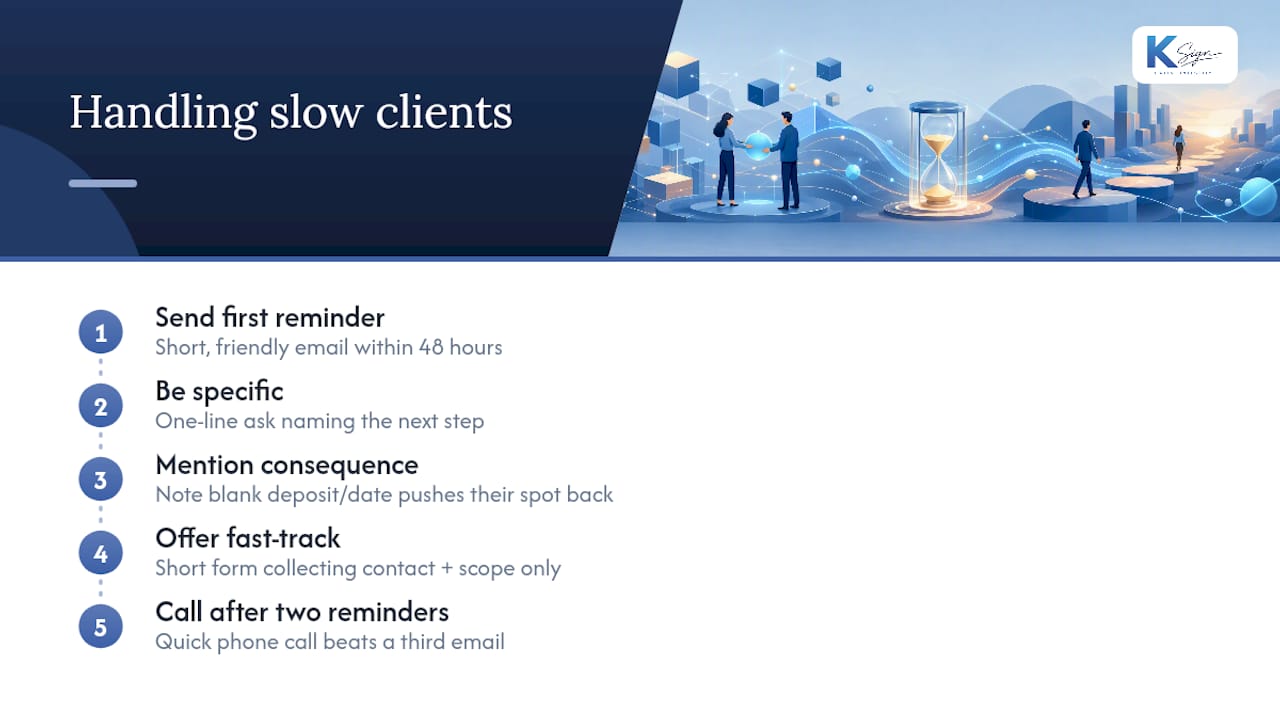
Send a short, friendly reminder within 48 hours rather than waiting a week. A one-line email referencing the specific next step (“just need your project details to lock in your start date”) works better than a generic nudge. If the form has a deposit or start-date field, remind the client that leaving it blank pushes their spot back, this isn’t a threat, it’s simply true, and most people respond to a real deadline.
Consider a shorter “fast-track” version of your form for clients who need to get moving quickly, capturing only the true minimum, contact and scope, with everything else collected in a follow-up call. Well-designed onboarding forms prioritise the minimum viable set of fields and push optional detail to a later stage precisely for this reason.
If a client still hasn’t completed the form after two reminders, a quick phone call usually resolves it faster than a third email ever will.
Customising forms for different industries and client types
A generic onboarding form works, but an industry-specific one converts better because it feels like it was built for exactly this client’s situation.
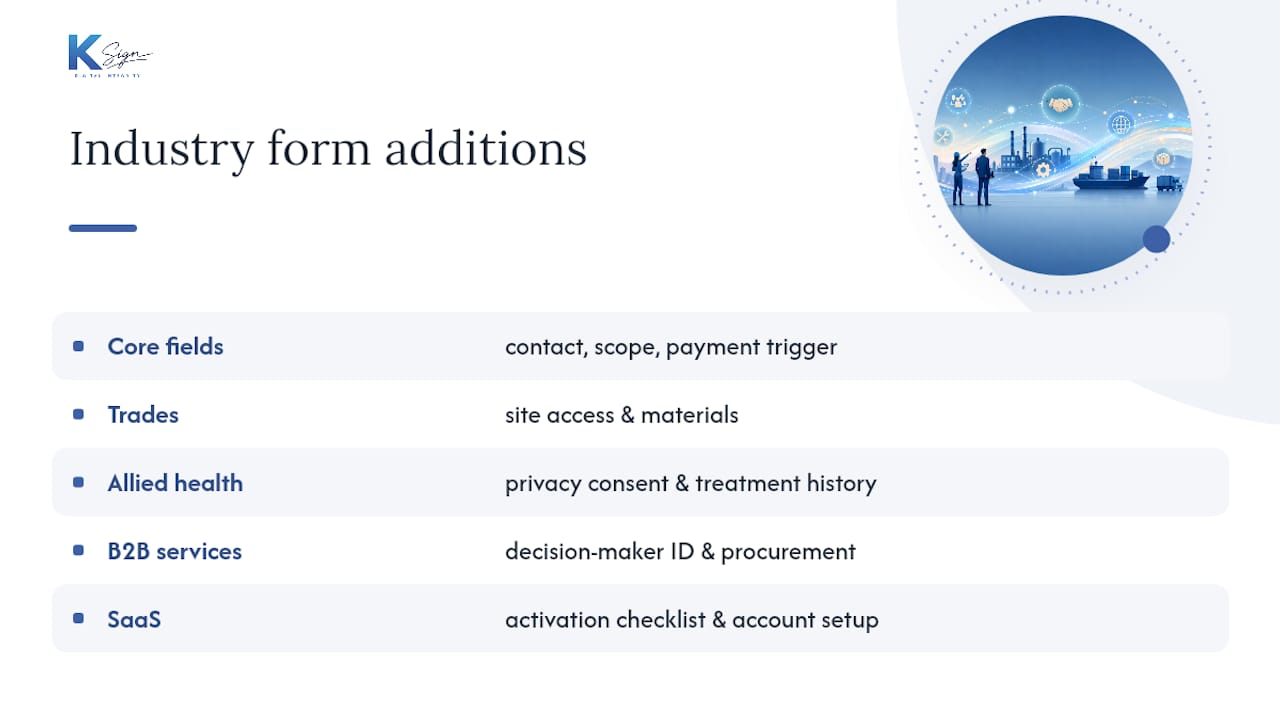
For trades and field services, lean into physical logistics: site access, parking, pets, materials on hand. For allied health and clinics, privacy consent and treatment history carry more weight than budget fields, and a patient-facing intake workflow needs its own careful structure around consent and confidentiality. For B2B service providers, professional services firms, agencies, consultants, decision-maker identification and procurement processes matter more than they would for a residential client. For SaaS or subscription businesses, an onboarding checklist that walks a new customer through account setup and activation steps looks quite different again, closer to a structured activation sequence than a one-off intake form.
The core three fields, contact, scope, payment trigger, stay constant across every industry. What changes is the detail layer sitting around them. Build your base template once, then keep a short list of industry-specific additions you can drop in without rebuilding the whole form each time.
Follow-up strategies that lift completion rates
The gap between a form sent and a form completed is where most small businesses lose momentum. A few adjustments close that gap reliably.
Automated reminder sequences beat manual follow-up because they happen consistently, regardless of how busy your week gets. Set a reminder at 24 hours, then 72 hours, then a final nudge at one week if the form still hasn’t been touched. Keep each message short and specific about what’s left to complete.
Show progress within the form itself, a simple “step 2 of 4” indicator reduces abandonment because people are more willing to finish something they can see is nearly done. Save partial responses where your form tool supports it, so a client who starts on their phone during a lunch break can finish later on a laptop without starting over.
Finally, test your own form as if you were the client. Time how long it actually takes, not how long you assume it takes. Most small business owners underestimate their own form length by several minutes, and that gap is exactly where a slow-moving client gives up.
Author perspective: common mistakes and quick fixes from the field
The biggest mistake isn’t a missing field, it’s sequencing. Businesses ask for detailed project notes before asking for the deposit commitment, so clients invest effort before they’ve committed money, then stall. Fix: ask for commitment first.
The second mistake is treating file uploads as optional when they’re actually load-bearing, a tradie without a site photo, a designer without a brand asset, ends up doing a second round of questions by email anyway. Fix: make relevant uploads mandatory, not optional.
The third is skipping the consent line entirely. It costs one sentence and it changes how seriously a new client takes your process.
— Josh
Turning your onboarding form into a signed, paid agreement
There are solutions that combine form tools, contract templates, e-signature applications, and payment links into one workflow. A streamlined workflow can allow a completed intake form to flow directly into contract generation, e-signature request, and deposit charge with minimal manual intervention.

When you’re evaluating any platform for this job, look for four things: guided forms with conditional logic, contract generation from form answers, legally binding e-signatures, and built-in payment collection that works on a phone as easily as a desktop. Ksign’s form builder covers the intake side, its contract automation turns those answers into a ready-to-sign document, and its e-signature and payment tools close the loop through to a paid deposit.
If you’re still rebuilding the same intake form from scratch for every new client, start by mapping your current fields against Ksign’s web form solution and see how much of that manual handover you can remove this week.
Sources
- Free Client Intake Form Template | Tally, Free Form Builder
- New Client Intake Form Template | Brieform
- Form 2: New or Amended