
Digital job approval means capturing a customer’s quote sign-off, work authorisation, or completion approval through a mobile-first workflow, one that turns form answers into a contract, collects a legally binding signature, and takes payment before the technician leaves site. The strongest setups follow a single sequence: form, contract, signature, payment. A digital platform that builds around exactly that sequence. This is why it’s worth understanding before you cobble together your own version from email, PDFs, and a separate payment link.
TL;DR:
- Digitally capturing approvals and payments in a single step increases technician utilization and speeds invoicing, significantly reducing administration time and errors.
- Core workflow components include guided forms, auto-generated contracts, legally binding e-signatures, embedded payment collection, and offline evidence capture for field conditions.
- Missing any one of these core features risks workflow collapse, especially in signal-deprived areas or during dispute resolution, making comprehensive integration essential.
- Building a limited, tested workflow for one job type allows smoother scaling, with early customer and technician training reducing errors and resistance.
- Proper permission settings and simple, minimal forms prevent bottlenecks and ensure security while streamlining the approval process for field personnel and office staff.
Table of Contents
- Why digital job approval matters for small trades and field services
- Core components of a reliable digital job approval workflow
- Step-by-step: build a digital job approval workflow your team will actually use
- Must-have features checklist for trades and field services
- Dispute-proofing and evidence best practice
- Templates and quick examples: three approval workflows you can reuse
- Common challenges and troubleshooting tips during implementation
- User roles and permission settings for job approvals
- First-person perspective: small routines that make approvals stick
- How Ksign fits the workflow you just built
- Sources
- FAQ
Why digital job approval matters for small trades and field services
Paper-based approval still costs small trades more than most owners realise. A signed docket sits in a work van for three days before it reaches the office. A technician transcribes handwritten job notes into an invoice and gets a figure wrong. A customer says they never agreed to the call-out fee because nobody has proof they did.
Mobile-first digital tools close that gap in a measurable way. Teams that capture job documentation and approvals on a phone or tablet report 20–30% gains in technician utilisation, as shown in examples from Wallers Plumbing and Heating’s portfolio, because techs spend less time on admin and more time on billable work. The same shift speeds up invoicing, since the job record and the invoice are the same document, not two separate ones created hours apart.
There’s a cashflow risk hiding in this too. When payment collection isn’t built into the exit routine, small businesses tend to extend credit they never intended to offer, waiting weeks for a cheque that should have cleared at the door. The fixes worth building around:
- Capture the approval and the payment in the same digital step, not two separate follow-ups
- Generate the invoice from the same data the technician already entered, so nobody retypes anything
- Store every signed job as a searchable record instead of a folder of scanned dockets
Core components of a reliable digital job approval workflow
Any workflow worth building needs five parts working together, not five separate tools stitched together with copy and paste.
- Guided online forms with conditional logic. The form should ask different questions depending on the answers already given, so a plumbing callout form skips irrelevant fields a solar install form needs.
- Auto-generated contracts or quotes. The moment the customer finishes the form, that data should populate a proper quote or service agreement, no manual drafting required.
- E-signature with a full audit trail. Every signed document needs a timestamp, device metadata, and IP record attached, not just a scribble on a screen.
- Embedded payment collection. The deposit or job fee gets collected as part of the signing step itself, not through a follow-up invoice sent days later.
- Evidence capture built for the field. Photos, GPS location, itemised parts and labour, and offline capture for jobs done where mobile coverage drops out.
Miss any one of these and the workflow leaks time somewhere. Skip the auto-generated contract and someone’s still typing quotes by hand. Skip embedded payment and you’re back to chasing invoices a week later. The point of building all five into one flow is that a customer’s “yes” on the form becomes a signed, paid job without anyone in the office touching it twice.
Step-by-step: build a digital job approval workflow your team will actually use
Start narrow. Trying to digitise every document type in your business at once is how these projects stall for months.
- Pick one use case and keep the scope tight. Quote approval for new HVAC installs, say, or completion sign-off for pest control jobs. One workflow, done properly, beats five half-finished ones.
- Design the customer-facing form first. Decide exactly what fields you need: job address, scope, photo uploads for before-and-after evidence, a field for variations, and clear payment terms stated up front.
- Configure the contract and signature step. Set the form answers to auto-populate your quote or agreement template, then attach the signature field with an audit trail that logs the timestamp and device.
- Embed payment before the job status can move to “complete.” Decide your reconciliation rule now, whether that’s a fixed deposit percentage or the full invoice amount, and make the payment step mandatory before the record closes.
- Train two five-minute drills, then revisit after three real jobs. One drill for the technician in the field, one for whoever reconciles payments in the office. Run both on a handful of live jobs, then fix whatever broke before you roll it out further.
Pro Tip: Run your first three jobs through the new workflow deliberately, even if it’s slower than the old paper habit. You’ll spot the one form field everyone skips or the payment step that confuses customers before it becomes a pattern across fifty jobs instead of three.
The office-side drill matters as much as the field one. A technician who signs a customer up correctly is only half the workflow. Someone still needs to check that the payment landed, the invoice matches the job record, and the accounting export ran without a hiccup. Building both halves into your training from day one means neither the field crew nor the office is guessing at how the other half works. Tools like Sales Invoices exist precisely to close that loop automatically once the signed job triggers it.
Must-have features checklist for trades and field services
Whether you’re auditing a tool or briefing a developer, the same feature set separates a workflow that holds up from one that quietly fails under real field conditions.
- Forms: conditional logic, native photo and signature fields, itemised line items for parts and labour
- Contracts: auto-generation from form data, editable clauses for site-specific terms, version history for every amendment
- Signatures: full audit trail, support for multi-party signing (customer and technician), metadata capture on every signed document
- Payments: embedded card and bank transfer collection, automatic receipts, exports that match your accounting system’s format
- Operations: offline-first capture for jobs with patchy signal, sync with dispatch scheduling, clean data exports for reporting
A workflow missing even one of these tends to break down at the least convenient moment, usually a signal dead zone on a rural job site or a signature with no timestamp when a customer disputes the work months later.
Dispute-proofing and evidence best practice
A signature on its own proves someone was on site. It doesn’t prove what they actually did, and that gap is where disputes live. A signature answers “was someone there,” not “what exactly was done”, which means a complete record needs more than a scrawled name on a screen.
A defensible job record includes:
- Timestamped before-and-after photos
- GPS location tied to the job address
- A completed checklist showing what was inspected or repaired
- An itemised log of parts used and labour hours billed
The gap most trades miss: attaching that evidence directly to the invoice, not filing it separately, is what actually reduces disputes and speeds up collection. Platforms that link photos, checklists, and signatures to the job record make the invoice match what the customer watched happen on site, which cuts the “I didn’t agree to that” conversation off before it starts.
Keep naming and retention simple. Job number, date, and customer surname in the file name is enough. A retention rule of at least seven years covers most trade warranty and liability windows without turning your storage into an unsearchable mess.
Templates and quick examples: three approval workflows you can reuse
Three patterns cover most of what trades and field service businesses need, and each one maps directly onto the form → contract → signature → payment sequence.
- Quote approval with deposit. Customer fills an intake form, the system auto-generates a quote, the customer signs and pays a deposit in the same step, and the job gets scheduled automatically. A ready starting point for this is the HVAC service agreement template.
- Variation approval. The technician records a scope change on site, the customer approves and pays the staged amount on their phone, and the job record updates without a separate change order form.
- Completion sign-off with invoice. The technician completes a checklist with photos, the customer signs off, and an invoice with embedded payment goes out immediately. See how this works in practice through handling practical completion sign-off electronically.
Common challenges and troubleshooting tips during implementation
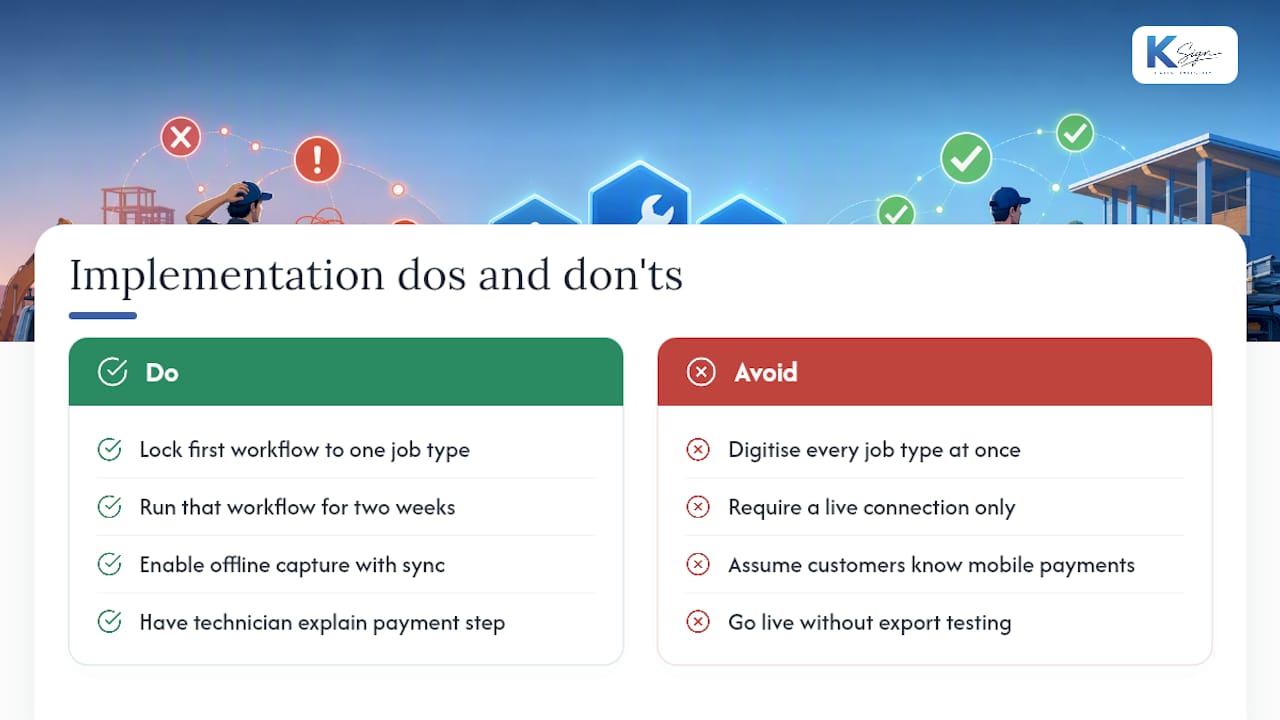
The most common failure isn’t the software, it’s scope. Businesses try to digitise every document type across every job category in the first month, and the whole rollout collapses under its own complexity. Fix this by locking your first workflow to one job type until it’s running smoothly for a fortnight.
Signal dropout is the second issue. A technician on a rural property with no coverage can’t submit a form that needs a live connection. Any workflow you build or buy needs offline capture that syncs once the device reconnects, otherwise your field crew will quietly revert to paper the first time a form fails to save.
Customer hesitation at the payment step trips up a surprising number of rollouts. Customers who’ve never paid a deposit on their phone before sometimes freeze at the signing screen. The fix is almost always process, not technology: have the technician explain the step verbally before handing over the device, the same way they’d explain a card machine at a till.
Data mismatches between the form and your accounting system cause the quietest kind of damage, because nobody notices until reconciliation day. Test your export format against your actual accounting software before you go live with real customers, not after the first month of invoices has already piled up wrong.
Finally, resist the urge to add fields “just in case.” Every extra field on a customer-facing form is a small piece of friction at the exact moment you want a fast yes. Cut anything that isn’t strictly needed for the contract, the signature, or the payment.
User roles and permission settings for job approvals
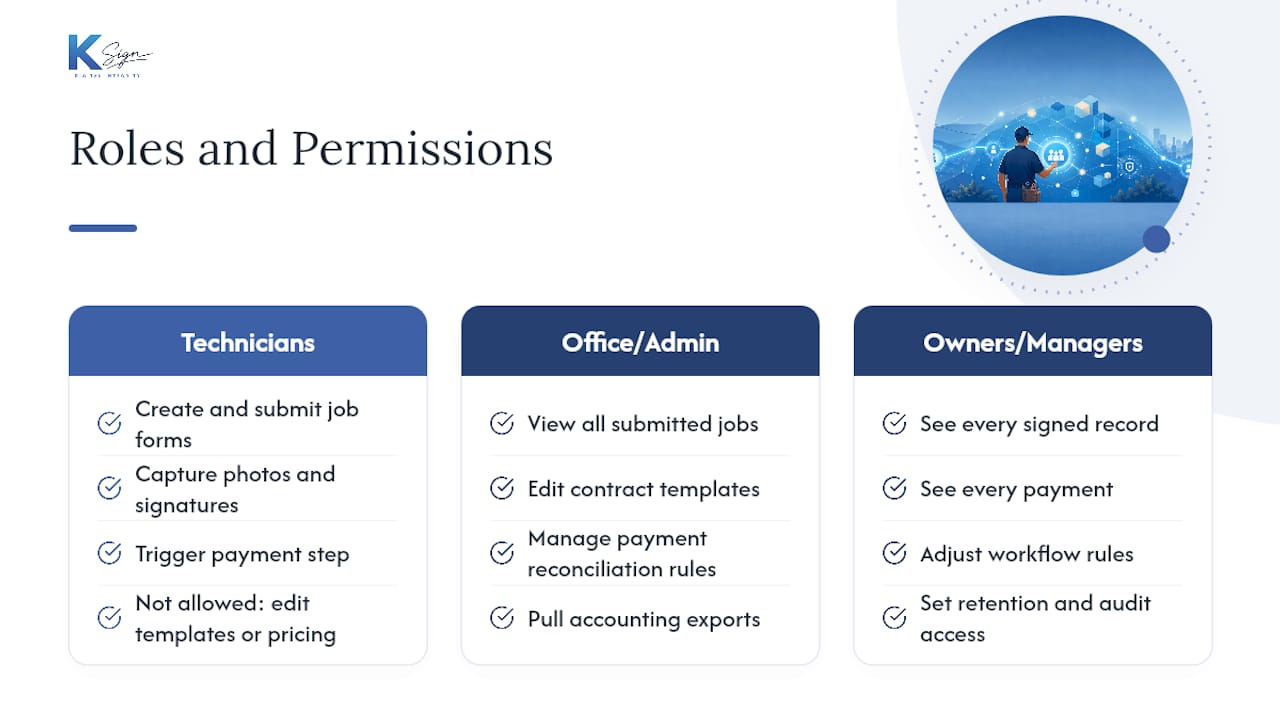
Not everyone touching your workflow needs the same access, and getting this wrong causes either bottlenecks or security headaches down the line.
Field technicians need permission to create and submit job forms, capture photos and signatures, and trigger the payment step. They generally shouldn’t have permission to edit contract templates or change pricing structures, since that’s how quotes end up inconsistent across a team.
Office staff or admins need broader access: viewing all submitted jobs, editing templates, managing the payment reconciliation rules, and pulling accounting exports. A smaller trade business often collapses this into one or two people, but even a two-person operation benefits from separating “who can submit a job” from “who can change what a template charges.”
Owners or managers usually need a level above both, with visibility into every signed record, every payment, and the ability to adjust workflow rules as the business grows. This is also the role that should own decisions about retention periods and who gets audit trail access if a dispute ever goes to a third party like an insurer or a solicitor.
If you’re building this out formally, set permissions before you launch, not after. Retrofitting access controls onto a workflow that’s already live with real customer data is far messier than deciding upfront who can see what.
First-person perspective: small routines that make approvals stick
The workflow that survives contact with a real job site is the one with the smallest possible technician checklist. Overload the form with fields nobody needs and your crew will find a workaround within a week.
Condition customers early. Tell them at the quote stage that signing and paying happens on the spot, not as a surprise sprung on them at the door. Pilot on three jobs before you scale anything. That’s not caution for its own sake, it’s the only way to find the one broken field before it costs you fifty customers instead of three.
— Josh
How Ksign fits the workflow you just built
Everything above describes a sequence: form, contract, signature, payment, evidence. The described platform is built around that exact sequence rather than starting from a blank document you have to upload yourself. It creates the guided form, auto-generates the contract from the customer’s answers, collects a legally binding signature with a full audit trail, and takes the payment in the same step, all from a phone in the field.

The mobile capture and offline-friendly design matter for trades working outside strong signal, and the industry-specific templates mean you’re not building a quote-to-contract workflow from scratch for every job type you offer. If you want to see how the pricing works for a small crew versus a growing team, the Standard, Professional, and Enterprise plans are laid out on the pricing page, or you can look at embedded payment collection directly if that’s the piece you’re missing right now. Either way, the next step is the same one recommended throughout this article: pick one workflow, build it properly, and run it through three real jobs before you scale it further.
Sources
- Digital Work Orders: How Field Teams Actually Get Work Done in 2026
- Embedded payments in field service: close the payment gap
- Why a signature is not proof (and what you actually need to close a job) | Contractor Magazine
FAQ
What Is Digital Job Approval?
Digital job approval is a mobile workflow where a customer fills out a form, that form generates a contract or quote, they sign it electronically, and payment gets collected in the same step. Ksign builds this exact sequence into one platform rather than requiring separate tools for each stage.
Do I Need a Separate Payment Tool?
No, if your workflow embeds payment into the signing step itself, which is the setup that speeds up invoice-to-cash cycles and raises payment attachment rates at the point of service. Running a separate payment link after signing adds a delay and a step where customers can simply not follow through.
How Much Does Ksign Cost?
Ksign offers a Standard plan and a Professional plan, priced at A$24 per month per seat and A$40 per month per seat respectively. An Enterprise plan is also available, with pricing provided on request.
Is a Digital Signature Alone Enough Proof of Work Done?
Not on its own. A signature confirms someone was present, but a defensible record needs timestamped photos, GPS location, and itemised parts and labour logs attached to the same job file.
How Long Should I Trial a New Approval Workflow Before Rolling It Out?
Run it on a small pilot, three real jobs is usually enough, before scaling it across your whole team. That gives you room to fix a broken form field or a confusing payment step before it affects a larger group of customers.