
Online quote approval turns a static PDF into an interactive page a buyer can accept, decline, or ask to change from any phone. For small businesses, the practical result is a shorter quote-to-order time, fewer chase-up calls, and the ability to collect a deposit the moment a customer says yes. Some platforms build in an audit trail so every view and approval is recorded automatically.
TL;DR:
- Keeping the approval process simple with mobile-first pages, visible pricing, and no login requirements significantly increases buyer acceptance.
- Automated status updates and instant payment collection at acceptance streamline cash flow and reduce manual follow-up tasks.
- Setting thresholds for internal approval rules helps prevent errors or discounts from overlooked high-margin or high-risk quotes.
- Sending quotes via shareable links or SMS accelerates engagement better than traditional email or PDF attachments.
- Using integrated tools that auto-generate contracts, collect deposits, and sync with accounting systems minimizes delays and manual re-entry.
Table of Contents
- How does online quote approval actually work?
- What features actually cut friction for buyers?
- How do you set up internal approval rules?
- Which sending method actually gets quotes approved faster?
- How do you choose the right quote approval tool?
- A practical example: form to contract to signature to payment
- Quick wins to speed up your approvals this week
- A form-native way to get quotes signed and paid
- Sources
How does online quote approval actually work?
The mechanics are simpler than most business owners expect, and understanding the flow matters because each stage leaves a record you can act on.
- Create and send. You build the quote, then send it by email, text message, or a shareable link. No PDF attachment required.
- Buyer views the page. The system logs the moment it opens, and often how long the buyer stays on it.
- Buyer responds. They accept, decline, or leave a comment requesting changes, directly on the page. Interactive quote delivery lets them do this from a single web view without downloading anything.
- The system records the decision. Timestamp, IP address, and any comments get attached to the quote as a permanent entry in the audit trail.
- Status updates automatically. A quote marked “approved” can trigger conversion into a job, a sales order, or an invoice without anyone re-typing figures.
- Payment happens on acceptance. If a deposit or full payment is attached to the approval button, the transaction processes and gets recorded against that same quote.
Many small-business quoting tools now push accepted quotes straight into an invoice and sync with accounting software, cutting the manual gap between approval and cash flow. That single step, quote to invoice with no re-entry, is often the difference between getting paid this week and chasing payment next month.
What features actually cut friction for buyers?
Buyers don’t reject quotes because the price is wrong nearly as often as they reject them because responding felt like a chore. The features that move acceptance rates are the ones that remove steps, not the ones that add polish.
- Branded, mobile-first pages with one visible accept button, viewable in a browser without an app.
- No login required. A unique link is the only credential a buyer needs, which removes a major point of drop-off compared with portal-based systems.
- A visible price and deposit summary so the buyer sees exactly what they owe before they click.
- A simple comment field for requesting changes, instead of a phone tag loop.
- View and activity tracking, so you know who opened the quote and when, and can time a follow-up instead of guessing.
- Electronic acceptance capture, logging the click as a timestamped, legally recognisable record.
Pro Tip: Put the deposit button above the fold on the quote page. Buyers who see the payment option immediately are far more likely to act on impulse than ones who have to scroll to find it.
How do you set up internal approval rules?
Not every quote needs a gatekeeper, but the ones that carry margin risk or unusual terms usually should. Most platforms offer two tiers.
Standard approvals use a fixed list of approvers, useful for a business with one or two decision-makers who sign off on anything above a set dollar figure. Advanced, rule-based approvals trigger automatically based on conditions such as discount percentage, specific SKUs, billing terms, or margin thresholds, which is how larger CRM platforms structure their approval logic.
Key setup decisions:
- Sequential vs parallel approvers. Sequential routes a quote manager to director in order; parallel sends it to both at once for speed.
- Approver permissions. Whoever approves needs the right role assigned, and needs a notification method (email or in-app) that actually reaches them.
- Re-enrolment on edits. If a quote changes after submission, it should re-enter the approval queue rather than skip it.
- Approval history. Keep a visible panel showing who approved what and when, which HubSpot’s own approval tracking treats as a standard feature, not an add-on.
Small teams rarely need more than a few sequences. Rule-based approval frameworks exist to reduce errors and enforce compliance on larger deals, but stacking extra sequences on a two-person business just slows down quotes that never needed a second signature.
Which sending method actually gets quotes approved faster?
Choosing how you send a quote matters almost as much as what’s in it, because the channel shapes how quickly a buyer engages.
- Email suits detailed quotes with attachments or line-item breakdowns the buyer wants to review at a desk.
- SMS works best for urgent or simple approvals, tradies confirming a callout fee, for instance, where the buyer is likely on their phone already.
- A shareable link posted directly in a chat or text thread skips the inbox entirely and gets opened faster for repeat customers.
Whichever channel you pick, the message needs the same essentials: a clear call to action, a due date, a payment link if a deposit applies, and a way to ask a question without starting a new email thread. Keep the acceptance prompt short. “Approve this quote” beats a paragraph of legal framing every time.
Offering deposit collection at the point of acceptance also reduces no-shows and locks the job into your schedule rather than leaving it as a soft verbal agreement. When a buyer requests changes, edit the quote, republish the same link, and notify them, don’t start a fresh document. For construction and trade businesses managing scope changes after the fact, a documented change order process keeps variation requests from turning into disputes later.
How do you choose the right quote approval tool?
Not every quoting platform is built for a five-person trade business, and the enterprise features that matter to a sales team of fifty are often irrelevant here. Run any tool through this checklist before signing up.
- Mobile-first, branded pages that need no buyer login.
- A genuine audit trail that captures a legally valid acceptance, not just a “read receipt.”
- Built-in payment collection with gateway support such as Stripe or PayPal.
- Flexible but simple approval rules you can set up without a consultant.
- Pricing that suits a small business flat monthly pricing beats per-user or per-envelope fees that punish growth.
- Integrations with your accounting or CRM system, so an approved quote doesn’t need re-entry.
Pro Tip: Ask any vendor to show you the buyer-side page before you commit. If it takes more than two clicks for a customer to accept and pay, it will cost you conversions no matter how good the back-end features are.
A practical example: form to contract to signature to payment
A short guided form is often the fastest way to build an accurate quote in the first place. A customer answers a handful of questions, the answers auto-populate a quote or contract, and the document goes out for signature immediately.
- Step one: Customer completes a guided intake form.
- Step two: The form auto-generates the quote or contract from those answers.
- Step three: The document sends for electronic signature.
- Step four: A deposit collects on approval, and the signed record stores itself in the audit trail.
For trades and field services, this form-first sequence removes the manual step of retyping job details into a separate quoting tool, which is where most delays actually happen.
Quick wins to speed up your approvals this week
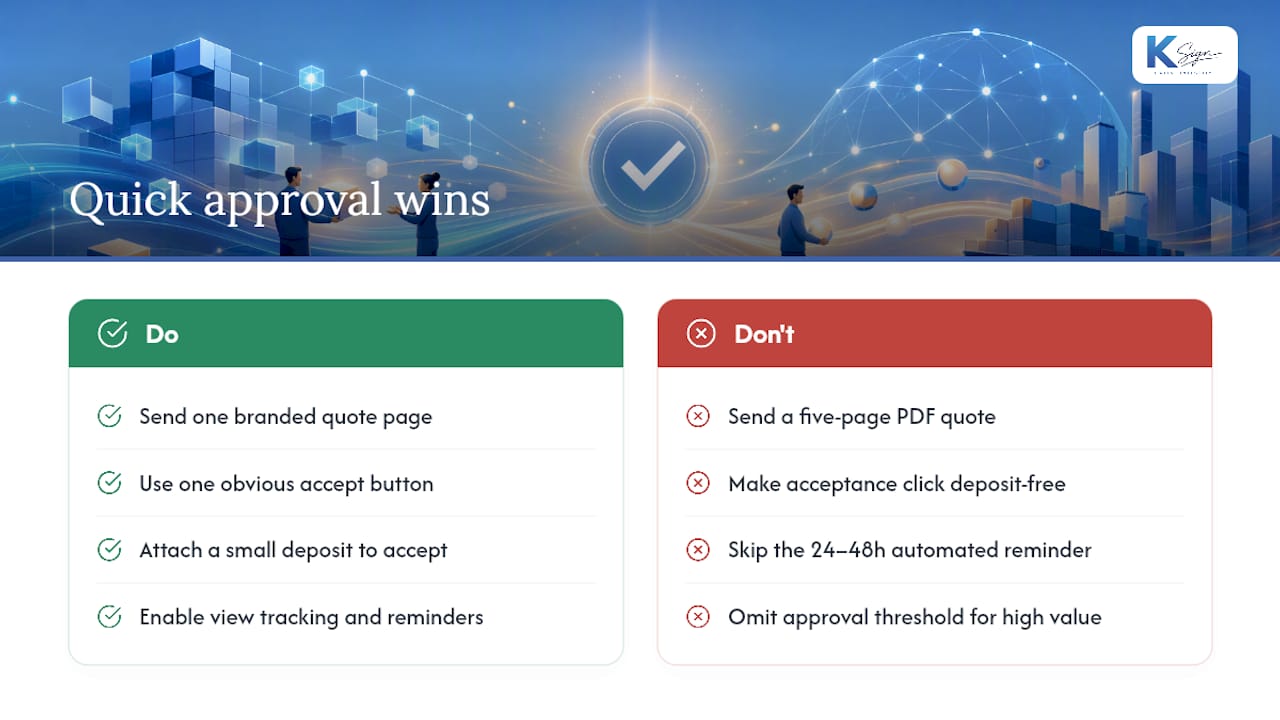
Send a single branded quote page with one obvious accept button, not a five-page PDF. Attach a small deposit to the acceptance click. Turn on view tracking and set an automated reminder for 24 to 48 hours after sending, most buyers who were going to say yes will do it in that window, and a nudge catches the rest.
If you handle high-value quotes, add a simple approval threshold that requires additional review before sending. It costs nothing and saves you from a discounting mistake that only gets caught after the customer has already signed.
— Josh
A form-native way to get quotes signed and paid
Most quoting tools stop at the signature. KSign starts earlier, at the form, so the same customer answers that build the quote also generate the contract, collect the e-signature, and take the deposit, all in one workflow.

That matters for trades and field teams especially, where re-typing job details into three separate tools is the actual bottleneck, not the paperwork itself. KSign’s approval workflow features handle sequencing and permissions without enterprise complexity, its contract automation builds the document straight from form answers, and embedded payments let you collect a deposit the moment a buyer clicks accept. If you’re still sending PDFs by email and waiting on replies, start a trial and send your next quote as a one-page, mobile-ready link instead.
Sources
For setup detail beyond this guide, HubSpot’s documentation on quote approval configuration and approval history tracking covers standard CRM workflows in depth. For the buyer-side experience, QuoteValet’s interactive quote pages and KSign’s own quote software page walk through the send-to-accept flow end to end.
- QuoteValet — interactive quotes and capture acceptance — QuoteWerks
- Customer quote page — NanoQuote
- CPQ approval process — Cflow