
The fastest way to get final delivery approval signed online is a mobile ePOD (electronic proof of delivery) workflow: the driver or consignee signs on a phone or tablet, the system stamps that signature with the exact time and identity metadata, and the record is locked into a tamper-evident audit trail the moment it’s captured. That single step satisfies both operational needs (instant back-office notification, no lost paperwork) and legal ones (evidence that stands up under ESIGN and UETA).
The evidence set that makes this defensible is consistent across freight, courier, and last-mile delivery: a signature, a timestamp, GPS coordinates, and often a photo of the goods on arrival. Platforms like KSign build this directly into a guided mobile form, so the workflow doesn’t rely on a driver remembering to screenshot anything.
What to put in place immediately:
- Mobile signature capture at the point of delivery, not back at the depot
- Automatic notification to the back office the moment the signature lands
- PDF export with the full audit trail attached, ready for invoicing or a dispute
Pro Tip: Set your delivery form to capture a photo automatically whenever the “goods damaged” or “partial delivery” option is ticked — don’t leave photo capture as an optional extra drivers can skip under pressure.
Key Takeaways
A legally defensible online delivery approval requires a timestamped electronic signature, signer identity metadata, and a tamper-evident audit trail captured at the point of delivery, not after the fact.
| Point | Details |
|---|---|
| Capture evidence at delivery | Signature, timestamp, GPS, and photo should all be recorded in the same mobile action. |
| Match approval mode to risk | Use auto-approve for routine drops and manual review for exceptions or high-value freight. |
| Build the exception path first | Log refusals, damage, and disputes with extra photos and timestamped notes before they happen. |
| Export signed PDFs immediately | Faster exports mean faster invoicing and a stronger record if a dispute arises. |
| KSign fits the full workflow | KSign combines mobile signature capture, audit trails, and API sync into one guided delivery form. |
Table of Contents
- Why moving final delivery approval online pays off
- What makes an online delivery approval legally binding?
- Feature checklist: what your ePOD workflow needs
- Step-by-step: rolling out a final delivery approval workflow
- Handling exceptions and signature disputes
- Why KSign fits final delivery approval workflows
- Get your first delivery signed off online this week
- Sources
Why moving final delivery approval online pays off
Paper proof of delivery loses money quietly. A driver forgets to grab a signature, a docket sits in a glovebox for three days, and invoicing stalls until someone chases it down. Switching to online delivery approval fixes the choke points that cost logistics operators the most:
- Faster turnaround: mobile capture closes the job the second the customer signs, and the back office gets notified in real time rather than at end of shift.
- Fewer disputes: a timestamped signature paired with GPS and a photo removes most of the ambiguity behind chargebacks and delivery claims.
- Quicker cash collection: invoicing can start the moment approval lands instead of waiting for paperwork to physically return to the office.
Enterprise systems have long recognised this pattern. NetSuite’s final-approver workflow lets an authorised approver finalise a record instantly and skip the rest of the chain, which is precisely the efficiency small transport operators need at the point of delivery, not three approval layers later.
What makes an online delivery approval legally binding?
Electronic signatures are recognised under ESIGN in the United States and equivalent UETA-style rules at the state level, provided you can show the signer intended to sign and consented to do so electronically. That’s the legal bar, and it’s lower than most operators assume: you don’t need a notarised document for a standard delivery, you need proof of intent and a durable record.
What actually strengthens that proof in practice:
- The signature image itself, captured at the moment of delivery
- Signer identity metadata — name, email or phone number, device or IP information
- A reliable, system-generated timestamp that can’t be edited after the fact
- A stored, exportable signed PDF with the audit trail attached
Transflo’s driver ePOD documentation shows this pattern in practice: consignees sign on a mobile device or via a secure SMS/email link, and the resulting record carries both the timestamp and signer metadata needed for compliance.
Pro Tip: If a delivery is high value or contractually sensitive, consider a qualified electronic signature rather than a standard e-signature. It adds a stronger identity assurance layer for the deliveries where a dispute would actually cost you something.
Feature checklist: what your ePOD workflow needs
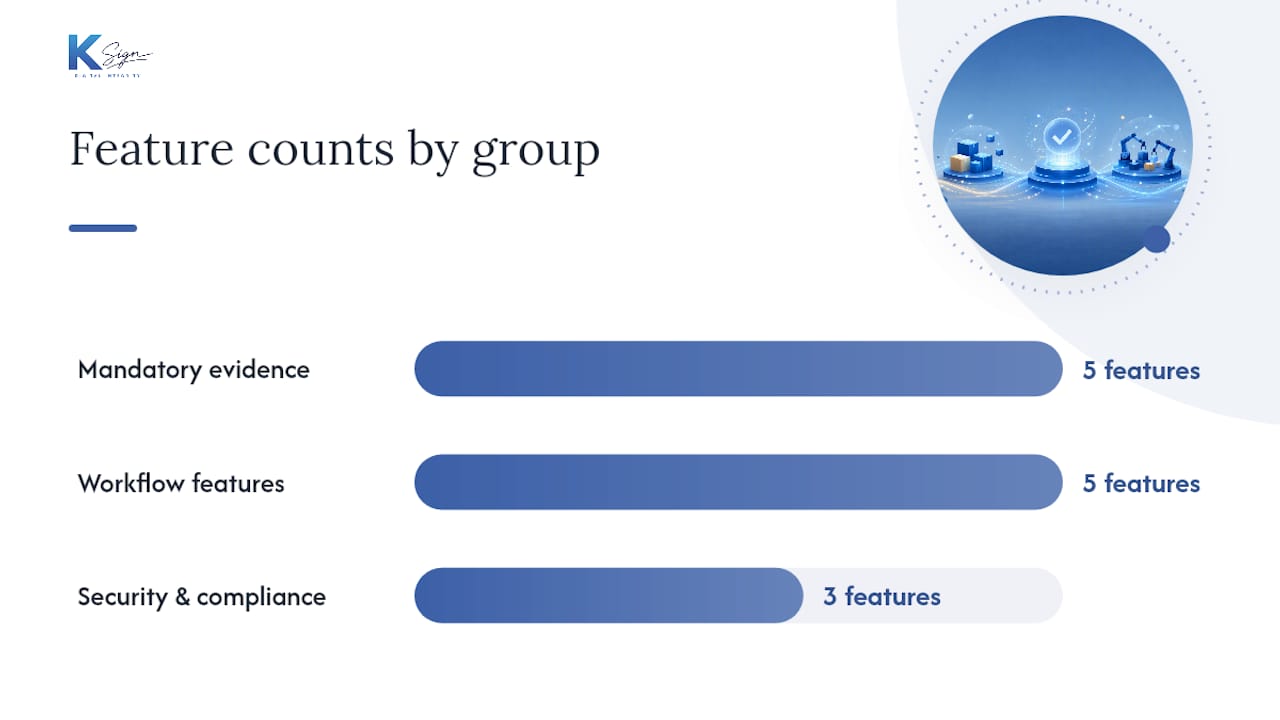
Building or buying a final-approval workflow comes down to three groups of features. Miss one and you’ll either fail an audit or lose a dispute you should have won.
Mandatory evidence features
- Mobile signature capture that works on a phone or tablet screen
- Timestamped audit trail attached automatically, not added manually afterwards
- Signer identity metadata: email, phone number, or device ID
- PDF export and retention for invoicing, audits, or legal requests
- Photo and GPS capture tied to the same record as the signature
Workflow features
- Approval modes that switch between manual and auto approval depending on the delivery type
- Offline capture with automatic sync once the driver’s device reconnects
- Instant notifications to both the driver and the back office when a signature is captured
- API or webhook connections into your TMS or ERP so the delivery status updates without manual re-entry
- Role-based final-approver permissions, so a supervisor can override or finalise an exception without waiting on the standard chain
Security and compliance features
- Tamper-evident records that flag any attempt to alter a signed document
- Encrypted storage for signed PDFs and metadata
- Clear retention periods and export paths that line up with your invoicing cycle and audit obligations
Manual approval mode matters more than most operators give it credit for. Talech’s documentation on managing online orders shows how manual approval settings change fulfilment flow and trigger “awaiting approval” statuses, which is exactly the mechanism you want active for high-value or contested deliveries, while routine drop-offs run on auto-approve.
Pro Tip: Don’t make every delivery go through manual approval “just to be safe”. It slows your fastest, most routine jobs for no benefit. Reserve manual review for exceptions, high-value freight, and first-time customers.
You can build this checklist into a working form using KSign’s digital proof of delivery form template rather than starting from a blank page.
Step-by-step: rolling out a final delivery approval workflow
- Set entry and exit criteria. Define exactly what must exist before a delivery counts as complete: item count matches, condition photos taken, delivery note reconciled against the order.
- Choose your evidence set and approval mode. Standard drops get signature plus GPS on auto-approve; exceptions (damage, partial delivery, high-value freight) get a photo, note, and manual review before final sign-off.
- Configure the workflow. Build the mobile form with offline capture enabled, set up immediate back-office notification, and connect an API or webhook so your TMS updates the delivery status the second approval lands.
- Pilot, train, and measure. Run it with a small group of drivers first. Track time-to-invoice, dispute rate, and signature capture rate before rolling out fleet-wide.
The rollout sequence itself is often where operators trip up, not the technology.
Rollout checklist:
- Drivers trained on the exception path, not just the happy path
- Back office confirmed as receiving real-time notifications
- First week’s signed PDFs spot-checked for completeness
- KPIs baselined before the pilot starts, so you can prove the improvement
Pro Tip: Roll out to your slowest, most dispute-prone route first, not your best one. If the workflow survives your worst route, it’ll handle everything else without adjustment.
Handling exceptions and signature disputes
Most disputes happen on the delivery you didn’t expect to be a problem. Build the exception path before you need it.
For damaged goods or partial delivery, capture more evidence than usual: multiple photos from different angles, a timestamped text note describing the issue, and the driver and vehicle ID. If a consignee refuses to sign, log the refusal reason, take a photo as evidence, and send a secure link so they can sign later via text or email. Record every attempt with its own timestamp.

When a dispute is raised, the resolution workflow should be simple: flag the record, hand customer service the full exportable package (signed PDF, photos, GPS, audit trail), and set a fixed SLA for resolution rather than letting it drag.
Pro Tip: Never delete or re-request a signature on a disputed delivery. Keep the original record exactly as captured, even if it’s incomplete. A partial record with an honest timestamp beats a “cleaned up” one every time a dispute reaches a customer’s legal team.
Why KSign fits final delivery approval workflows
KSign maps directly onto the checklist above rather than treating signature capture as an isolated step. It’s built as a mobile-first guided form, so a driver captures the signature, photo, and GPS location in one motion, and the record carries a timestamped audit trail with signer metadata attached automatically.
Where it earns its place in a logistics workflow specifically:
- Templates for delivery sign-off mean you’re not designing a form from scratch
- API and webhook connections push completed approvals straight into a TMS or invoicing system
- Payment capture can sit inside the same signing flow when cash-on-delivery or deposits apply
- Offline capture with sync means a dead zone on a rural delivery route doesn’t stall the record
It’s the same logic KSign applies to construction variation approvals and practical completion sign-off: capture the evidence once, at the point of completion, and let the paperwork follow automatically.
A field note on where these rollouts actually go wrong
Most failed digital approval rollouts don’t fail on the software. They fail because operations managers try to make every delivery type follow the same approval path, which either slows the fleet down or trains drivers to skip steps on jobs that felt “too routine to bother with.” The businesses that get this right pick two paths on day one: routine and exception, nothing in between. If you only remember one thing from this: the minimum defensible evidence set is a signature, a timestamp, and one photo. Everything else is a bonus, not a requirement.
Get your first delivery signed off online this week
KSign is built for exactly this workflow, not adapted from a generic contract tool bolted onto a signature button. Where a paper docket or a generic e-signature app leaves you stitching together photos, GPS, and a PDF after the fact, KSign captures the signature, timestamp, photo, and location together in one guided mobile form, then exports it straight into your invoicing process.

Three steps to get moving: pick a delivery form template, run it with two or three drivers for a week, then export the signed PDFs and check they hold up against a real dispute scenario. Start with the eSignature workflow built for exactly this use case, and if you need the approvals to update your TMS automatically, the API integration connects the two without manual re-entry. There’s currently 50% off all e-signature plans for operators ready to pilot this now.
Sources
- Transflo knowledge base — ePOD / driver ePOD find
- NetSuite Applications Suite — Managing records as a final approver
- Talech help — manage online orders