
An invoice approval workflow, in the context that matters to service businesses, is the sequence that gets a quote or invoice reviewed, approved, signed and paid by your customer, not by your finance team. The single best practice is deceptively simple: send one mobile-friendly link that lets the customer review, sign and pay in the same session. Platforms built around this flow, including Ksign, treat the quote as a live document rather than a static PDF sitting in someone’s inbox.
TL;DR:
- Automated, mobile-friendly approval links shorten approval times and reduce delays, boosting quote-to-cash speed and cash flow for service businesses.
- Tiered approval structures for low-risk quotes streamline routine jobs, while higher-value or complex quotes require faster, clearly defined review processes.
- Embedding payments in the signing session eliminates drop-offs, with options like fixed deposits, percentage, or variable amounts covering most job types.
- Tracking approval times, deposit capture rates, and conversion metrics helps identify workflow bottlenecks and improve overall efficiency.
- Simplifying user roles and permissions, along with automated reminders and escalation steps, ensures faster approvals and reduces process stalls.
Table of Contents
- Why a proper invoice approval workflow matters for cash flow and admin
- How do you build a working invoice approval workflow?
- Tiered approvals: how fast can you go without losing margin?
- Should signatures and payments happen in the same session?
- What do you actually need to launch a pilot this week?
- Handling exceptions and rejections within the workflow
- What security measures protect invoice data during approval?
- Why do approvals stall, and how do reminders fix it?
- How do you spot bottlenecks in your approval process?
- How should you set up user roles and permissions?
- What tradies get wrong about approval speed
- How Ksign brings the whole workflow into one link
- Sources
Why a proper invoice approval workflow matters for cash flow and admin
Every tradie who has chased a signature knows the real cost isn’t the paperwork, it’s the wait. A customer who has to open an email, print a PDF, sign it, scan it, and email it back will sit on that task for days. Compress that into one link and the maths changes fast.
Automating estimate delivery with mobile approval and dual-channel delivery (email plus SMS) meaningfully reduces approval latency and lifts 48-hour close rates for field-service operators. Linking estimate, approval, scheduling and payment into one chain also shortens the quote-to-cash cycle and cuts late payments, because the job doesn’t sit waiting on a separate invoice to go out later.
The knock-on effects show up everywhere in your week:
- Higher quote-to-job conversion, because approval friction is the main reason live quotes go cold
- Faster cash flow, since deposits get captured at the moment of signing instead of chased afterwards
- Less admin time, with no retyping form answers into a separate contract or invoice
- A cleaner customer experience, one link, one session, done
Pro Tip: If you only fix one thing this month, fix the gap between quote and signature. That gap is where most jobs quietly die.
How do you build a working invoice approval workflow?
Building this properly takes an afternoon, not a quarter. Here’s the order that actually works in the field.
- Design the intake form and link it to a contract template. Start with the questions you ask every customer anyway (job scope, address, materials, timeframe) and let those answers auto-populate the quote or contract. This is form-to-contract automation, and it removes the manual copy-paste step that causes most pricing errors.
- Set approval triggers and assign approvers. Decide which quotes need a human look and which don’t. HubSpot’s own guidance on configuring quote approvals shows how routing by property (discount size, job value, custom scope) and sequential approval steps stop risky quotes going out unchecked, while everything else flows straight through.
- Send via email and SMS with one mobile-friendly link. Dual-channel delivery gets in front of the customer faster than email alone, and a single link means they never have to juggle attachments.
- Embed the payment field at the point of signature. Whether it’s a fixed deposit, a percentage, or a variable amount, the payment authorisation happens in the same screen as the signature, not in a follow-up email three days later.
- Auto-create the job and schedule once signed. The moment the contract is signed and the deposit clears, the job should drop straight into your calendar. No re-entry, no second system.
Start your form design with a quote template built for exactly this handoff, so the fields you capture at intake are the same fields your contract and invoice need later.
Tiered approvals: how fast can you go without losing margin?
Speed and margin protection pull in opposite directions, but a tiered structure lets you have both. Not every quote needs a manager’s eyes on it. Most don’t.
A sensible three-tier setup looks like this:
- Auto-approve: standard jobs under a set dollar threshold, using a pre-approved template with no discount applied
- Manager review: jobs above that threshold, or any quote with a discount over a set percentage
- Owner sign-off: custom scope changes, non-standard terms, or anything touching a fixed-price contract variation
Tiered routing exists precisely so low-risk quotes bypass review entirely, keeping approvers focused only on the items that genuinely need judgement instead of rubber-stamping routine work.
When something does land in front of an approver, they need to check four things fast: margin against your minimum, any discount applied, whether the scope matches what was actually discussed on site, and whether the standard terms and conditions are still intact. Set a service-level target too, say, four business hours, with a backup approver who gets notified if the primary one hasn’t responded. A single point of approval failure is how good workflows quietly stall.
Keep the notification itself short. A push alert with the customer’s name, the dollar figure and a one-tap approve button beats a full email thread every time, because most of your approvers are in a van, not at a desk.
Should signatures and payments happen in the same session?
Yes, and the data backs the instinct. Keeping the customer in one unbroken session, review, sign, pay, without bouncing them to a separate payment portal, removes the single biggest drop-off point in the entire process. Every redirect is a chance for the customer to get distracted, close the tab, or simply forget.
Embedding the payment field directly beside the signature block, rather than sending a follow-up invoice link, is the configuration most guides now recommend for exactly this reason: it produces one combined signed-and-paid record instead of two disconnected ones.
Three payment configurations cover almost every service business:
- Fixed deposit: a flat dollar amount, useful for standard jobs with predictable material costs
- Percentage: a set share of the total quote, common on larger renovation or construction jobs
- Variable: the customer or approver sets the amount, useful for staged or milestone-based work
Once payment clears, timestamp everything: the signature, the payment confirmation, and a receipt emailed automatically to both parties. Store the signed document and the payment record together, not in two separate systems, so your audit trail reads as one continuous event rather than a paper trail you have to reconstruct later. For jobs where the customer genuinely can’t pay upfront, a pre-authorisation hold or a scheduled post-signing payment with automated reminders keeps the job moving without you chasing a card manually.
What do you actually need to launch a pilot this week?
You don’t need every feature built before you start. You need five things working together: an intake form, a contract or quote template, an embedded payment field, a handful of approval rules, and a notification path that reaches someone’s phone.
- Build one quote-plus-deposit template and one change-order template for handling contract variations.
- Add a completion sign-off template so the job closes out with the same signature-and-payment logic it opened with.
- Pilot the whole flow with one technician or one job type for two to three weeks.
- Track three numbers only: median approval time, deposit capture rate, and quote-to-job conversion within 48 hours.
Those three metrics tell you almost everything. If approval time is high, your tiers are too conservative. If deposit capture is low, your payment field is buried too deep in the flow. Pro Tip: Widen your auto-approve threshold only after a few weeks of clean data, not on day one. Trust the tier, then expand it.
Handling exceptions and rejections within the workflow
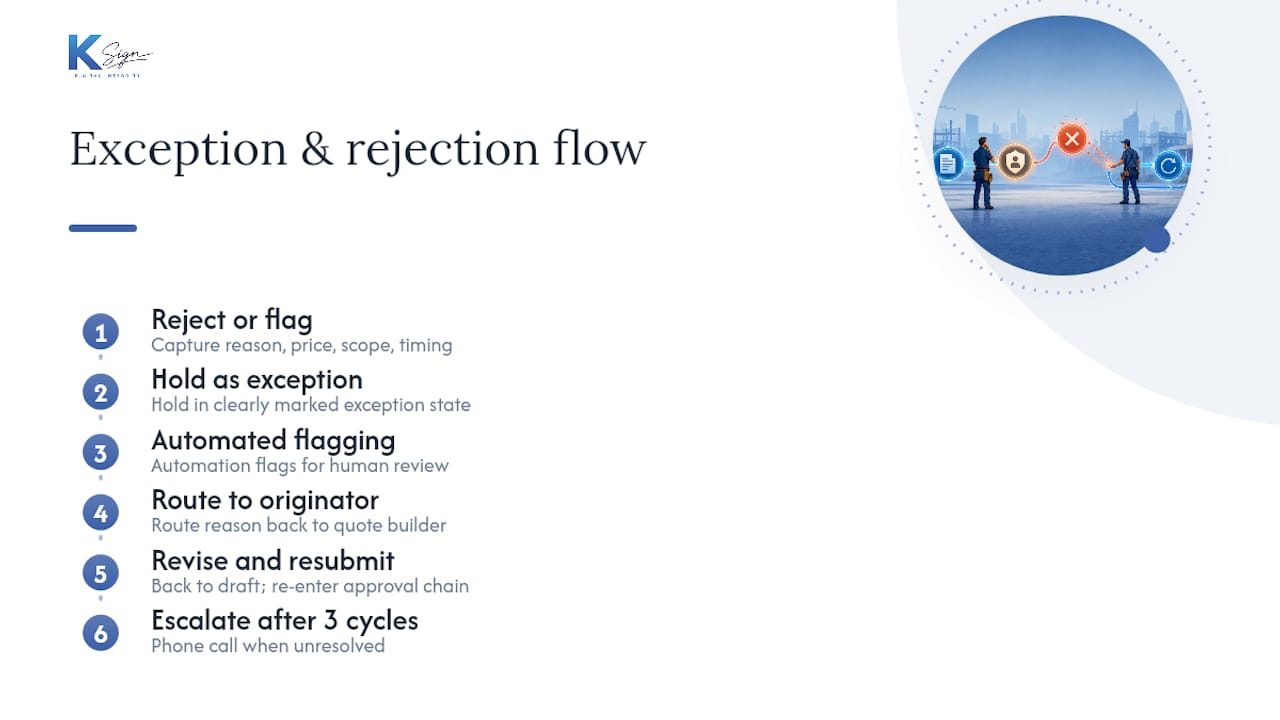
Not every quote sails through, and a workflow that can’t handle a “no” gracefully isn’t finished yet. When a customer rejects a quote, the record should capture why, price, scope, timing, and route that reason back to whoever built the quote, not just archive it silently.
Internally, exceptions work the same way. If an approver flags a quote instead of approving it, the workflow should hold the document in a clearly marked state rather than letting it drift. Automation should flag exceptions for a human to look at while letting routine jobs keep flowing untouched, which preserves oversight exactly where it’s needed without slowing down everything else.
Build in a revision path: a rejected or flagged quote goes back to draft, gets adjusted, and re-enters the approval chain rather than starting from scratch. This matters more than it sounds, because a workflow with no re-entry point trains your team to work around it with side emails and manual fixes, which defeats the entire point of having one system.
Set a maximum number of revision cycles too. If a quote has bounced back and forth three times without resolution, that’s a signal for a phone call, not another automated round trip. The workflow should know when to step aside and let a human close the gap.
What security measures protect invoice data during approval?
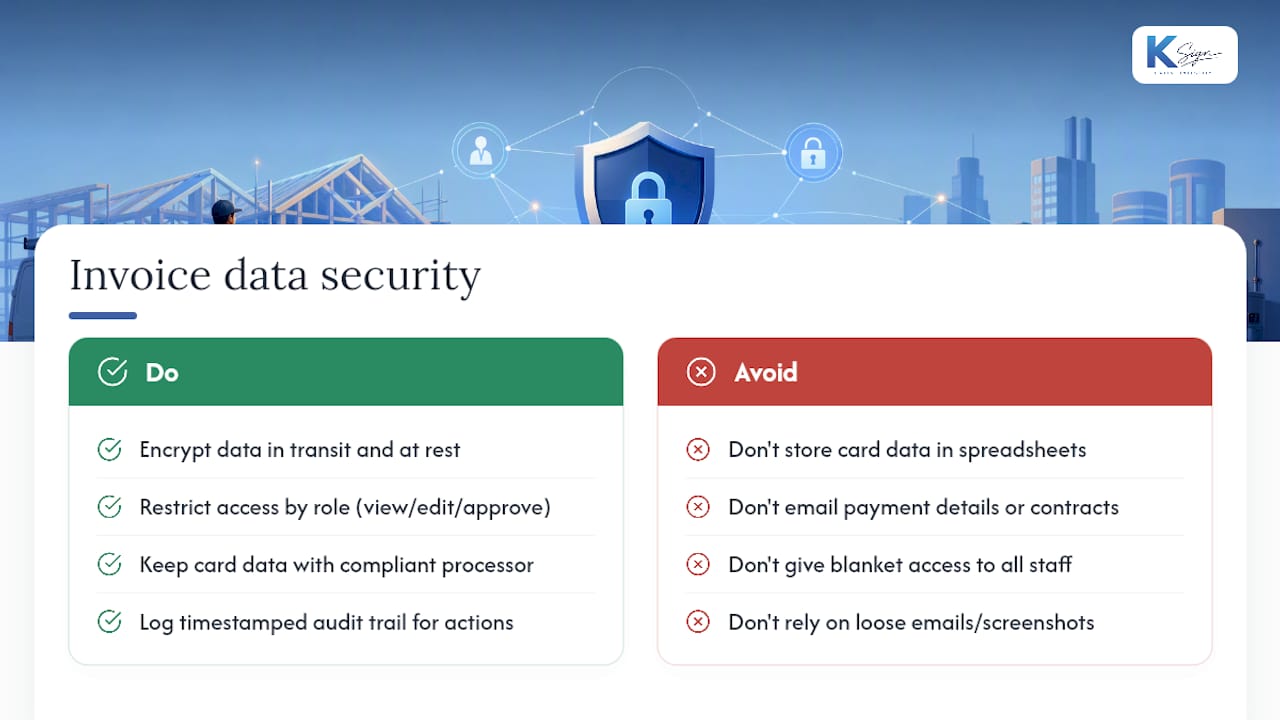
Every quote or invoice moving through this workflow carries a customer’s name, address, price and often their payment details, so it deserves the same handling you’d expect from your own bank. At minimum, look for encryption in transit and at rest, meaning the data is scrambled both while it’s moving between devices and while it sits in storage.
Access control matters just as much as encryption. Not everyone in your business needs to see every signed contract, and a platform should let you restrict who can view, edit or approve based on their role. Payment details themselves should never sit in a spreadsheet or an email thread. Card data belongs with a compliant payment processor, not copied into your own records.
The audit trail is your security net as much as your proof of process. A timestamped log of who viewed the document, when it was signed, and when payment cleared gives you a defensible record if a customer disputes a charge months later. That single unbroken record, rather than a folder of loose emails and screenshots, is what actually holds up when someone asks “prove they agreed to this.”
Why do approvals stall, and how do reminders fix it?
An approval that sits untouched for five days isn’t a workflow problem, it’s a visibility problem. The approver either didn’t see the notification or didn’t treat it as urgent, and both are fixable with automated reminders rather than a manual follow-up call.
A sensible escalation path looks like this: a reminder at 24 hours if nothing’s happened, a second reminder plus a notification to a backup approver at 48 hours, and an alert to the business owner at 72 hours. The same logic applies on the customer side. A quote sitting unsigned for three days should trigger a gentle nudge, not silence.
Escalation only works if it’s specific. A vague “you have pending approvals” message gets ignored. A message naming the customer, the dollar value and how long it’s been waiting gets acted on, because it puts a real cost in front of the person holding up the job.
How do you spot bottlenecks in your approval process?
You can’t fix what you don’t measure, and most small businesses have no idea where their quotes actually stall. The fix isn’t complicated: track median approval time by approver, by job type, and by dollar tier, then look for the outlier.
If one approver consistently takes twice as long as everyone else, that’s a training or workload issue, not a system issue. If quotes over a certain dollar value stall disproportionately, your threshold might be set wrong. If Tuesday afternoons show a spike in pending approvals, that’s a staffing pattern worth knowing about.
Run this reporting monthly at first, then quarterly once the workflow settles. The goal isn’t a dashboard for its own sake, it’s catching the moment your process starts drifting before it costs you a job.
How should you set up user roles and permissions?
Most service businesses need only three or four roles, not a dozen. A typical structure looks like: field staff who can create and send quotes but not approve discounts, managers who can approve within a set threshold, an owner or finance lead with full override, and an admin role for template and integration setup.
Keep permissions tied to the job, not the person. When someone changes role or leaves the business, their access should update automatically rather than requiring someone to remember to revoke it manually. This also protects you if a dispute ever lands: you can show exactly who had the authority to approve what, and when.
Resist the urge to give everyone owner-level access “just in case.” The whole point of tiered approvals is that not every set of eyes needs to see every dollar figure that moves through your business.
What tradies get wrong about approval speed
Most operators think the fix for slow approvals is nagging their customers harder. It isn’t. The fix is removing the number of steps between “customer likes the quote” and “customer has paid a deposit.” Every extra click, every second app, every “I’ll sign it when I get home” is a chance for the job to go cold.
What surprised me most digging into how field businesses actually lose jobs isn’t rejection, it’s inertia. A customer who intends to say yes but has to open three different tools to do it often just doesn’t get around to it. Treating the quote as a live transaction state, one that can be approved, signed and paid without ever leaving a single screen, fixes more lost revenue than any amount of follow-up calling ever will.
— Josh
How Ksign brings the whole workflow into one link
Ksign was built around exactly this gap: the space between sending a quote and getting it signed and paid. It starts with the intake form, turns those answers into a contract automatically through contract automation, collects a legally binding signature, and takes the deposit or payment in the same session through embedded payments. No separate invoice link, no second email, no re-typing job details into another system.

If you’re currently running quotes through one tool, contracts through Word, and payments through a separate link, the fastest way to see the difference is to pilot it on a single job type this week. Build one quote-plus-deposit template, send it to the next customer who asks for a quote, and watch how quickly they sign compared to your usual process. Start with a free trial at Ksign and see the whole form-to-payment flow in one place before you commit to anything.
Sources
- Set up quote approvals — HubSpot Knowledge
- Slow Quote Turnaround in Plumbing: Fix It in 2026
- Quote-to-cash automation for service businesses — AnovaGrowth