
Download contractor-ready change order templates in Word, PDF, Excel, and Google Sheets — the AIA G701-style itemised change order is the recommended starting point for most US contractors, covering work change, price adjustment, contract-time change, and the new contract total in a format courts and owners recognise. For projects governed by ConsensusDocs language, the ConsensusDocs 202 form is the industry-standard alternative.
Grab the format that fits your workflow:
- Word (.docx): Edit fields, add your logo, and save as PDF before sending. Best for one-off changes.
- PDF: Pre-formatted, print-ready, and accepted for wet or electronic signature. Use when the owner or GC specifies a fixed layout.
- Excel / Google Sheets: Line-item pricing rows that calculate totals automatically. Best for cost-plus and time-and-materials changes with multiple cost categories.
- Google Sheets: Shareable via link for real-time collaboration with owners or subcontractors before finalising.
A sample filled example is included in Section 8 below. Download it, complete the fields, and send for signature before any work starts.
Key takeaways
A signed change order, completed before work starts, is the single most reliable protection against non-payment and scope disputes on any US construction project.
| Point | Details |
|---|---|
| Use a standard form | AIA G701-style or ConsensusDocs 202 reduces ambiguity and speeds owner acceptance. |
| Six fields are non-negotiable | Scope description, itemised cost, schedule impact, contract reference, revised total, and dated signatures. |
| Sign before work starts | Unsigned change orders are generally unenforceable; verbal authorisations must be documented in writing immediately. |
| Update the log same day | A sequential change order log reconciles the contract sum and preserves your audit trail for payment disputes. |
| Ksign speeds the workflow | Form to signed document to payment in one workflow, with a timestamped audit trail and mobile signing. |
Table of Contents
- What change order templates are available, and which one should you use?
- What fields does every change order need to include?
- How do you use a change order on a live job?
- Change request vs change order: which document do you need?
- Best practices that keep change control tight and disputes rare
- How a digital workflow speeds change order approvals
- What a completed change order looks like: a sample walkthrough
- A project manager’s honest take on change order discipline
- Ksign makes change order approvals faster and cleaner
- Sources
What change order templates are available, and which one should you use?
Six template variants cover the most common US construction contract types. Each is available in the formats noted, and each maps to a specific contract or billing structure.
| Template variant | Best for | Formats available |
|---|---|---|
| Generic contractor (AIA G701-style) | Most prime contracts; GC to owner | Word, PDF, Excel |
| ConsensusDocs 202-style | ConsensusDocs prime contracts | Word, PDF |
| Fixed-price (lump sum) | Defined scope additions or deletions | Word, PDF |
| Cost-plus | Open-book projects; reimbursable costs | Excel, Google Sheets |
| Time and materials (T&M) | Hourly labour + material receipts | Excel, Google Sheets |
| Subcontractor-specific | Sub to GC variations | Word, PDF |
The generic AIA G701-style template suits the widest range of jobs. It ladders the contract sum clearly (original sum, prior authorised changes, this change, new total) and includes a schedule-impact field that protects you from liquidated-damages exposure. For cost-plus and T&M work, the Excel or Google Sheets variants are preferable because repeatable line-item rows let you add labour, materials, equipment, and subcontractor costs without reformatting. The Constructionbids takes a similar approach, with structured line-item rows and export-to-PDF functionality built in.
Pro Tip: Pick one format as your firm standard and stick to it. Mixing Word on some jobs and PDF on others creates version-control headaches and slows approvals. Consistent formatting across your firm reduces confusion and speeds sign-off.
What fields does every change order need to include?
Six fields appear on every enforceable change order: a specific description of the change, line-item cost impact, time impact with a revised completion date, the original contract reference, signatures from all required parties, and the revised contract total. Miss any one of them and you risk a disputed payment or an unenforceable document.
Here is the full field-by-field checklist:
- Project and contract reference: Project name, address, contract number, and the date of the original contract. This ties the change order to the right agreement.
- Change order number: Sequential, never skipped or duplicated. CO-001, CO-002, and so on. Gaps in numbering raise audit flags.
- Date issued: The date you prepare and send the document, not the date work is performed.
- Parties: Full legal names of owner, contractor, and (where applicable) architect or contract administrator. Match the names on the prime contract exactly.
- Description of change: Specific, not generic. “Install additional 20A circuit to panel LP-2 per RFI-014 and Sketch SK-07” beats “electrical work.” Attach drawings, marked-up plans, photos, or RFIs as exhibits.
- Cost breakdown: Labour, materials, equipment, and subcontractor costs listed separately. Apply overhead and profit markup on self-performed work (commonly 10–15% per prime-contract terms) and a separate, typically smaller, markup on subcontracted work (verify your prime contract). Include applicable tax.
- Schedule impact: State the number of calendar days added or deleted and the revised substantial completion date. Omitting this field invites liquidated-damages claims on added work.
- Payment schedule adjustments: Note which progress payment milestone the change order amount falls under, or add a new line item.
- Running contract sum: Original contract sum + all prior authorised changes + this change = new contract sum.
- Signature block: Signature lines, printed names, titles, and dates for all required parties. Unsigned change orders are generally unenforceable.
eForms’ downloadable change order form uses the same six-field structure and is a reliable reference for field-level language.
Pro Tip: Always cite drawing numbers, specification sections, and RFI numbers in the description field. That cross-referencing creates an audit trail that resolves most scope disputes before they escalate.
How do you use a change order on a live job?
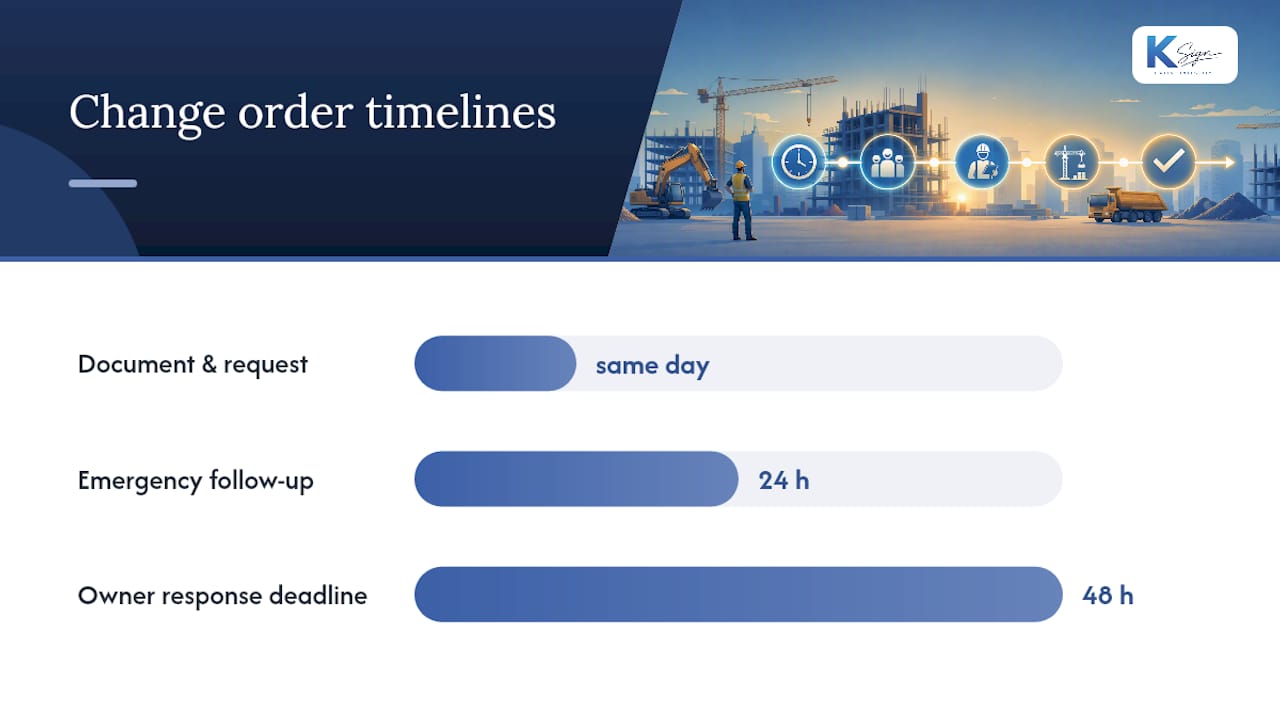
The sequence matters as much as the document itself. ProjectManager recommends filling out the change order the same day the change is identified — delays create memory gaps and give owners room to dispute the scope or price later.
- Identify the change. A site condition, owner directive, design revision, or unforeseen condition triggers the need. Document it with photos or a short field note immediately.
- Prepare a change request (if required). Some prime contracts require a preliminary change request or RFI before a formal change order is issued. This is a proposal, not a binding amendment. Complete it the same day where possible.
- Estimate cost and time, itemised. Break down labour, materials, equipment, and subcontractor costs. State the schedule impact in calendar days. Attach a cost breakdown sheet for anything over a few thousand dollars.
- Send the change order for approval. Deliver via email, your project management platform, or an e-signature tool. Include the itemised breakdown, relevant drawings, and a clear deadline for response (48 hours is a reasonable standard for small changes).
- Obtain signatures before work starts. This is the non-negotiable rule. Electronic signatures are broadly accepted under the federal ESIGN Act and state UETA laws, but check your prime contract for any specific signature-party requirements.
- Update the contract sum and schedule. Revise your project schedule and payment schedule to reflect the approved change. Update your running contract-sum log.
- Attach to the contract and update your change order log. The signed change order becomes part of the contract documents. Log it with the CO number, date, description, cost, and schedule impact.
For emergency work where you cannot wait for a signature, document the verbal authorisation in writing (email or text) immediately, note “verbal authorisation received from [name] on [date/time]” on the change order, and follow up with a signed copy within 24 hours.
Pro Tip: Speed approvals by sending a short scope summary (three bullet points maximum), an itemised price, and a mobile-friendly e-sign link in the same message. Owners approve faster when the ask is clear and the signing step is frictionless.
Change request vs change order: which document do you need?
These two documents serve different purposes at different stages of the change-control process. Using the wrong one at the wrong time creates gaps in your audit trail.
- Change request (or request for change / RFI): A preliminary document. It proposes a change, asks a question, or flags a condition. It is not binding. It documents the “ask” and starts the clock on the owner’s response obligation.
- Signed change order: A formal, binding amendment to the contract. It records the agreed scope, price, and schedule impact. It is enforceable once signed by all required parties.
The conversion point is owner approval. When the owner approves the change request in writing, you convert it to a signed change order. That signed order is what authorises the work and protects your payment.
Practical examples of when each applies:
- Small field tweak (e.g. relocate a light switch 300mm): A brief written directive from the owner or architect may suffice, but a change order still protects you. Issue one for any change with a cost or schedule impact, no matter how small.
- Owner-directed scope addition (e.g. add a bathroom): Always start with a change request to confirm scope intent, then issue a formal change order with full pricing before mobilising.
- Unforeseen site condition (e.g. buried rock): Document the condition with photos immediately, issue a change request citing the contract’s differing-site-conditions clause, and follow with a change order once the scope of remediation is agreed.
Log both requests and signed orders chronologically. A complete request-to-order trail is your strongest defence in a payment dispute.
Best practices that keep change control tight and disputes rare
The ConsensusDocs 202 form and the AIA G701 model both exist for one reason: transparency. A change order’s job is to document the “what,” “why,” “how much,” and “when” in specific enough terms that no party can later claim they understood something different. Using a standard format modelled on either of these reduces ambiguity and makes it easier to reconcile running contract sums and schedule impacts across a multi-year project.

Three contractor mistakes that most often cause non-payment: vague scope descriptions that let owners dispute what was agreed, missing or undated signatures that make the document unenforceable, and no schedule-impact statement that exposes the contractor to liquidated damages on added work.
Pro Tip: Add the clause “Not valid until signed by all required parties” to every change order template. Under most AIA and ConsensusDocs prime contracts, “required parties” means the owner and the contractor at minimum; some contracts also require the architect’s signature. Check your prime contract and fill in the correct parties on your template before you send a single change order.
How a digital workflow speeds change order approvals
A paper-based change order process has a predictable failure mode: the document sits in someone’s inbox, unsigned, while the crew waits on site. A digital workflow removes that bottleneck at every step.
The practical sequence using a platform like Ksign looks like this:
- Guided online form: The site supervisor or project manager fills in a structured form capturing scope, cost breakdown, and schedule impact. Pre-filled fields (project name, contract number, parties) pull from the original contract record, cutting data-entry errors.
- Auto-generated change order document: The form responses populate a pre-formatted change order PDF or Word file with line-item pricing, the contract-sum ladder, and all required fields. Document generation from form data removes the manual copy-paste step that introduces errors.
- E-signature request: The document is sent to the owner (and architect if required) via a mobile-friendly signing link. Electronic signatures are accepted under the ESIGN Act and state UETA laws, subject to prime-contract requirements.
- Payment or deposit collection: Where the change order triggers a deposit or progress payment, Ksign’s integrated payment workflow lets the owner pay at the point of signing, removing the separate invoice step.
- Audit trail and archiving: Every signed document is stored with a timestamped audit trail, version history, and access log. That record is your first line of defence in any payment dispute.
For contractors managing building contracts digitally, this workflow replaces the email-PDF-print-scan-email loop with a single, traceable thread. You can also use offline templates or other platforms — the right choice depends on your contract obligations and the owner’s preferences.
What a completed change order looks like: a sample walkthrough
Here is a representative completed change order to show how the fields work together in practice.
Sample: Change Order CO-003
- Project: Riverside Office Fitout, 142 Commerce St, Austin TX 78701
- Contract reference: Prime Contract dated January 15, 2026, Contract No. ROF-2026-01
- Change order number: CO-003
- Date issued: March 4, 2026
- Owner: Riverside Holdings LLC
- Contractor: Summit Build Group Inc.
- Description of change: Supply and install one additional 20A dedicated circuit from panel LP-2 to server room, per RFI-014 (dated February 28, 2026) and Sketch SK-07 (attached). Work includes conduit, wire, breaker, and labelling per NEC 2023.
- Cost breakdown:
- Labour: $480 (6 hrs @ $80/hr)
- Materials: $210 (conduit, wire, breaker, fittings)
- Equipment: $0
- Subcontractor: $0
- Overhead and profit (15%): $104
- Tax (8.25%): $65
- Total this change order: $859
- Schedule impact: 0 calendar days added. Revised substantial completion date remains April 30, 2026.
- Contract sum ladder:
- Original contract sum: $284,500
- Prior authorised changes (CO-001, CO-002): +$3,240
- This change order (CO-003): +$859
- New contract sum: $288,599
- Attachments: RFI-014, Sketch SK-07, material quote from supplier
- Signature block: Owner signature / date, Contractor signature / date, Architect signature / date (if required by prime contract)
Change order log entry for CO-003:
| CO No. | Date | Description | Cost | Schedule impact | Signed by |
|---|---|---|---|---|---|
| CO-003 | March 4, 2026 | Additional 20A circuit, server room | $859 | 0 days | Owner, Contractor |
Update the log within 24 hours of each approval. A complete log is your running reconciliation of the contract sum and your clearest evidence of authorised scope in a dispute.
A project manager’s honest take on change order discipline
The contractors who get paid consistently are not necessarily the ones with the best lawyers. They are the ones who treat change order discipline as a daily habit, not a crisis response.
A few habits that make a real difference on live jobs:
- Always get the owner to initial the marked-up drawing that describes the change, not just the change order form itself. The drawing is the clearest record of what was agreed.
- Set a 48-hour turnaround expectation for small changes at the project kick-off meeting. Put it in writing. Owners who know the expectation upfront almost always meet it.
- Keep a single change order log, shared with the owner, updated in real time. Transparency removes the adversarial dynamic that turns small disputes into large ones.
- Train foremen to trigger a change order the moment they identify a scope deviation, not at the end of the week. Same-day documentation is the single most effective dispute-avoidance tactic available to a field crew.
- When a change order is disputed, escalate to the contract administrator (architect or owner’s representative) in writing within 48 hours. Do not let a verbal disagreement sit unresolved while work continues.
The paperwork is not the bureaucracy. It is the protection.
Ksign makes change order approvals faster and cleaner
Chasing signatures by email, reformatting Word templates for each job, and sending separate payment links after approval are the three biggest time drains in the change order process. Ksign replaces all three with a single workflow: guided form, auto-generated document, e-signature, and payment, all in one place.

For contractors and project managers who need faster approvals and a cleaner audit trail, Ksign’s construction workflow tools cover the full change order cycle, from form to signed document to payment confirmation. Pre-built templates, mobile signing, integrated payments, and timestamped audit trails mean fewer errors and fewer disputes. Right now, you can access 50% off all e-signature plans and set up your first change order workflow in minutes. Check your prime contract requirements before switching to a digital workflow, and confirm that your e-signature method meets any specific contractual obligations.
Sources
- General Contractor Construction Change Order Form | ConsensusDocs 202
- Construction Change Order Template (Free): 2026 Guide
- Construction Change Order Form Template
- Free Change Order Form (Construction) - PDF | Word - eForms