
A multi-party e-signature is a signing process where several people, beyond just a sender and one recipient, must add legally binding signatures to the same document. Small businesses hit this most often with quotes needing manager approval before a customer signs, job completion sign-offs involving a supervisor and a client, or contracts requiring a witness. The simplest, most reliable setup is a form-to-contract workflow: collect the details once, generate the correct document automatically, and then route it for signature in the right order.
TL;DR:
- Most small businesses should use parallel or mixed signing workflows to optimize speed rather than defaulting to sequential signing, which can cause unnecessary delays.
- Ensuring a tamper-evident audit trail with timestamps, signer identity, and document hashes is critical for legal enforceability of multi-party signatures.
- Flat or tiered subscription pricing models without per-signer or per-document charges best suit small businesses and prevent hidden costs.
- Incorporating form-based contract generation and data reuse streamlines the signing process, reduces manual errors, and shortens turnaround time.
- Designing mobile-friendly, simplified signing flows with clear instructions significantly improves completion rates and reduces business process stalls.
Table of Contents
- What is multi-party e-signature and how does it differ from two-party signing?
- Sequential, parallel, or mixed: which signing mode do you need?
- What makes a multi-party e-signature legally enforceable?
- How do you design a multi-party signing process that doesn’t stall?
- What security and protocol issues matter in multi-party signing?
- How much should multi-party e-signature software cost?
- How does a form-native platform simplify multi-party signing?
- Lessons from implementing form-to-contract multi-party workflows
- Sources
What is multi-party e-signature and how does it differ from two-party signing?
Two-party signing is the simplest case: one sender, one signer, one signature field. Multi-party e-signature introduces role logic. Each signer needs their own field, their own place in the sequence (or none, if signing happens simultaneously), and their own audit record proving who signed what and when.
That extra layer changes what “core features” means for a platform. At minimum, you need:
- Role-assigned fields so a manager’s approval box never gets mixed up with a customer’s signature line
- Signing order control, letting you enforce sequential, parallel, or mixed paths
- Tamper-evident audit trails that log every action against a timestamp and signer identity
- Digital signature backing, not just a captured scribble image
That last point trips people up. A “simple” e-signature can be nothing more than a drawn or typed name with no cryptographic proof behind it. A true digital signature ties the signing event to a tamper-evident hash, usually SHA-256, so any post-signing alteration is detectable. For a single-party consent form, that distinction rarely matters. For a multi-party contract with money attached, however, it does.
Sequential, parallel, or mixed: which signing mode do you need?
Workflow mode is the decision most small businesses get wrong first, usually by defaulting to sequential when the situation doesn’t call for it. Three modes cover almost every case:
- Sequential signing suits approval chains where each signature depends on the last. A construction variation that needs the site manager’s sign-off before the client sees it belongs here. Skip this order and you risk sending an unapproved variation straight to a paying customer.
- Parallel signing works for board-style approvals or multi-owner agreements where nobody needs to wait on anybody else. Three business partners signing a shared services agreement can all sign the moment they receive it, cutting a five-day turnaround to same-day.
- Mixed workflows combine both: internal approval happens sequentially first, then the approved document goes out for parallel external signature. A typical pattern is an internal manager approving a quote, followed by the customer and a co-signer receiving it at the same time.
Multi-signer platforms generally support exactly these three modes as standard, alongside signer-specific fields and an audit trail with timestamps and signer metadata.
What makes a multi-party e-signature legally enforceable?
Enforceability rests on the audit trail, not the signature’s visual appearance. If a dispute lands in front of a court, the audit record is what proves who signed, when, from where, and whether the document changed afterward.
A defensible audit trail typically includes:
- A timestamp for every signing action
- The signer’s IP address
- An identity marker (email verification, OTP, or stronger authentication)
- Field-level provenance showing exactly what each signer completed
- A tamper-evident hash confirming the document wasn’t altered post-signing
In the US, the ESIGN Act and UETA give electronic signatures the same legal weight as ink, provided intent to sign and consent to do business electronically are clearly established. Some platforms explicitly document ESIGN compliance alongside SHA-256 tamper-evident hashing, which is worth checking before you commit to one.
Pro Tip: Match identity verification to risk. Email or SMS one-time passcodes cover most quotes and internal approvals. Reserve document-plus-selfie verification for high-value agreements where identity fraud is a genuine risk, since it adds friction most signers don’t need.
Retention matters too. Store signed documents and their full audit trails indefinitely where possible, and make sure they’re retrievable by contract, customer, or date, not buried in an inbox.
How do you design a multi-party signing process that doesn’t stall?
Most multi-party signing failures aren’t legal problems, they’re process problems: a signer goes quiet, an order gets set wrong, or a form re-asks a question already answered. Building the process properly upfront avoids almost all of it.
- Map roles before you build the workflow. Decide who actually needs to sign in order and who doesn’t. Not every approval needs a strict sequence, and forcing one adds delay for no legal benefit.
- Set deadlines and automated reminders. A document with no expiry sits in an inbox indefinitely. Escalation paths (notify a supervisor after 48 hours of silence, for example) keep things moving.
- Plan for absent signers. Build in delegation options and a fallback contact so one unavailable person doesn’t deadlock the entire agreement. A time-limited placeholder with a resolve path to admin review stops a half-signed contract from stalling the business.
- Use signer-specific fields and conditional logic. Nobody should re-enter data another party already supplied. Conditional fields (show this clause only if the job value exceeds a threshold) keep documents relevant without manual editing.
- Fold storage and retrieval into the workflow itself. Signed documents and audit trails should land in one searchable place automatically, not get filed manually after the fact.
Form-to-contract setups handle steps 4 and 5 almost by default, since the same data collected at the start populates the document and travels with it into storage. That single change is what most small-business document automation analysis points to as the biggest reduction in manual error and turnaround time.
What security and protocol issues matter in multi-party signing?
Multi-party signing carries a technical wrinkle two-party signing doesn’t: fairness. If four people need to sign and three do, who’s protected if the fourth never shows? This is the “fair exchange” problem, and it’s why many protocols rely on a trusted third party (TTP) to resolve incomplete signing rounds rather than leaving one signer exposed. Research into synchronous contract signing protocols has pushed the theoretical minimum down to 3(n − 1) message steps in the all-honest case, a meaningful efficiency gain over older multi-round designs.
Most small businesses will never need to think about protocol theory directly, but a few practical measures matter regardless of platform:
- Encrypt documents both in transit and at rest
- Confirm the platform generates a tamper-evident hash for every completed document
- Restrict who can view or export signed records, and log every access
- Verify audit trails independently rather than trusting a vendor’s summary screen
Advanced multiparty cryptographic schemes, including three-round Schnorr multi-signature protocols, are built for custody, blockchain, and other high-assurance scenarios. They’re overkill for a landscaping quote or a cleaning contract, but worth knowing exist if your business moves into higher-stakes territory.
How much should multi-party e-signature software cost?
Pricing in this category splits into three broad models: per-envelope (you pay each time a document goes out for signature, regardless of signer count), per-user seat licences (you pay for each staff member who can send documents, with signer counts sometimes uncapped), and flat-fee subscription tiers (a fixed monthly or annual cost covering a set volume of documents and signers).
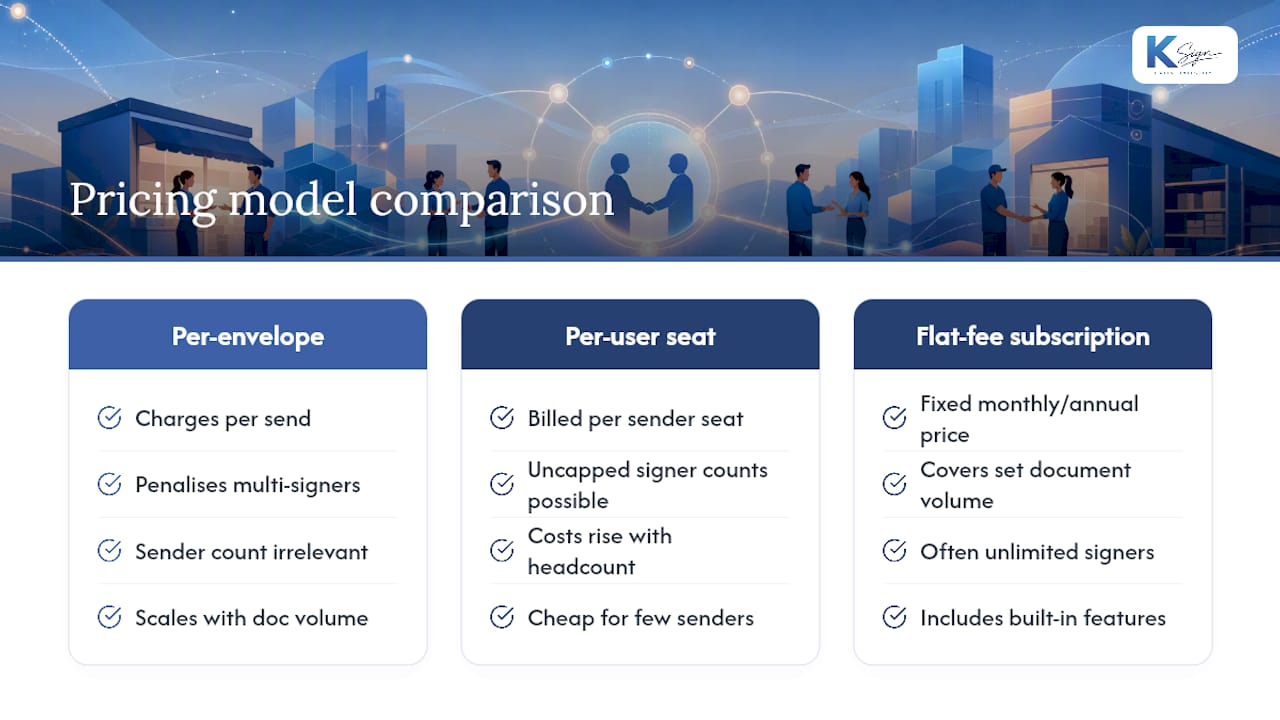
Per-envelope pricing punishes exactly the workflows small businesses run most often. A five-person approval chain on a single contract can burn through several envelope credits for what is, functionally, one transaction. Per-user pricing causes a different problem: a five-person trade business paying for five seats when only one person actually sends documents is paying for headcount it doesn’t need.
The pricing model that tends to suit small business best is a flat or tiered subscription that doesn’t penalise multi-party complexity. Watch for three cost traps specifically: charges per additional signer, charges for payment collection as a bolt-on rather than a built-in feature, and hidden fees for template or workflow storage beyond a low cap. None of these are unusual in enterprise-grade platforms, but they add up fast for a business signing dozens of multi-party documents a month rather than dozens a year. Ask directly whether a quote includes unlimited signers per document, because that single question separates SMB-friendly pricing from enterprise pricing dressed up as SMB pricing.
How does a form-native platform simplify multi-party signing?
Most e-signature tools start from an assumption: you already have a finished document ready to upload. That assumption doesn’t hold for a lot of small-business work, where the contract doesn’t exist yet until a customer answers a few questions about their job, their property, or their budget.
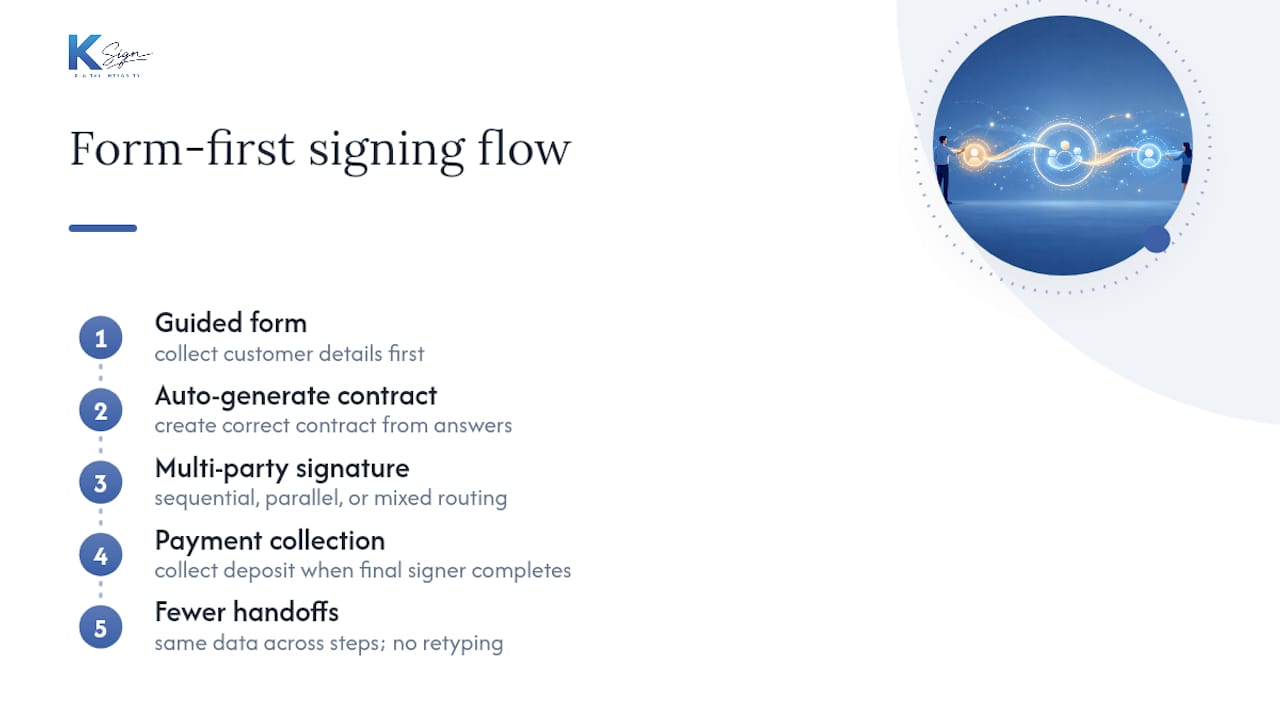
Ksign starts one step earlier. A guided form collects the customer’s details first, auto-generates the correct contract from those answers, then routes the document into multi-party signature, sequential, parallel, or mixed, exactly as the job requires.

That form-first order matters for multi-party workflows specifically. A tradie sending a quote for manager approval, then customer sign-off, then a deposit request, no longer needs three disconnected tools stitched together with email. The document generation step and the signing step share the same data, so nobody retypes a job address or a price twice. Payment collection sits inside the same flow too, letting you collect a deposit the moment the final signer completes their part, rather than chasing an invoice separately afterward.
For builders managing variation approvals, cleaning businesses confirming recurring service agreements, or consultants running engagement sign-offs, the practical win is fewer handoffs and fewer places for a signature to go missing. If your business already runs quotes, approvals, or completion sign-offs through a patchwork of PDFs and email, it’s worth looking at the contract automation feature set directly and seeing where it replaces steps you’re currently doing by hand.
Lessons from implementing form-to-contract multi-party workflows
The biggest implementation mistake I see is businesses forcing sequential signing onto agreements that didn’t need it, adding days to a process that should take hours. The second is skipping mobile-first design: most signers open these documents on a phone between jobs, so a form with ten fields on one screen gets abandoned. Shorter flows and one clear instruction per screen consistently raise completion rates far more than any feature addition does.
— Josh
Sources
- How small businesses are automating document workflows (TechRadar Pro)
- A synchronous multi-party contract signing protocol improving lower bound of steps
- Batch & Multi-Signing — IdentiGate
- Simple three-round multiparty Schnorr signing with full simulatability