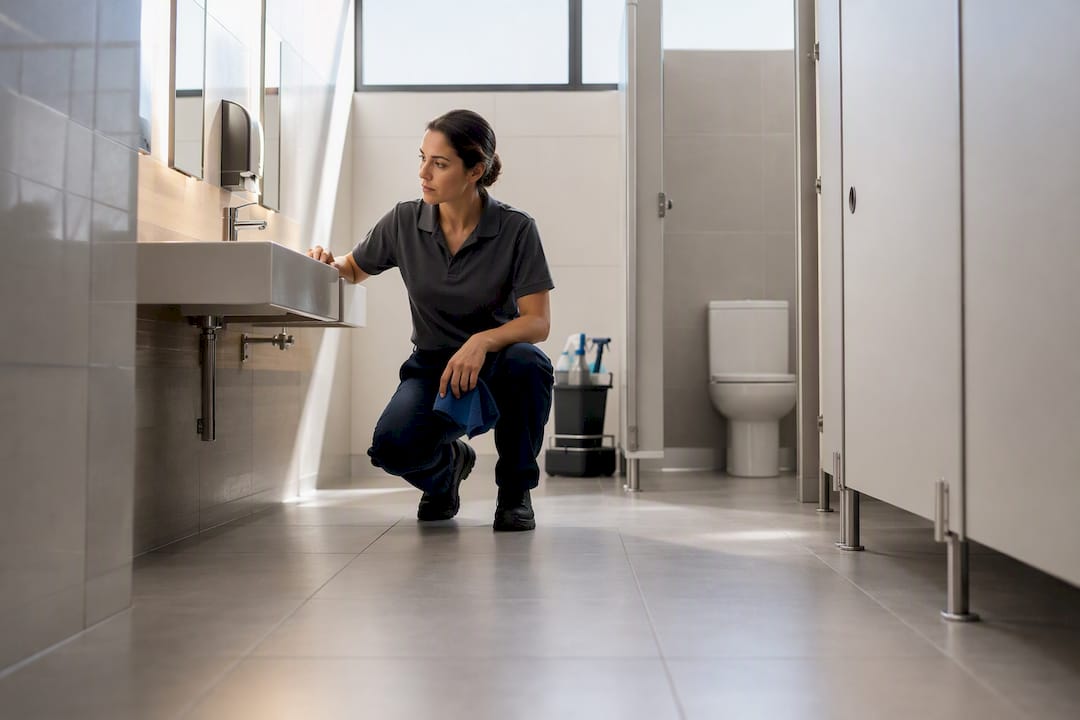
A fillable cleaning site inspection form is available now in PDF, Word and digital formats, built around pass/fail ratings, room-by-room checks and an issue log. Use it for post-clean spot checks, weekly supervisor visits and client walkthroughs. Complete it on a phone or tablet whenever possible, because digital versions capture photos and timestamps that a paper form simply can’t.
TL;DR:
- Using digital inspection forms allows automatic capture of photos, timestamps, and GPS data, ensuring evidence is reliable and easily accessible.
- Regularly updating and controlling version numbers of inspection templates helps prevent inconsistencies and maintains program effectiveness.
- Standardizing severity levels and assigning specific owners to issues improves clarity and accountability during follow-up actions.
- Separating inspection cadences into daily, weekly, and monthly visits enables better focus on immediate issues versus long-term trends.
- Implementing digital forms reduces the risk of lost paperwork and speeds up dispute resolution through better traceability and audit trails.
Table of Contents
- What format should your cleaning inspection template take?
- How do you run an inspection and fill out the form?
- What should the room-by-room checklist actually cover?
- How do you keep an inspection form useful over time?
- Why does digital completion matter for compliance?
- What actually breaks these inspection programs?
- Get a fillable inspection template into your workflow
- Reference templates used in this article
- Sources
- FAQ
What format should your cleaning inspection template take?
Format decides how useful the form is once you’re standing in a corridor with a clipboard, or more realistically, a phone. Each format suits a different working style, and picking the wrong one is why so many inspection checklists end up half filled or abandoned after week two.
- Printable PDF works for supervisors who still prefer paper on a clipboard, though it means manual data entry afterwards and no photo attachment.
- Fillable PDF lets an inspector type directly into fields on a laptop or tablet, which speeds up the office side without needing a dedicated app.
- Digital/mobile form captures photos, GPS and timestamps automatically, and syncs straight into a shared record.
- Word document suits businesses that need to heavily customise layout or branding before converting to a fillable version.
The GSA’s contract cleaning inspection report, form GSA1181A, is worth studying even outside government contracting work. It uses a satisfactory/unsatisfactory rating, a quantity field for counting units inspected, and a remarks section that specifically instructs inspectors to explain any unsatisfactory rating. That’s a genuinely well-tested structure, and it’s a solid model to build your own fillable version around.
Whichever format you start with, save a dated master copy before you customise it for a specific site or client. Version drift is one of the quietest ways an inspection program falls apart.
How do you run an inspection and fill out the form?
A consistent visit flow matters more than a fancy template. Here’s a sequence that works for daily post-clean checks and monthly reviews alike:
- Confirm the cadence first. Decide whether this is a daily post-clean check, a weekly supervisor visit or a monthly SLA review, and grab the matching template.
- Fill in the header. Site name, inspector, date, time and the cleaning crew on shift that day.
- Work room by room. Rate each area satisfactory or unsatisfactory, and add a comment on anything that isn’t a clean pass.
- Log every issue properly. Severity level, the corrective action needed, who owns the fix, and a follow-up date.
- Capture photos with timestamps for any unsatisfactory item, then get client or supervisor sign-off before you leave.
- Distribute the finished report to the site contact and file a copy for trend tracking.
Pro Tip: Photograph the issue and the fix, not just the problem. A “before and after” pair in the issue log closes disputes about whether corrective action actually happened.
What should the room-by-room checklist actually cover?
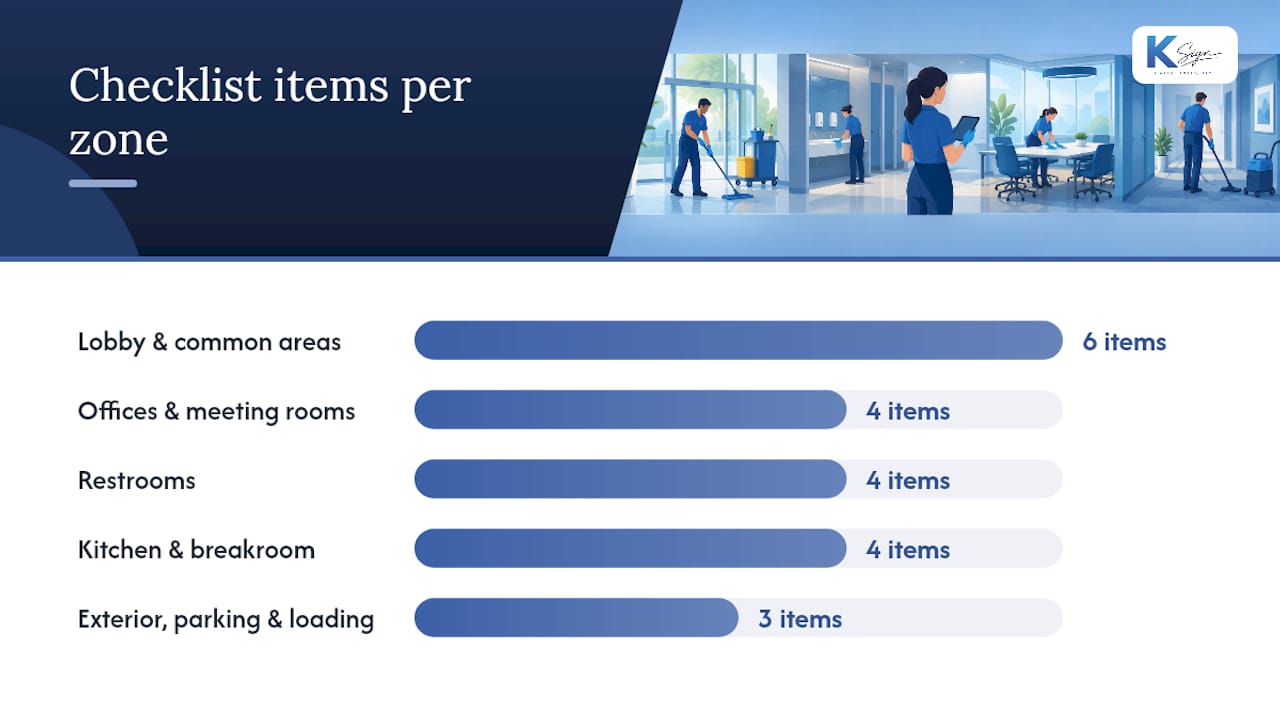
A cleaning inspection checklist earns its keep when it names specific, checkable items rather than vague categories like “general cleanliness.” Break the form into these zones:
Lobby and common areas
- Floors free of streaks, spills or visible dirt
- Glass and mirrors free of smudges
- Seating and upholstery clean and undamaged
- Bins emptied and liners replaced
- Signage in place and legible
- No lingering odour at entry points
Offices and meeting rooms
- Desks and surfaces dusted
- Floors vacuumed or mopped
- Waste and recycling removed
- Touchpoints (light switches, door handles) wiped down
Restrooms
- Fixtures disinfected, including taps and handles
- Supplies stocked: soap, paper towel, toilet paper
- Floors dry and free of standing water
- No odour issues
Kitchen and breakroom
- Counters and sink degreased and dry
- Appliance exteriors wiped down
- Waste bins emptied, liners replaced
- No accumulated grease on stovetops or splashbacks
Exterior, parking and loading areas
- Litter cleared from entryways and garden beds
- Drainage grates clear of debris
- Trip hazards flagged and noted
Add conditional sections for chemical storage areas, food handling zones or medical spaces, checking labelling, ventilation and PPE availability. OSHA guidance supports including these safety and operational checks wherever they’re relevant to the site, not as a blanket requirement on every form.
How do you keep an inspection form useful over time?
The forms that actually get used share a few habits, and the ones that get abandoned share the opposite ones. Build a stable core checklist that appears on every inspection, then attach conditional sections for restrooms, kitchens or specialised zones rather than forcing one bloated form onto every property. Separating cadence matters too: daily post-clean checks catch immediate misses, client walkthroughs build shared understanding of standards, and monthly reviews are where you actually spot trends and check SLA compliance.
A few habits keep the whole system trustworthy:
- Stamp every form with a version number, inspector name and date.
- Keep a simple change log whenever the checklist itself is updated.
- Define severity levels (minor, moderate, urgent) so corrective action isn’t guesswork.
- Assign a named owner to every logged issue, not just “the crew.”
Pro Tip: Review your checklist every quarter and cut anything nobody’s marked unsatisfactory in six months. A form people skim is worse than a shorter one they actually read.
Why does digital completion matter for compliance?
Paper forms get lost, and lost forms mean lost evidence when a client disputes a service issue months later. Digital completion fixes that by attaching a timestamp, an inspector identity and often a GPS location to every entry, and by keeping photos linked directly to the issue they document rather than in a separate folder somewhere.
Digital records reduce lost paperwork because timestamps, assigned owners and stored reports make trends visible and speed up how quickly corrective action gets closed. The form still needs a stable version of the site standard behind it. Technology captures the evidence; it doesn’t replace an inspector’s judgement about what “clean” actually means for that site.
That’s worth sitting with — see what comes after drywall installation for a step-by-step finishing checklist relevant to inspection and cleaning standards. A digital form is a better filing cabinet, not a better inspector. The judgement calls, what counts as a fail, how urgent an issue really is, still sit with the person walking the floor.
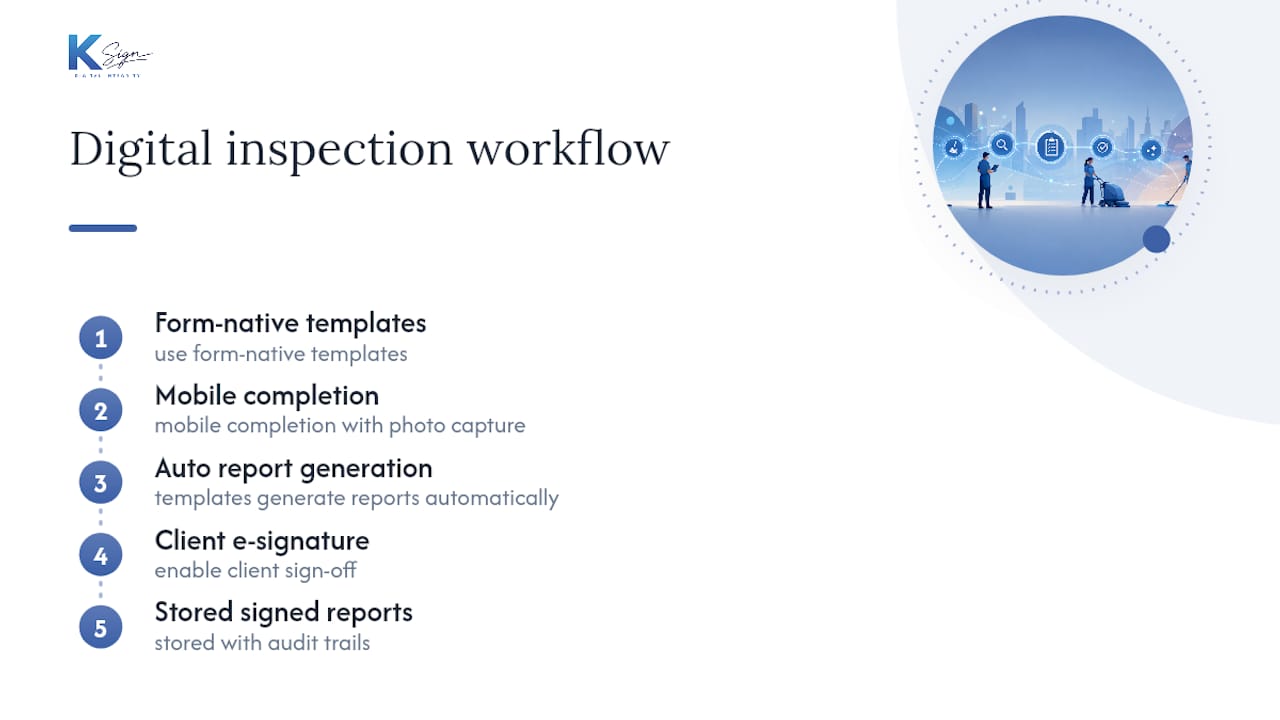
There are workflow tools available that use form-native templates to generate reports automatically, allow mobile completion with photo capture, and enable e-signature for client sign-off, storing signed inspection reports with audit trails rather than as simple PDFs.
What actually breaks these inspection programs?
Most cleaning inspection templates fail for boring reasons, not exciting ones. No version control means three people are filling out three slightly different forms. Severity labels are vague, so “urgent” and “minor” mean whatever the inspector felt that day. Photos get taken but never linked back to the specific issue they were meant to prove.
Fix the boring things first: standardise photo file names, run a digital form on one site before rolling it out everywhere, and give every logged issue a named owner. Review the checklist itself every few months, because a form that hasn’t changed in two years is usually a form nobody’s really reading anymore.
— Josh
Get a fillable inspection template into your workflow
Some platforms offer an alternative to juggling paper checklists, separate photo folders and a signature chase after every visit by using one form that generates the report, captures photo evidence, collects client e-signatures and stores the audit trail automatically. For cleaning contractors running multiple sites, this means inspections completed on a phone can become signed, distributable reports within minutes.

Templates are built through contract automation tools that turn your form answers into a finished, signable document, and fillable PDF forms are available if you’d rather keep a familiar PDF workflow while still collecting a digital signature. It suits sole operators and small cleaning teams just as well as multi-site facility contractors juggling weekly and monthly reporting cycles. Plans start with a Standard plan at a per-seat monthly price around twenty-four Australian dollars. The Professional plan costs around forty Australian dollars per seat monthly for growing teams. Both are listed on the Ksign pricing page. Start building your first inspection template today and see how quickly a signed report reaches your client’s inbox.
Reference templates used in this article
- GSA contract cleaning inspection report, form GSA1181A (PDF)
- Weekly cleaning site inspection checklist
- General cleaning inspection checklist
- Commercial cleaning inspection checklist
- Monthly cleaning inspection form
Sources
- CONTRACT CLEANING INSPECTION REPORT (GSA form GSA1181A)
- Weekly cleaning site inspection checklist (Mitti / SafetyCulture community)
- General cleaning inspection checklist (Resco)
- Commercial cleaning inspection checklist (LeadDuo)
- Occupational Safety and Health Administration (OSHA)
FAQ
What Should a Cleaning Site Inspection Form Include?
A solid form includes header details (site, inspector, date), room-by-room checks with a pass/fail or satisfactory/unsatisfactory rating, an issue log with severity and corrective action, and a sign-off field. The GSA1181A form is a useful structural model, pairing a rating field with a remarks section for explaining any fail.
How Often Should You Run a Cleaning Inspection?
Most sites benefit from daily post-clean spot checks, a weekly supervisor inspection and a monthly SLA review. Separating these cadences stops minor daily misses from being confused with the longer-term trends a monthly review is meant to catch.
Can I Use a Cleaning Inspection Form on My Phone?
Yes, and it’s the better option for recurring inspections. A mobile form captures photos, timestamps and inspector identity automatically, which speeds up corrective-action tracking and avoids the paperwork getting lost between visits.
How Much Does Ksign Cost for Inspection Forms and E-Signatures?
Ksign offers a Standard plan starting at a monthly per-seat price similar to twenty-four Australian dollars, and a Professional plan around forty Australian dollars per month per seat, both covering form creation, e-signature and audit trail storage. Enterprise pricing isn’t published and is available on request through the Ksign pricing page.
Why Use a Digital Cleaning Compliance Form Instead of Paper?
Digital forms attach a timestamp, inspector identity and photo evidence directly to each entry, which makes trends easier to spot and speeds up how fast corrective action gets closed. Paper checklists still work, but they’re easier to lose and harder to search months later when a client disputes a service issue.