A model release form gives you legal permission to use someone’s photo or video for commercial or editorial purposes, provided the person signing has the legal capacity to consent (or a parent signs for a minor). Three things to do right now:
- Collect full legal names and describe exactly what you’re shooting.
- State the intended use plainly, whether that’s advertising, stock, or social media.
- Get the signature on the spot. For minors, a parent or guardian signs instead.
Keep a dated copy of every release and file it against the shoot’s image proofs. A signed form that nobody can match to the right photos is barely better than no form at all.
Key Takeaways
A valid model release requires clear identification of both parties, defined scope of use, consideration, and a capacity or guardian statement, signed and stored against the matching images.
| Point | Details |
|---|---|
| Sign before or during the shoot | Waiting until later risks losing contact with the model entirely. |
| Use plain-English clauses | Specific, checkable scope language gets more signatures than blanket wording. |
| Minors need guardian consent | Confirm the local age threshold and collect relationship and ID details. |
| E-signatures are generally valid | Ensure authentication, timestamping, and a secure audit trail back the signature. |
| Automate the paperwork | Tools like Ksign auto-generate releases from form data and store them with an audit trail. |
Table of Contents
- What is a model release form, exactly?
- When do you actually need one?
- What must a model release form include?
- Where to find a ready-to-use template
- How do you handle a minor model release?
- How do you actually get a release signed on set?
- Are electronic signatures legally valid for model releases?
- What do the common clauses in a release actually mean?
- How do you store and prove consent later?
- Why I favour modular releases over blanket “all rights” wording
- From signed form to stored record: a workflow worth automating
- Where to find authoritative templates and guidance
- Frequently asked questions
- Sources
What is a model release form, exactly?
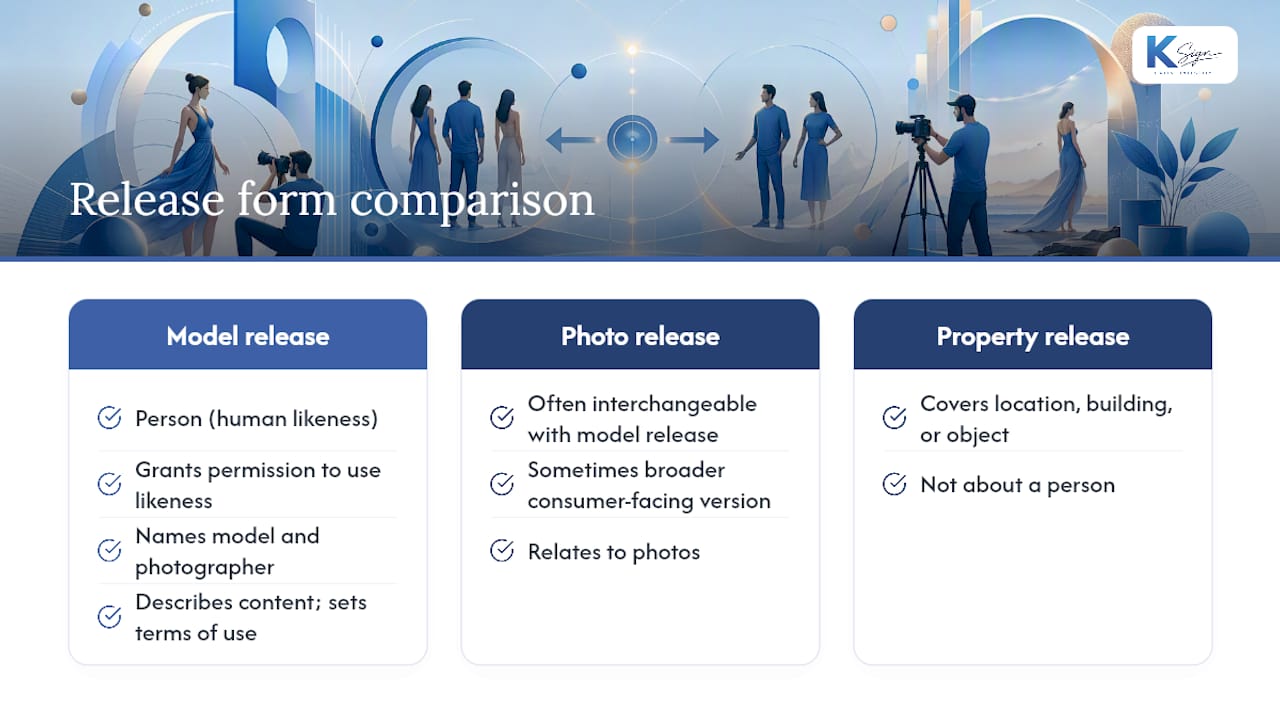
A model release form is a signed agreement between the person appearing in a photo or video and the creator, granting permission to use that likeness for a specified purpose. It names the model and the photographer, describes the content, and sets the terms of use.
It’s worth separating three terms people often confuse. A photo release form is often used interchangeably with a model release, though some treat it as the broader consumer-facing version. A property release covers a location, building, or object, not a person. A model release is specifically about a human likeness. Authoritative starting points include the Columbia University Photo and Video Release template, guidance from the American Society of Media Photographers, and the RPS model release form.
When do you actually need one?
Not every photo needs paperwork, but plenty of situations demand it before you press publish. You need a release for:
- Paid advertising and branded campaigns
- Stock photo or video library licensing
- Commercial product or service promotion
- Branded social media content featuring identifiable people
- Some editorial contexts, particularly when the image implies endorsement
Street photography and pure news reporting generally sit in lower-risk territory, since editorial and newsworthy use often doesn’t require consent. Still, if there’s any chance the shot could later be resold or repurposed commercially, get a signature while the person is standing in front of you. It’s far harder to track them down later.
Pro Tip: Check your client’s or platform’s own wording requirements before you shoot. Stock agencies and some publishers specify exact release language, and a generic template can get your submission rejected.
What must a model release form include?
A release that actually holds up needs specific, unambiguous language, not a vague “all rights granted” stamp. The essential components are:
- Full legal names of both the model and the photographer or business
- A clear description of the content (stills, video, or both)
- Scope of use: which media, how long, and in what territory
- A statement of consideration, even if it’s just $1 or a copy of the photos
- Signature block with a printed name and date
- A statement confirming the signer is an adult with legal capacity, or guardian details for a minor
Plain English beats dense legalese here. A scope clause might read: “You grant [photographer/business name] the right to use these images on its website, social media, and print advertising for two years within Australia.” A consideration clause can be as short as: “In exchange for $1 and the images provided.”
Clear, accessible language and specific checkboxes for each permitted use tend to get more people to sign on the spot than a dense, all-rights paragraph does.
If your subject is under 18, the release must include a parent or guardian signature line, their relationship to the minor, and ideally a note confirming their identity was checked. Don’t skip this step. It’s the single most common gap that turns a usable release into a liability.
Where to find a ready-to-use template
You don’t need to draft a release from scratch. The Columbia University Photo and Video Release template is a solid institutional starting point, built for standardised permissions across an organisation. The RPS model release form is worth using if you’re working in a jurisdiction where GDPR-style data protection applies. Services like LawDepot offer editable templates with optional witness fields for entertainment and commercial use.
A compact clause you can drop straight into your own template:
“I grant [Photographer/Business] permission to photograph me and to use, reproduce, and publish these images in print, digital, and social media for commercial purposes. This release is valid indefinitely unless revoked in writing.”
Adjust the consideration and duration fields to suit your local market before you send it out.
How do you handle a minor model release?
When your subject is under the age of legal capacity in your jurisdiction, a parent or guardian must sign on their behalf. Confirm the local age threshold first, then collect the guardian’s full name, relationship to the child, and contact details alongside their signature.

A simple guardian line reads: “I am the parent/legal guardian of [child’s name] and consent on their behalf.” Keep a copy of ID and, where possible, proof of the relationship. If anything about guardianship is unclear, hold off on publishing until it’s verified. A delayed shoot is cheaper than a legal dispute.
How do you actually get a release signed on set?
Getting a release signed shouldn’t feel like a separate admin task bolted onto the shoot. Build it into your workflow:
- Pre-fill what you can before the shoot, names, date, and location, so signing takes seconds.
- Present the release before or during the session, not as an afterthought at the end.
- Explain the scope of use in plain terms so the model knows exactly what they’re agreeing to.
- Collect the signature on a phone, tablet, or paper form.
- File the signed release against that subject’s image proofs, ideally as a single PDF with thumbnails attached.
Naming convention matters more than people expect. A folder full of “IMG_4021.pdf” releases with no link to the actual shoot is a nightmare to search through later.
Pro Tip: A digital release with checkboxes for each permitted use can be completed on a phone in under 90 seconds. That speed matters when you’ve got a queue of subjects and limited daylight.
Are electronic signatures legally valid for model releases?
Yes, in most jurisdictions, provided the platform follows recognised electronic signature principles such as those under the ESIGN Act and UETA in the US. An e-signature carries the same legal weight as a wet-ink signature when it’s properly authenticated and timestamped.
Best practice for e-signing a model release includes:
- A secure audit trail recording when and how the document was signed
- Signer authentication (email verification, ID check, or in-person device signing)
- A timestamp attached to the signature event
- A copy of the fully executed document sent automatically to the signer
For unusual or high-risk uses, particularly anything involving sensitive personal data, biometric processing, or minors, it’s worth having a solicitor review your release wording once. Jurisdictional differences in consent law are real, and a template built for one country won’t always translate cleanly to another.
What do the common clauses in a release actually mean?
Legal wording in a release often looks scarier than it needs to be. Here’s what the standard clauses actually do:
- Scope of use defines where and how the image can appear. Plain version: “on our website and social channels for two years.”
- Exclusivity determines whether you can license the same image to others. Most standard releases are non-exclusive.
- Compensation is whatever you’re giving in exchange, cash, free images, or a flat $1. It needs to be stated, not implied.
- Revocation covers whether and how the model can withdraw consent later. Many releases are silent on this, which itself is a decision worth making deliberately.
- Digital manipulation clauses confirm whether you can retouch, composite, or use the image to train AI models. Modern commercial releases increasingly spell out AI and biometric-data clauses explicitly, given how licensing has shifted.
Add custom clauses for anything genuinely sensitive, political content, health-related imagery, or anything involving intimate or vulnerable subject matter. A standard template won’t cover those adequately on its own.
How do you store and prove consent later?
A signed release only protects you if you can find it and prove it’s genuine six months or six years later. The best-practice workflow pairs each release with the relevant image proofs in a single searchable file, backed up in at least two locations.
A solid audit trail includes:
- Confirmed signer identity (name, ID reference, or authentication method)
- Timestamp of signing
- A verifiable signature (digital certificate or clear wet-ink scan)
- Storage location noted in your project metadata
- A retention note stating how long you’ll keep the file
Pro Tip: Form-to-contract tools that auto-generate releases from a guided intake form and store the signed copy with a built-in audit log remove most of the manual filing risk entirely.
Why I favour modular releases over blanket “all rights” wording
Blanket “all rights, all media, forever” clauses might look thorough, but they scare people off and rarely match what you’ll actually do with the images. I’d rather see a release with specific, checkable use categories, website, social, paid ads, because it builds trust and gets signed faster. If a shoot involves anything unusual, biometric data, minors, sensitive content, get a solicitor to glance at the wording once rather than guessing.
From signed form to stored record: a workflow worth automating
Every step covered here, prefilling names, presenting the release, capturing a signature, filing it against the right images, is exactly what a guided digital workflow handles without the paperwork chase. Ksign lets you build a form that collects the model’s details, auto-generates the release from that data, sends it for a legally binding e-signature, and stores the signed copy with a timestamped audit trail, all before you’ve packed up your gear.

That’s a meaningfully different experience from juggling a Word template, a PDF scanner app, and a separate folder of signed forms after every shoot. If you’re currently doing releases the manual way, take a look at Ksign’s e-signature workflow and see how a form-to-signature pipeline fits your next shoot, or check the current e-signature offer to get started.
Where to find authoritative templates and guidance
- Columbia University Photo and Video Release template: a customisable institutional template.
- RPS model release form: GDPR-aware guidance for photographers.
- The Mother Agents’ beginner’s guide: plain-language explanation of clauses.
- StudioBinder’s template and management tips: practical advice on filing releases with image proofs.
Frequently asked questions
Do I need a model release for editorial photography? Often not, since editorial and newsworthy use typically doesn’t require consent. But if there’s any chance the image will later be used commercially, get a signature anyway.
Can a digital photo release form replace a paper one? Yes. A properly authenticated e-signature carries the same legal weight as a handwritten one in most jurisdictions, provided it includes a timestamp and audit trail.
What happens if someone refuses to sign a model release? You can’t legally use their identifiable image for the restricted purpose without consent. Blur the face, crop them out, or leave the shot unused.
Can a model withdraw consent after signing? It depends on the release’s wording. Some releases are silent on revocation; others specify a process. If your release doesn’t already have written distribution, treat it as final and non-revocable unless the reader states otherwise.
Do I need a different release for every country I sell images in? Consent laws and age thresholds vary by jurisdiction, so a release drafted for one country may need adjusting for another, particularly around minors and data protection.
This article is general information, not a substitute for advice from a qualified lawyer. Consult a qualified legal professional about your own circumstances before acting on anything here.
Sources
- Attaching model release forms to photos (AssetBank)
- 5 best practices for getting model release (500px ISO)
- Photo and Video Release Form template (Columbia University Photo Library)
- Model Release_2026_English (Getty Images PDF)
- Model release form (RPS)