
HIPAA does not ban electronic signatures. HHS has confirmed that electronic authorisations are acceptable provided the method produces a legally valid signature and protected health information stays secured throughout the process. The single non-negotiable step before you sign anything electronically: a signed Business Associate Agreement with your e-signature vendor, backed by real technical safeguards, not marketing promises. Everything below unpacks how to get there.
TL;DR:
- Electronic signatures are legally valid under HIPAA if they produce a legally recognized signature and protect patient data through security controls.
- Vendors must provide verifiable encryption standards, immutable audit trails, role-based access, and secure data handling to meet compliance.
- Implementing a workflow that links form data, generated documents, and signatures reduces errors and preserves audit integrity.
- A comprehensive BAA should specify permitted uses, breach procedures, subcontractor rules, and data return or destruction requirements.
- Prioritize signing the BAA and enabling multi-factor authentication before focusing on other controls during implementation.
Table of Contents
- What HIPAA says about electronic signatures
- Technical and administrative safeguards for HIPAA e-signatures
- How to roll out a HIPAA-compliant e-signature workflow
- What to require in a BAA for e-signature vendors
- Common healthcare e-signature use cases
- Audit trails and records retention for signed documents
- How form-first workflows protect audit evidence
- Priority actions and pitfalls from the field
- Where Ksign fits into your e-signature workflow
- Sources
What HIPAA says about electronic signatures
HIPAA itself is technology neutral. The Security Rule and Privacy Rule set requirements for protecting PHI, but neither prescribes a specific signing method. That leaves e-signatures fully permitted, so long as the covered entity or business associate treats the surrounding data the same way it would treat a paper form: with access controls, encryption, and a documented chain of custody.
HHS’s own guidance on electronic authorisations makes this explicit. An authorisation collected digitally is valid when it complies with applicable contract law and the electronic method safeguards the PHI involved. That second condition is where most healthcare organisations trip up. It is easy to bolt an e-signature widget onto a web form; it is harder to prove the whole workflow—from form submission to signed PDF storage—meets HIPAA’s technical and administrative standards.
Two federal laws sit underneath HIPAA here: the ESIGN Act and the Uniform Electronic Transactions Act (UETA). Both establish that electronic signatures carry the same legal weight as ink signatures for most transactions, including healthcare consent and authorisation forms. Most states have adopted UETA in some form, but a handful use their own variants, and a few document types (certain wills, some court orders) remain exceptions everywhere. If your organisation operates across state lines or handles anything outside routine clinical consent, that variation matters.
Reporting from HIPAA Journal in January 2026 confirms the baseline position that HIPAA allows e-signatures while flagging regulators are actively revisiting related guidance. Expected clarifications touch on:
- Stronger expectations around risk assessments specific to e-signature and remote-signing workflows
- Clearer documentation standards for identity verification methods used before a signature is captured
- Tighter alignment between Security Rule technical safeguards and cloud-based signing platforms
- Possible new emphasis on audit trail completeness as evidence during compliance reviews
None of this changes the fundamental answer. It does mean the bar for “adequate safeguards” is rising, and vendors that could get away with vague security language in past years will face more scrutiny going forward.
Edge cases deserve real legal review rather than a blog post’s best guess. Minors signing without a guardian, powers of attorney, multi-state telehealth relationships, and anything involving law enforcement or court-ordered disclosures all sit outside what a compliance officer should decide alone. Loop in counsel before you finalise policy for those scenarios.
Technical and administrative safeguards for HIPAA e-signatures
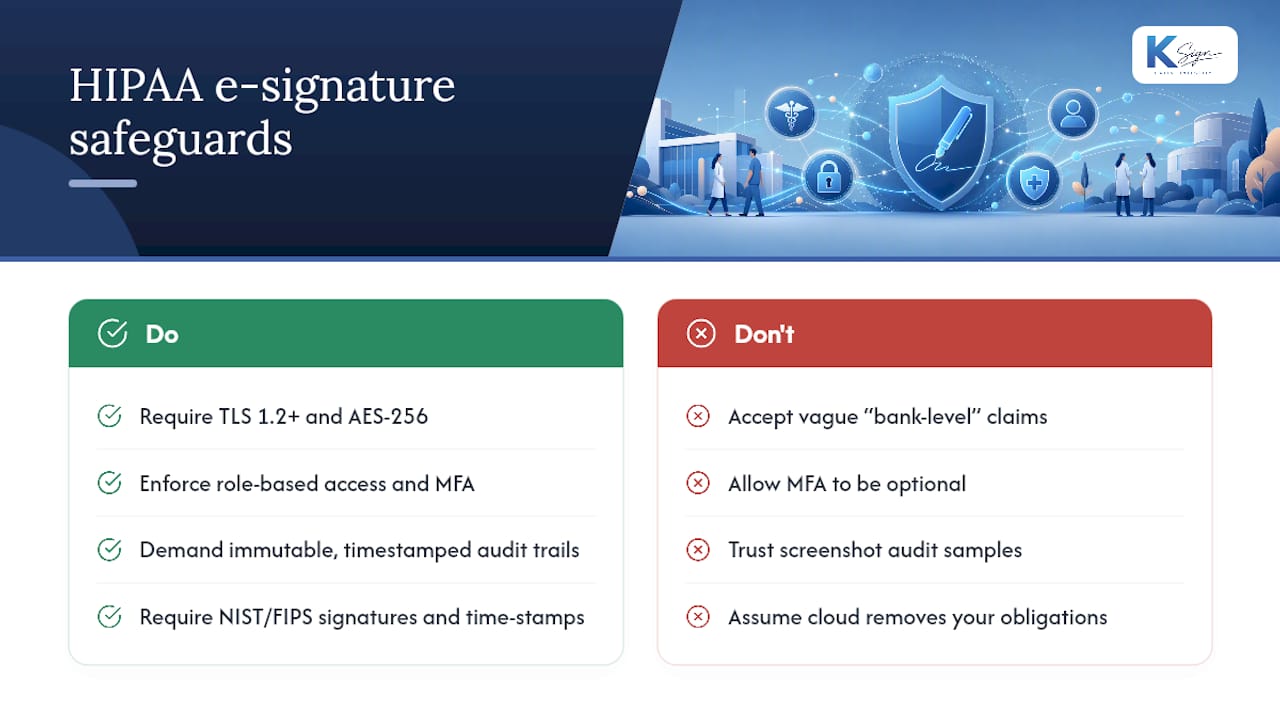
A HIPAA compliant e-signature isn’t a feature, it’s a set of layered controls working together. Vendors that only advertise “bank-level encryption” without naming a standard are telling you nothing verifiable.
Encryption in transit and at rest. Documents and form data need TLS 1.2 or higher moving between systems, and AES-256 (or equivalent) protecting stored records. Ask vendors directly which encryption standard they use and where keys are managed, not just whether data is “encrypted.”
Access controls and least privilege. Role-based access ensures only staff who need to view a signed consent form can open it. Multi-factor authentication (MFA) should be mandatory for anyone with administrative access to signed PHI, not optional.
Immutable audit trails. Every signature event needs a timestamp, the signer’s identity metadata, the authentication method used, and a record of what document version was actually signed. Tamper-evidence, meaning any post-signature alteration is detectable, separates a genuinely compliant workflow from one that merely looks compliant.
Cryptographic signature integrity. NIST’s FIPS 186-5 defines the approved digital signature algorithms and key management practices that underpin trustworthy e-signature systems. For records that must remain provably valid for years, formats like CAdES, described in ETSI’s technical specification on advanced electronic signatures, add trusted time-stamping so the signature’s validity doesn’t degrade as certificates expire.
Data residency and secure deletion. Know where signed documents physically live, whether backups are encrypted separately, and how the vendor deletes data on request. HHS’s cloud computing guidance spells out that using a cloud-based e-signature platform doesn’t remove your obligations. It shifts some of them contractually to the vendor, provided a BAA is in place.
Pro Tip: Ask a prospective vendor to show you an actual audit trail export, not a screenshot from their marketing site. If they can’t produce a real sample in the sales call, that’s a signal their logging isn’t as complete as the pitch deck suggests.
How to roll out a HIPAA-compliant e-signature workflow
Implementation goes smoother when it follows a sequence rather than happening all at once. Here’s the order that avoids the most expensive mistakes.
- Scope your documents first. Not every form touches PHI. A vendor onboarding contract and a treatment consent form carry very different risk profiles. Separate them before you configure anything.
- Run a focused risk assessment. Look specifically at the e-signature data flow: where the form lives, how it’s transmitted, where the signed copy is stored, and who can access it at each step.
- Negotiate and sign the BAA. HHS confirms that business associate agreements can be executed electronically, but don’t let convenience substitute for substance. Read every clause on breach notification and subcontractor use.
- Demand evidence, not assurances. Ask for SOC 2 Type II reports, recent penetration test summaries, and a plain description of encryption and key management.
- Configure and test the controls. Turn on MFA, set retention periods, confirm audit logs capture what you expect, and actually pull a sample export before go-live.
- Train staff and pilot before full rollout. Run the workflow with one form type and a small group of staff for a few weeks. Fix what breaks before you scale it across every department.
Most compliance failures in this space aren’t caused by weak encryption. They’re caused by skipping step one and treating every document the same way, which either over-engineers low-risk forms or under-protects high-risk ones.
What to require in a BAA for e-signature vendors
The BAA is where legal obligation meets operational reality. A signed contract that only exists to check a box protects nobody.
At minimum, the agreement should specify:
- Permitted uses of PHI, spelled out clearly rather than left to general language
- Breach notification timelines, including what counts as a reportable incident and how fast you’ll be told
- Subcontractor and subprocessor rules, since most e-signature platforms rely on cloud infrastructure and payment processors that also touch your data
- Termination rights and data return or destruction obligations if you switch vendors
Beyond the contract itself, insist on operational evidence: a current SOC 2 Type II report or ISO 27001 certification, a summary of the vendor’s most recent penetration test, and a straightforward answer about which encryption algorithms protect data at rest and in transit. As one HHS-linked analysis of BAA requirements notes, the signed agreement is the core contractual control, and third-party audit evidence is what actually substantiates it.
Confirm you’ll have access to audit logs on your own terms, including the ability to export the full trail for a given document rather than viewing it only inside the vendor’s dashboard. Check that data export and deletion are genuinely possible, not locked behind a support ticket queue.
A few red flags should end the conversation immediately: a vendor that hesitates to sign a BAA, one that won’t name its subprocessors, or one that treats audit log access as a premium add-on rather than a baseline feature.
Common healthcare e-signature use cases
Different document types carry different identity-verification expectations, and treating them all the same either wastes staff time or leaves gaps.
- Treatment consent forms generally need in-person or verified-portal identity confirmation, since they authorise clinical action.
- Release of information (ROI) requests need stronger verification when the requester isn’t the patient, particularly for third-party disclosures.
- Telehealth intake and consent should combine a verified patient portal login with MFA, since there’s no in-person check to fall back on.
- Financial responsibility and payment agreements carry lower clinical risk but still need an audit trail if a deposit or fee is involved.
Minors and proxy signers need documented guardianship or power-of-attorney verification before the signature request even goes out, not after. Emergency situations sometimes allow verbal consent with delayed documentation. Confirm your state’s specific exception language rather than assuming it matches a neighbouring state’s rules.
Capturing the context around a signature is what gives it evidentiary weight later: the exact form answers submitted, the IP address and device type used, and a precise timestamp. A signature with no surrounding context is far weaker evidence in a dispute than one bundled with the full record of how it was collected. Ksign’s approach to treatment consent workflows illustrates why keeping the form data and signature together, rather than as two separate systems, closes that gap.
Audit trails and records retention for signed documents
An audit trail is only useful if it captures the right fields and survives long enough to matter in a dispute or an OCR investigation.
| Audit element | What to capture | Why it matters |
|---|---|---|
| Signer identity metadata | Name, role, verified email or portal login | Proves who actually signed |
| Authentication method | MFA, portal login, ID verification | Shows the strength of identity proof |
| Timestamp | Date and time of signature event | Establishes sequence and validity window |
| Document hash | Cryptographic hash of signed version | Detects any post-signature tampering |
| IP and device info | Originating IP address, device type | Supports forensic review if disputed |
Retention periods for signed healthcare records generally follow state-specific rules that apply to the underlying medical record, which vary by jurisdiction and document type. Providers should confirm the exact period against their own state’s requirements rather than assuming a single national standard. Long-term validation matters here too: a signature that’s cryptographically sound today can become harder to verify years later if the certificate behind it expires. Advanced formats referenced in ETSI’s electronic signature specification address this with trusted time-stamps that preserve validity independent of certificate lifecycles.
When legal discovery or a breach investigation demands records, you need to export a complete package, document, audit trail, and metadata, without scrambling to reconstruct it from three different systems. Build that export capability into your vendor requirements before you need it under pressure.
How form-first workflows protect audit evidence
The weakest link in most healthcare paperwork isn’t the signature itself. It’s everything that happens before it, particularly manual re-entry of information from a paper intake form into a separate contract or consent document. Every transcription step is a chance to introduce an error and to lose the link between what the patient actually said and what ended up on the signed page.
A guided form that feeds directly into an auto-generated consent or intake document keeps that context intact from the first keystroke to the final signature. There’s no gap where a staff member retypes answers into a different template, and no separate system where the original form responses live apart from the signed record.
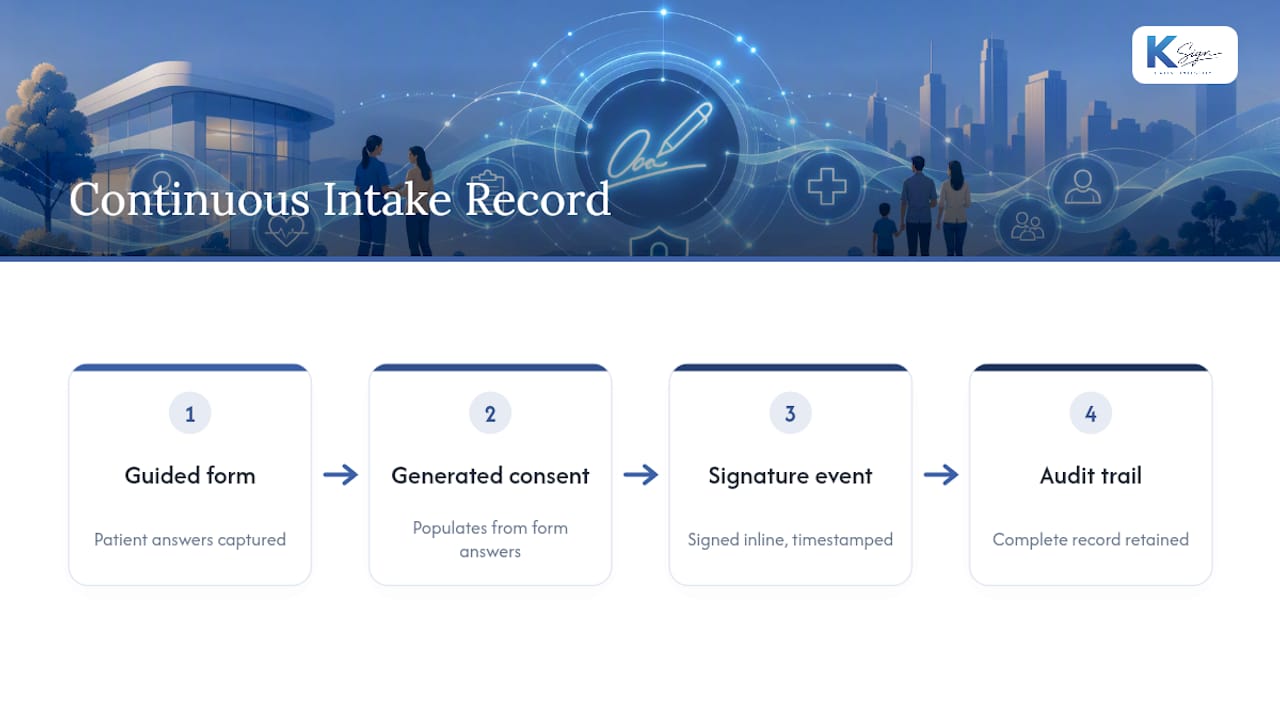
Ksign’s patient intake workflow demonstrates this directly: form answers, the generated document, the signature event, and the audit trail all sit in one continuous record rather than three disconnected files.
Priority actions and pitfalls from the field
If you’re implementing this for the first time, sequence matters more than perfection. Get the BAA signed and MFA turned on before you worry about anything else. Audit logging and staff training come next; a system with perfect encryption but untrained staff clicking through consent screens without reading them isn’t actually compliant, it just looks compliant on paper.
The pitfall I see most often is organisations trusting a vendor’s marketing language instead of demanding evidence. “HIPAA compliant” printed on a landing page means nothing without a signed BAA and a SOC 2 report behind it. The second common mistake is treating every e-signature the same, applying heavyweight identity verification to a low-risk internal form while skimping on verification for a genuine treatment consent.
Governance shouldn’t sit with one department. Compliance, IT, and clinical operations all have a stake, and a workflow that looks fine to IT can still fail a compliance review if clinical staff weren’t consulted on identity verification steps. Review the whole setup at least annually, and sooner if you change vendors or add a new document type.
— Josh
Where Ksign fits into your e-signature workflow
The compliance checklist above only works if the underlying workflow keeps form data, generated documents, and signatures connected instead of scattered across separate tools. Ksign was built around that exact problem: a guided form collects patient or client information, that data auto-generates the consent or service document, the signature gets captured with a full audit trail, and payment collection can happen in the same step if a deposit or fee applies.
For small clinics and allied health practices juggling intake forms, consent documents, and payment collection across three or four disconnected tools, that consolidation directly reduces the transcription risk discussed earlier. It also means your audit trail export includes the original form responses, not just a signature timestamp floating on its own.
If you’re evaluating e-signature options as part of a compliance rollout, take a look at Ksign’s e-signature capabilities and how document generation from forms works in practice. Current pricing includes a discount on e-signature plans worth checking before you commit to a longer-term vendor.
Sources
- How do HIPAA authorizations apply to electronic health information? (HHS FAQ)
- Digital Signature Standard (DSS) FIPS 186-5
- Can E-Signatures Be Used Under HIPAA Rules? (HIPAA Journal, Jan 15, 2026)
- TS 101 733 - Electronic signatures and infrastructures (ETSI)
This article is general information, not a substitute for advice from a qualified lawyer. Consult a qualified legal professional about your own circumstances before acting on anything here.