
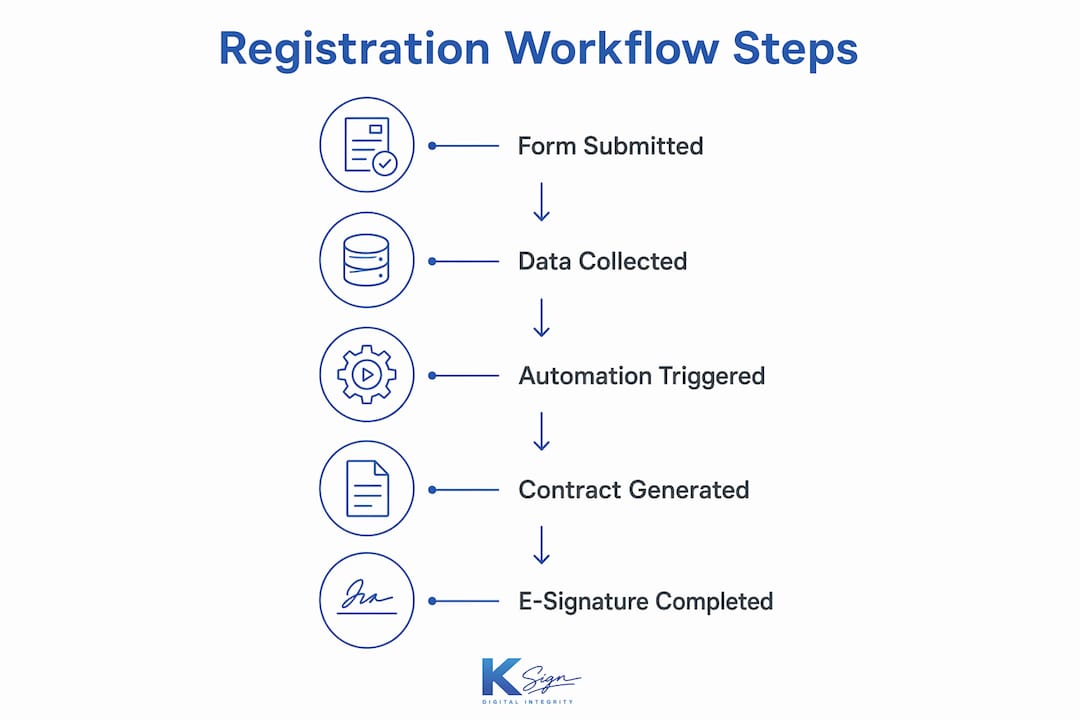
A digital candidate registration form is the front door to your entire client or candidate workflow. Submit the form, and the system automatically generates a contract, routes it for e-signature, and triggers payment collection — all without manual rekeying. That single submission replaces what used to be four or five disconnected steps: a phone call, a Word document, an email chain, a separate invoice, and a chase-up.
The core components of a complete digital registration workflow are:
- Form capture: structured fields, conditional logic, file uploads, identity verification
- Validation: real-time error checking and duplicate detection before data enters your system
- Contract generation: form answers populate a template to produce a ready-to-sign agreement
- E-signature: legally binding electronic signature collected on any device
- Payment: deposit or invoice collected at the point of signing
- Storage and audit trail: signed document, timestamps, IP address, and device data stored securely
Digital registration shifts work from data collection to workflow automation, using each submission to trigger contract generation, payment requests, and notifications automatically. For Australian service businesses, that means fewer errors, faster approvals, and a professional experience for every new client or candidate.
Table of Contents
- What is a digital candidate registration form, exactly?
- How the end-to-end workflow operates, step by step
- How integrations connect your form to the rest of your business
- Australian legal and compliance checklist
- Design and conversion best practices
- Typical setup steps, timeline, and costs
- Practical examples for Australian service businesses
- How to choose a platform and your next steps
- Key takeaways
- What working with Australian small businesses actually teaches you
- Ksign puts the form-to-contract workflow within reach
- Useful sources and further reading
What is a digital candidate registration form, exactly?
A digital candidate registration form is an online, mobile-first form that collects structured data from a person entering your workflow — a job applicant, a new client, a site inductee, or a contractor — and feeds that data directly into downstream business processes. It is the workflow front end, not a full applicant tracking system or business management platform.
The form handles:
- Field types: text, dropdowns, date pickers, file uploads, signature capture, photo attachments
- Conditional logic: questions that appear or hide based on previous answers, keeping the form short and relevant
- Identity proofing: email verification, checkbox consents, and declaration fields
- Integration hooks: webhooks or API calls that push structured data into your CRM, contract engine, or accounting system the moment the form is submitted
Common use cases across Australian service industries include recruitment candidate registration, site safety inductions, new patient intake at allied health clinics, contractor onboarding for builders, and client intake for accountants or consultants.
Pro Tip: A form is the top of your funnel. It needs integrations to do the heavy lifting downstream — form builders require connections into contract systems, scheduling tools, and accounting software to create a complete workflow.
How the end-to-end workflow operates, step by step
Understanding the digital registration process means tracing exactly what happens after a candidate or client hits “Submit.”
- Public form submission: the candidate completes the form on any device, including mobile
- Real-time validation: the system checks required fields, format rules, and flags errors before submission is accepted
- Duplicate detection: the platform checks for existing records with matching email or phone to prevent double entries
- Conditional branching: form logic routes the submission to the correct contract template based on the answers given
- Contract generation: field values populate the template automatically, producing a personalised, ready-to-sign agreement
- E-signature request: the signed document is sent to the candidate or client via email or SMS link
- Payment capture: a deposit or invoice is collected at the point of signing, before work begins
- Storage and notifications: the signed document, audit trail, and payment confirmation are stored; both parties receive confirmation
| Step | System holding the data | What replaces manual work |
|---|---|---|
| Form submission | Form platform | Paper form or email intake |
| Validation | Form platform | Manual checking by staff |
| Contract generation | Contract engine | Copy-paste into Word template |
| E-signature | Signature platform | Print, sign, scan, return |
| Payment | Payment gateway | Separate invoice and follow-up |
| Storage | Document store | Filing cabinet or email folder |
NHS England Digital’s GP registration service found that removing scanning and rekeying saved significant time per registration — a benefit that compounds quickly across dozens of weekly submissions.
Pro Tip: Test the entire flow on a real smartphone before going live. Use a QR code at your front desk or job site so candidates can start the form on the spot — mobile optimisation is the primary QA step, not an afterthought.
How integrations connect your form to the rest of your business
The form captures data; integrations put it to work. The three common connection methods are native connectors (built-in links between platforms), webhooks (real-time HTTP pushes triggered on submission), and API calls (programmatic data exchange for custom workflows). Middleware tools sit between platforms when a direct connection does not exist.
- Native connectors: fastest to configure; cover common pairings like form-to-CRM or form-to-Xero
- Webhooks: fire immediately on submission; ideal for triggering contract generation or job creation in scheduling software
- API pushes: most flexible; used when you need to transform data or route it to multiple systems simultaneously
- Middleware: platforms like Zapier or Make connect tools that lack direct integrations
| Integration target | Automation triggered | Business outcome |
|---|---|---|
| CRM | Auto-create contact record | No manual data entry |
| Contract engine | Generate personalised agreement | Contract ready in seconds |
| Xero | Create draft invoice or bill | Accounting stays current |
| Scheduling software | Create job or appointment | Booking confirmed automatically |
| Payment gateway | Request deposit at signing | Cash flow secured upfront |
The critical discipline is field mapping: every form field must be named consistently so the receiving system knows exactly where to put the data. Poor mapping is the most common cause of broken automations. Build in idempotency checks — if a webhook fires twice, the system should not create two contracts or two contacts.

Pro Tip: Treat your form fields as a data schema from day one. Name them with the receiving system’s field names in mind, and your workflow automation will be far easier to maintain.
Australian legal and compliance checklist
Electronic signatures are legally binding in Australia under the Electronic Transactions Act 1999 (Cth) and its state equivalents, provided the signature method reliably identifies the signatory and indicates their intention to be bound. An audit trail — capturing timestamps, IP address, device fingerprint, and the signed document hash — satisfies the evidentiary requirements for most commercial agreements.
Key compliance obligations for Australian service businesses:
- Privacy Act 1988 (Cth): collect only the personal information you need, provide a collection notice, state the purpose, and allow access requests; businesses with turnover above $3 million are covered by the Australian Privacy Principles, though many smaller businesses voluntarily comply
- PCI DSS: never store raw card data; use a certified payment gateway (Stripe, Square, or similar) that handles card data within its own PCI-compliant environment
- Record-keeping: retain signed agreements and their audit trails for the period required by your industry — typically five to seven years for commercial contracts
- Data residency: confirm your platform stores data in Australia or in a jurisdiction with equivalent protections if your clients are Australian residents
Note: This article provides general information only. For high-value or high-risk contracts, obtain formal legal advice from a qualified Australian solicitor.
Design and conversion best practices
Many applicants abandon forms that are too long or complex. The design decisions you make directly determine how many complete registrations you actually receive.
Mobile-first principles:
- Single-column layout with large tap targets (minimum 44px)
- No pinch-to-zoom; text readable at default size
- File uploads that open the device camera directly
- Progress indicator showing steps remaining
Field-level guidance:
- Mark required fields clearly; keep optional fields to a minimum
- Use input masks for phone numbers and ABNs to prevent format errors
- Set smart defaults where possible (e.g., state pre-filled from postcode)
- Validate inline, not only on submission
Pro Tip: Multi-step forms with progress indicators increase completion rates and keep perceived completion time under five minutes. Break a ten-field form into three steps of three or four fields each.
Common UX mistakes to avoid:
- Asking for information you do not actually need at registration stage
- Requiring account creation before the form can be started
- Using open-ended text fields where a dropdown or date picker would do
- Sending candidates to a generic “thank you” page with no next step
Typical setup steps, timeline, and costs
Implementation for an Australian small business typically follows six phases:
- Discovery (1–3 days): map your current process, identify the contract template, list required fields, and confirm integration targets
- Template build (2–5 days): create the form and the contract template with field mapping defined
- Integration setup (1–3 days): connect to CRM, accounting, and payment gateway; configure webhooks
- Testing (2–4 days): end-to-end testing on desktop and mobile, including edge cases and duplicate submissions
- Staff training (half a day): walk through the admin dashboard, document storage, and how to handle exceptions
- Go-live (1 day): publish the form, activate QR codes or website embed, monitor first submissions
Cost factors that influence the total:
- Number of contract templates and conditional branching rules
- Number of integrations and whether middleware is required
- Custom branding and white-labelling requirements
- Whether you use a platform with built-in contract generation or need to connect separate tools
- Ongoing subscription tier based on monthly submission volume
The most common cause of blown timelines is incomplete field mapping discovered during testing. Define your data schema in discovery, not during integration setup.
Practical examples for Australian service businesses
Tradies and builders: a plumber sends a QR code link on-site. The customer completes a job authorisation form, which generates a service agreement pre-filled with the scope and price. The customer signs on their phone and pays a deposit via the embedded payment link. The signed agreement and payment confirmation land in the plumber’s dashboard instantly. For builders managing subcontractors, compliance document submission can follow the same pattern, reducing back-and-forth with head contractors.
Allied health clinics: a new patient completes an intake form before their appointment. The form maps directly into the practice management system, eliminating transcription errors and freeing reception staff for patient-facing tasks. Consent and payment agreement are collected in the same flow.
Recruitment agencies: a candidate completes a registration form capturing work rights, availability, and consent to representation. The platform generates a candidate agreement, collects the e-signature, and pushes the record to the CRM. Offer letters follow the same template-based flow.
Photographers and creatives: a booking enquiry form captures event details and generates a client contract with usage rights and cancellation terms. The deposit is collected at signing, removing the need for a separate invoice follow-up.
How to choose a platform and your next steps
Before committing to any platform, ask these questions:
- Does the platform start with the form, or does it require a finished PDF to upload?
- Can form fields map directly into contract templates without manual copying?
- Does it support legally binding e-signatures with a full audit trail?
- Is payment collection embedded in the signing flow, or is it a separate step?
- Does it offer native integrations with Xero, your CRM, or your scheduling tool?
- Is data stored in Australia or in a jurisdiction with equivalent privacy protections?
- Is pricing transparent — flat subscription rather than per-envelope or per-user fees?
Evaluation checklist:
- Mobile signing tested on iOS and Android
- Industry-specific templates available or easy to build
- API or webhook documentation accessible without a sales call
- Support available during Australian business hours
- Trial or free tier available to test the full workflow before committing
Three actions to take this week:
- Map your current registration-to-contract process on paper and identify every manual step
- List the three fields your contract always needs from the candidate or client
- Start a free trial on a form-native platform and build one template end-to-end before evaluating anything else
Key takeaways
Digital candidate registration forms work best when the form submission is the trigger for an automated contract, e-signature, and payment workflow — not just a data collection exercise.
| Point | Details |
|---|---|
| Form is the workflow trigger | A submitted form should automatically generate a contract, request a signature, and collect payment. |
| Mobile-first is non-negotiable | Applicants often abandon overly complex forms; single-column, multi-step design keeps completion rates high. |
| Removing manual rekeying and scanning saves roughly ten minutes per registration, as reported in NHS digital registration case studies, compounding across high-volume businesses. | |
| Audit trail is your legal protection | Timestamps, IP address, device data, and the signed document hash together satisfy Australian e-signature evidentiary requirements. |
| Ksign recommended starting point | Ksign’s form-native workflow covers form capture, contract generation, e-signature, and embedded payments in one platform built for Australian SMBs. |
What working with Australian small businesses actually teaches you
The gap between understanding a workflow and trusting it is wider than most implementation guides admit. The businesses that get the most from digital registration are rarely the ones with the most complex setups. They are the ones that started with a single, high-frequency process — a quote approval, a new client intake, a site induction — and automated it completely before touching anything else.
Staff resistance is real, and it almost always comes from uncertainty rather than stubbornness. A tradie who has used a paper docket for fifteen years is not opposed to technology; they are opposed to looking unprofessional in front of a customer while fumbling with an unfamiliar screen. The fix is a QR code at the point of service and a form that takes under three minutes on a phone. When the first signed agreement arrives in their inbox without them doing anything, the resistance dissolves.
The highest-impact automation is almost always the one that eliminates the gap between “customer said yes” and “deposit received.” Every day that gap exists, you carry risk. A form-to-contract-to-payment flow closes it in minutes. That is where the measurable return on investment sits — not in the technology itself, but in the cash flow and the time recovered from chasing approvals.
Ksign puts the form-to-contract workflow within reach
If you have mapped your process and you know which manual steps are costing you time, Ksign is built to replace them. The platform starts with the form — not a PDF upload — which means your contract is generated from the candidate’s or client’s own answers, not copied manually from an email.

Ksign’s contract automation handles field mapping from form to agreement, sends the document for a legally binding e-signature, and collects the deposit via embedded payments — all in one flow, on any device. Industry-specific templates, Xero integration, and transparent SMB pricing mean you are not paying for enterprise features you will never use. Start a trial at ksign.co and build your first form-to-contract workflow today.
Useful sources and further reading
The following authoritative resources support the legal, technical, and practical points covered in this guide:
- Electronic Transactions Act 1999 (Cth) — the primary Australian legislation governing e-signature validity
- Office of the Australian Information Commissioner — Privacy Act guidance — collection notices, Australian Privacy Principles, and data handling obligations
- NHS England Digital: from paper forms to quick clicks — real-world data on time saved by digital registration workflows
- Antforms: job application form builder guide — form design best practices, abandonment rates, and mobile optimisation
- Tradie Pass: subcontractor compliance document submission — practical guidance for construction and trade compliance workflows
- PCI Security Standards Council — PCI DSS requirements for businesses collecting card payments
| Resource | Best used for |
|---|---|
| OAIC Privacy Act guidance | Drafting your collection notice and data retention policy |
| Electronic Transactions Act 1999 | Confirming e-signature validity for your contract type |
| PCI Security Standards Council | Understanding payment gateway compliance obligations |
| NHS Digital registration case study | Benchmarking time savings from digital registration |
| Ksign blog | Practical workflow guides for Australian service industries |