
A conditional logic form is a web form that changes in real time based on if/then rules: show a field, hide a page, skip a section, redirect on submit, or calculate a value, all depending on what a respondent answers. The fastest way to understand this is to add a single show/hide rule to a test form right now and preview it. That one action makes the concept concrete in under two minutes.
Before you build anything complex, get clear on the six actions conditional rules can trigger:
- Show or hide a field or block based on a previous answer
- Show or hide a step in a multi-step form
- Jump to or skip a page entirely
- Make a field required or optional depending on context
- Calculate a value from numeric inputs
- Redirect on submit or trigger a conditional notification or integration feed
Pro Tip: Name your first rule in plain language before you build it: “IF service type = Commercial, THEN show ABN field.” Writing the rule as a sentence first prevents the most common mistake, which is building the trigger on the wrong field.
Key takeaways
Conditional logic forms are the most practical tool for collecting accurate, relevant data without overwhelming respondents. Build the rule structure before you open the builder, and the rest follows.
| Point | Details |
|---|---|
| Plan decisions before building | Map every branch field in plain language before adding a single rule to your builder. |
| Centralise your rules | Store field definitions and conditions in one place so a single edit propagates everywhere the form is used. |
| Test every path, including edge cases | Preview each conditional branch with real sample data, including empty fields and boundary values, before publishing. |
| Set a hidden-field data policy | Decide explicitly whether hidden fields clear or retain their values; the wrong default silently corrupts calculations. |
| Tie forms into workflows when stakes are high | When a form needs to produce a contract, collect a signature, and take a payment, use a platform like Ksign that handles the full flow. |
Table of Contents
- What do conditional logic forms actually do for your business?
- How do conditional rules, operators and logic groups work?
- How to set up conditional logic in a no-code form builder
- What goes wrong with conditional logic, and how do you debug it?
- How do you scale conditional logic without creating a maintenance problem?
- When your form needs to produce a contract, signature and payment
- Security and privacy when you use conditional logic in forms
- The part most guides get wrong about conditional logic
- Ksign handles the full workflow, from form to signed agreement
- Sources
What do conditional logic forms actually do for your business?
The technical definition is straightforward. The business case is where it gets interesting.
A standard form asks every respondent every question. A form with dynamic form fields asks only the questions that matter for that person’s path. The result is a shorter, more relevant experience that reduces drop-off and produces cleaner data.
Platforms that support conditional logic typically offer these on-form actions:
- Show or hide individual fields or entire content blocks
- Show or hide steps in a multi-step sequence
- Jump to a specific page, skipping irrelevant sections
- Make a field required or optional based on a prior answer
- Calculate a value from numeric inputs (pricing, totals, scores)
- Redirect the respondent to a different URL on submission
- Trigger conditional notifications, confirmations, or integration feeds
The use cases that benefit most from this approach span almost every service business:
- Progressive disclosure: A booking form that only shows the “number of guests” field when the respondent selects “event” as the service type.
- Lead qualification: A contact form that routes high-value enquiries to a sales inbox and low-value ones to a self-serve FAQ page.
- Pricing calculators: A quote form that multiplies area by rate and displays a live estimate before submission.
- Event registration paths: A conference form that shows dietary preference fields only when “in-person attendance” is selected.
- Job applications: A form that reveals a portfolio upload field only for creative roles.
- Customer support triage: A help form that branches into billing, technical, or general paths based on the issue category.
The before/after UX shift is stark. A generic intake form with 20 fields feels like a tax return. The same form with conditional rules shows 6 to 8 fields at a time, matched to the respondent’s actual situation. Completion rates improve, and the data you collect is more accurate because respondents are not guessing at fields that do not apply to them.
How do conditional rules, operators and logic groups work?
Every conditional rule follows the same structure: IF (field) (operator) (value) THEN (action). Understanding the operators and how groups combine is what separates a form that works from one that misfires.
Common operators and the field types they suit
The @yashjunagade/react-dynamic-forms library documents a representative set of operators used across most platforms:
| Operator | Typical field types | Behaviour |
|---|---|---|
| equals | Dropdown, radio, text | Exact match triggers the rule |
| not equals | Dropdown, radio, text | Any value except the specified one |
| contains | Text, multi-select | Partial match within the field value |
| greater than / less than | Number, date | Numeric or date comparison |
| is empty | Any | Field has no value yet |
| includes | Checkbox, multi-select | At least one selected value matches |
AND vs OR: condition groups and nesting
Most builders let you group conditions using ALL (AND) or ANY (OR) logic. A rule with ALL conditions requires every condition to be true before the action fires. ANY requires at least one.
Nested groups let you combine both: an outer ANY group containing two inner ALL groups, for example. A simplified representation of that structure looks like this:
OR [
  AND [ service_type = "Commercial", region = "Metro" ],
  AND [ service_type = "Government" ]
]
The action fires if the respondent selects Commercial + Metro, or if they select Government regardless of region. Getting this wrong is the most common source of logic failures in complex forms.
Pro Tip: Document each condition group in a comment or a shared spreadsheet before you build it. A rule that reads clearly in plain English is far easier to audit six months later than one you reverse-engineer from a visual builder.
How to set up conditional logic in a no-code form builder
This workflow applies to any modern no-code builder. The steps are vendor-neutral.
- Plan your decision points first. List every question where the answer should change what comes next. Mark these as “branch fields” in a simple diagram or table before opening the builder.
- Name every field clearly. Use descriptive labels (“Service Type” not “Q3”) so rules are readable when you return to edit them later.
- Group related fields. Place fields that belong to the same conditional path in the same section or page. This makes page-level rules easier to manage.
- Add the rule. Select the trigger field, choose the operator, enter the value, and select the action (show field, hide step, jump to page, and so on).
- Set the hidden-field data policy. Decide whether hidden fields clear their stored values when they disappear or retain them. This matters for calculations and for long forms where a respondent might toggle back and forth. The rhf-dynamic-form library documents this as a
resetOnParentChangeflag: set it to true to clear values when a parent field changes, or false to preserve them. - Save and preview. Use the builder’s preview mode to walk through every path manually.
- Test with sample data. Enter values that trigger each branch, including edge cases (empty fields, boundary numbers, unexpected text).
- Test on mobile. Conditional behaviour can render differently on small screens, particularly for multi-step forms with page-jump rules.
- Publish only after all paths pass. A form with a broken conditional path is worse than a static form because the failure is invisible to the respondent.
Deciding how to handle hidden-field data is the step most builders skip. If a pricing calculator stores an intermediate value in a hidden field and the respondent changes an earlier answer, that stored value may become stale. Clearing it keeps calculations accurate. Keeping it preserves work the respondent has already done. Neither choice is universally correct; the right answer depends on your form’s purpose.
What goes wrong with conditional logic, and how do you debug it?
Most conditional logic failures fall into a small number of categories. Knowing them in advance cuts debugging time significantly.
Common problems:
- Wrong trigger field: the rule references a field label that has since been renamed or duplicated
- Invisible required fields: a field is hidden by a rule but still marked required, blocking submission
- Circular rules: Field A shows Field B, and Field B hides Field A, creating an infinite loop
- Incorrect operator type: using “equals” on a multi-select field instead of “includes”
- Page-level placement errors: a rule placed on the wrong page fires too early or not at all
- Evaluation order surprises: rules fire in the order they were created, not the order fields appear
Debugging checklist:
- Reproduce the exact path that fails: enter the same values in the same sequence.
- Isolate the failing rule: disable all other rules and test the suspect rule alone.
- Check grouped logic: confirm AND/OR grouping matches your intent.
- Examine hidden-field values: use browser developer tools or the builder’s data log to check what value a hidden field is holding.
- Test the integration trigger: if a CRM, email, or payment integration is not firing, check whether the conditional feed is set to trigger on the correct path.
- Test on mobile: replicate the failure on a phone-sized viewport.
- Check for invisible required fields: scan every hidden field for a “required” flag.
Integrations deserve special attention. A conditional notification that routes to a CRM will not fire if the condition evaluates to false at the point the form submits. Payment integrations tied to conditional paths need to be tested with both the triggered and untriggered paths to confirm the payment step appears and disappears correctly.
Pro Tip: Before making significant changes to a live form’s logic, export a snapshot of the current rules or duplicate the form. Many builders do not version-control logic changes, so a snapshot is your only rollback option.
How do you scale conditional logic without creating a maintenance problem?
Simple forms with two or three rules are easy to manage. Forms with thirty rules across eight pages become brittle fast. The architecture decisions you make early determine whether your form logic stays maintainable as it grows.
The most reliable approach is a single source of truth for rules: store field definitions and conditions in a centralised metadata object rather than scattering logic across individual templates or components. Angular’s dynamic forms guide demonstrates this with a metadata-driven model where question objects define the form structure and a service builds the form groups from that model. The benefit is that changing a rule in one place propagates everywhere the form is rendered.
For teams building across web and mobile, a server-driven JSON schema takes this further. The dynamic_field_builder package shows how a visibleIf property on each field definition lets the backend publish both field structure and visibility rules as a single JSON payload, which any client (web, mobile, embedded) evaluates consistently. The same logic drives every surface without duplication.
Cascading resets are the most underestimated maintenance problem in conditional forms. When a respondent changes an early field, later fields may be hidden, and hiding them can clear their stored values. The rhf-dynamic-form library exposes per-field resetOnParentChange settings to control this behaviour explicitly. Without a deliberate policy, a form that looks correct in testing can silently discard data in production.
Governance checklist for growing forms:
- Adopt a naming convention for fields and rules before the form reaches ten fields
- Maintain a centralised rule dashboard or documentation file that lists every rule, its trigger, and its action
- Write a brief comment or note for any rule that is non-obvious
- Build a test harness: a set of saved input sequences that cover every conditional path
- Log changes: record what was changed, why, and when, especially for forms tied to contracts or payments
Pro Tip: When a form’s logic grows beyond what you can hold in your head, treat it like code: put it under version control or at minimum keep a dated changelog. A rule that made sense when a colleague built it six months ago will be opaque without documentation.
| Architecture approach | Best for | Key benefit |
|---|---|---|
| Centralised metadata object | Single-platform forms | One edit propagates everywhere |
| Server-driven JSON schema | Multi-platform (web + mobile) | Consistent logic across all clients |
| Per-field reset policy | Long forms with calculations | Prevents silent data loss |
| Unified rule dashboard | Teams managing many forms | Visibility and auditability |
When your form needs to produce a contract, signature and payment
Conditional logic handles the collection side of a workflow. For many small businesses, the form is only the first step: the answers need to produce a tailored document, get signed, and collect a deposit, all without the respondent leaving the flow.
This is where a standard form builder reaches its limit. A builder that shows and hides fields well does not automatically generate a contract from those answers, route it for legally binding e-signature, or collect a payment on the same screen.
Ksign is built around exactly this gap. The workflow it supports is: guided form with conditional fields, auto-generated contract or agreement from the form responses, legally binding e-signature, and integrated payment collection, all in one mobile-friendly flow. The signed document and audit trail are stored automatically.
Practical use cases where this matters:
- Trades quoting and deposits: A plumber’s quote form asks job type, location, and scope. The answers generate a scoped quote document, the customer signs it, and pays a deposit before work begins.
- Cleaning services: A site inspection form captures property details and service frequency. The completed form produces a service agreement, which the client signs and pays for on the spot.
- Consultants: An onboarding form collects project scope and billing preferences. The responses generate an engagement letter, which the client signs electronically before the first session.
For businesses that need contract automation tied to their intake forms, Ksign removes the manual step of copying form answers into a Word template and emailing a PDF. The form-to-contract path is built in.
Ksign also supports AI-generated custom forms, which can accelerate setup for businesses that need tailored intake forms without starting from a blank canvas.
Pro Tip: When conditional logic in your form determines which contract type a respondent receives, treat that branch as a conditional contract in the legal sense: the obligation activates only when the condition is met. The UNIDROIT Principles distinguish between suspensive conditions (which must be fulfilled before an obligation arises) and resolutive conditions (which terminate an obligation on fulfilment), a distinction worth understanding if your form routes respondents into different agreement types.
Security and privacy when you use conditional logic in forms
Conditional logic introduces a specific privacy risk that static forms do not: fields that are hidden from the respondent may still be submitted with the form payload. A field hidden by a rule is not necessarily absent from the data sent to your server. Depending on how the builder handles hidden fields, a respondent’s browser may transmit values they never saw or intentionally filled in.
The practical controls to put in place:
- Clear hidden-field values on hide. If a field is not shown to the respondent, its value should not be submitted. Configure your builder’s hidden-field policy to clear values when a field is hidden, unless you have a deliberate reason to retain them.
- Validate server-side, not just client-side. Conditional rules that enforce required fields or restrict options are enforced in the browser. A malicious actor can bypass them by submitting a crafted payload. Server-side validation must independently verify that submitted data is valid and expected.
- Limit data collection to what you need. Conditional logic makes it easy to collect a large number of fields across many paths. Audit your form periodically: if a field is rarely filled in because it is hidden for most respondents, consider whether you need it at all.
- Encrypt data in transit and at rest. This applies to all forms, but conditional forms that branch into sensitive paths (health information, financial details, legal agreements) carry higher risk if transmission is not secured.
- Audit trail for signed documents. When a conditional form feeds into a contract or agreement, the audit trail should record which path the respondent took, not just the final submitted values. This matters for disputes about what a signatory agreed to.
- Access controls on rule configuration. The ability to edit conditional rules is effectively the ability to change what data is collected and how it is routed. Restrict rule editing to authorised users and log changes.
For small businesses embedding forms on their websites, working with a web partner who understands form security and data handling is worth considering. Agencies that specialise in small business web services can help with both the technical embedding and the privacy configuration that many form builders leave to the user.
The part most guides get wrong about conditional logic
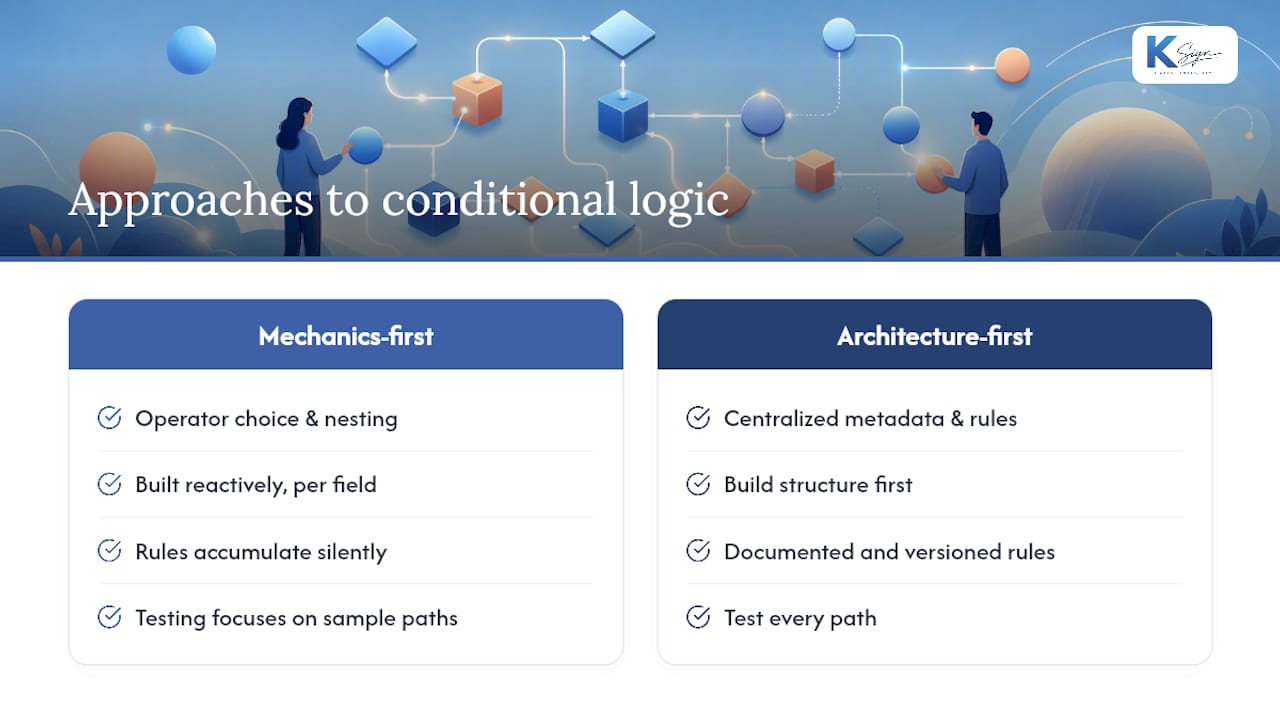
Most advice on conditional logic forms focuses on the mechanics: which operator to choose, how to nest AND/OR groups, how to test paths. That guidance is useful, but it misses the more consequential decision, which is architectural.
The real failure mode for conditional forms is not a broken rule. It is a form that works perfectly on launch and becomes unmaintainable six months later because the logic was built reactively, field by field, without a governing structure. Rules accumulate. Fields get renamed. A condition that referenced “Service Type” now references “service_type_v2” because someone updated the field without checking what depended on it. The form still appears to work, but one path silently misfires.
The conventional advice is to “keep your forms simple.” That is not wrong, but it is not enough. The better principle is to treat your form’s logic the same way a developer treats code: give it a structure, document it, and version it. A centralised metadata approach, as Angular’s dynamic forms guide demonstrates, is not just for developers. The underlying idea, that rules live in one place and render everywhere, applies equally to a no-code builder if you maintain a parallel documentation file that maps every rule to its intent.
The second thing most guides underweight is the downstream consequence of a conditional form. A form that qualifies a lead is low-stakes if a rule misfires. A form that determines which contract a customer receives, and then generates and sends that contract for signature, is a different matter entirely. The conditional logic in that form is not a UX convenience; it is a business-critical decision point. Treating it with the same rigour you would apply to a contract clause is not overcautious. It is the correct level of care.
Build the structure first. Document the rules. Test every path. And when the form feeds into a contract, use a platform that was designed for that workflow from the start.
Ksign handles the full workflow, from form to signed agreement
Most form builders stop at data collection. Ksign starts there and goes further: the answers your respondents provide automatically generate the right contract or agreement, route it for legally binding e-signature, and collect a deposit or payment, all in one flow.

For small businesses that currently copy form answers into Word templates, email PDFs back and forth, and chase signatures separately, Ksign removes every manual step in that chain. A tradie’s quote form becomes a signed job authorisation with a deposit collected before the van leaves. A consultant’s intake form becomes a signed engagement letter before the first meeting. A cleaning company’s site inspection becomes a service agreement the client signs on their phone.
Ksign’s web forms platform supports conditional fields, guided multi-step flows, auto-generated documents, e-signatures, and embedded payments, with a full audit trail stored automatically. It is built for service businesses that need repeatable, professional workflows without enterprise pricing or complexity.
Start a trial at Ksign to see the form-to-contract workflow in action.
Sources
The sources below cover rule syntax, schema-driven form architecture, and the legal principles behind conditional obligations.
- Chapter 5, Section 3 — UNIDROIT Principles (2010) — Conditional obligations and conditions
- Dynamic forms — Angular
- olegkrachun/rhf-dynamic-form
- dynamic_field_builder package
- @yashjunagade/react-dynamic-forms