
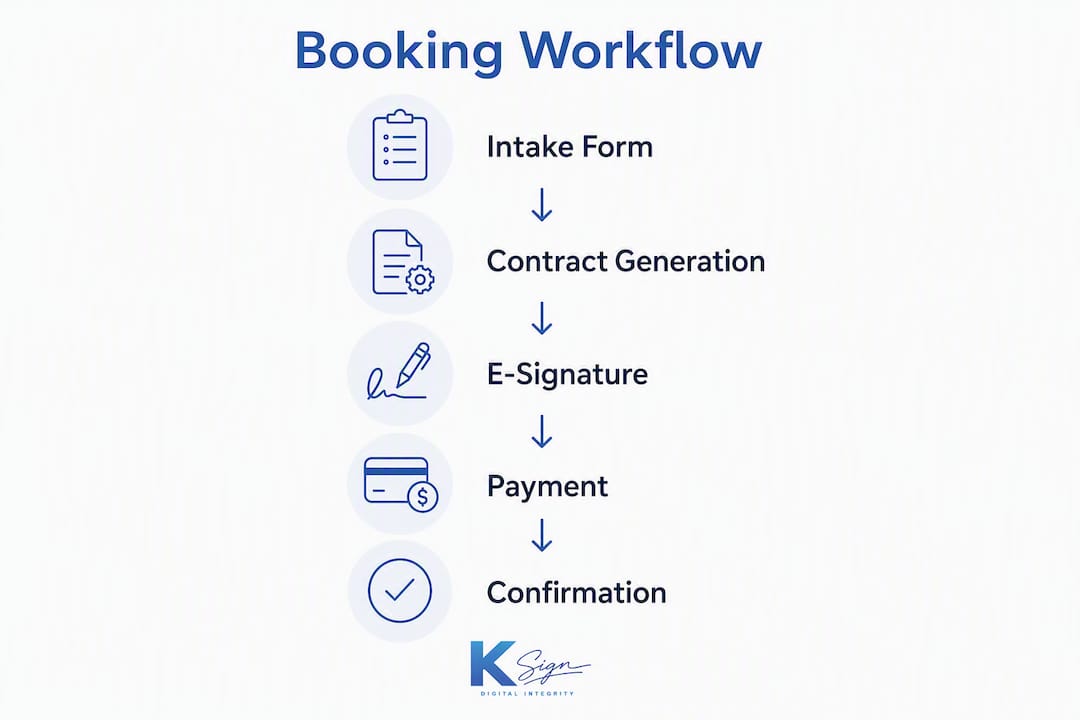
Ksign is the recommended booking agreement software for small Australian event planners. It delivers a single form → contract → signature → payment workflow that locks in bookings, captures a tamper-proof audit trail, and collects deposits in the same session — no chasing clients, no disconnected tools.
- Form-native automation: client answers auto-populate the contract, eliminating re-keying errors
- Payment-gated signing: the booking is only confirmed once the deposit clears
- Legally defensible records: IP address, timestamp, device info, and identity verification logged for every signing event
The form-to-contract workflow is the gold standard for event booking software because it automates client data capture, auto-populates contract templates, enables mobile signing, and collects deposits in one session.
Table of Contents
- Why a single-session booking flow matters for event planners
- What features must your booking agreement software have?
- How to build your form → contract → signature → payment workflow
- Templates and key contract clauses for event planners
- What makes an e-signature legally binding in Australia?
- How do integrated payments reduce cancellations at signing?
- What does booking agreement software actually cost?
- Red flags to watch for when evaluating booking software
- Key takeaways
- Why Ksign stands apart for small event businesses
- Try Ksign for your next event booking
- Further reading and documentation
Why a single-session booking flow matters for event planners
Every extra step between “I’m interested” and “I’m booked” is a drop-off point. A single-session flow — where the client completes a form, receives a pre-populated contract, signs it, and pays a deposit without leaving the browser — removes that friction entirely. Integrating signature capture with payment collection reduces last-minute cancellations and improves cashflow for small event businesses.
The immediate benefits for solo operators and small planning firms are concrete:
- Higher conversion: clients commit while intent is high, not after a two-day email thread
- Better cashflow: deposits land the moment the contract is signed
- Mobile booking: clients sign from any device, anywhere
- Fewer follow-ups: automated reminders handle unsigned contracts without manual chasing
Pro Tip: Set your booking form to expire after 48 hours. Scarcity is real for event dates, and a time-limited link nudges clients to complete the full flow in one sitting rather than saving it for later.
What features must your booking agreement software have?
The best software for event contracts does more than collect a signature on a PDF. Here is the capability checklist that separates genuinely useful platforms from expensive overbuilds.
- Form builder with smart variables: client answers map directly to contract fields; smart variables prevent mismatched terms between the intake form and the final agreement
- Contract templating and auto-fill: reusable templates for weddings, corporate events, and venue hires that populate automatically from form data
- Legally binding e-signature with tamper-proof audit trail: IP address, timestamp, device details, and identity verification (OTP or equivalent) logged for every creation, viewing, and signing event
- Integrated payment collection: deposit and instalment support within the signing flow, not as a separate link sent afterwards
- Mobile-first client experience: clients sign on a phone without downloading an app
- PCI-compliant gateway support: Stripe, PayPal, or equivalent gateways with tokenised card storage
- Event-specific template library: clauses for cancellation, force majeure, and supplier access pre-built and editable
- Transparent pricing: no per-envelope fees, no per-signer charges, no hidden gateway markup
- CRM and API integrations: connect to event management tools already in use
| Feature | Solo planner priority | Small firm priority |
|---|---|---|
| Smart variable auto-fill | High | High |
| Integrated deposit collection | High | High |
| Tamper-proof audit trail | High | High |
| Multi-signer workflows | Low | High |
| API / CRM integration | Low | Medium |
| Advanced clause library | Medium | High |
| Team permissions | Low | High |
How to build your form → contract → signature → payment workflow
A working booking workflow takes most small businesses under a day to configure. The steps below use Ksign’s features as the practical example.
- Create the client intake form. Collect event date, venue name, guest numbers, package selection, special requirements, and preferred payment terms. Every field you add here becomes available as a smart variable in the contract.
- Map smart variables to the contract template. Link each form field to the corresponding contract placeholder. The event date in the form becomes the event date in the agreement — automatically, every time.
- Build or import your contract template. Start from an event-specific template or upload your existing terms. Add clauses for deposit amount, cancellation policy, and force majeure.
- Enable identity verification. Configure OTP verification so the signer’s identity is confirmed and logged before the signature is captured.
- Connect your payment gateway and set deposit rules. Link Stripe or PayPal via Ksign’s embedded payments feature. Set the deposit as a fixed amount or percentage of the total, triggered at signing.
- Brand the client experience. Add your logo, brand colours, and a personalised message to the signing screen.
- Run an end-to-end test. Complete the form yourself, verify the contract auto-populates correctly, sign with a test account, and confirm the deposit processes.
Fields to collect in your intake form: client full name, contact email, phone number, event date and time, venue name and address, estimated guest count, package or service tier, special requests, deposit amount agreed, and payment schedule milestones.
Timeline for a small business: form and template setup takes 2–4 hours; end-to-end testing takes 1 hour; first live booking is typically achievable within one business day of starting.

Pro Tip: Roll out to one event type first — say, weddings only — before enabling the workflow for corporate bookings. This lets you refine clause language and deposit rules without disrupting your full client base.
Templates and key contract clauses for event planners
Generic templates create legal gaps. Event contracts in Australia need specific clauses that reflect the nature of time-sensitive, high-stakes bookings.
- Deposit and refund policy: “A non-refundable deposit of [X]% is required to secure the booking date. The deposit is forfeited if the client cancels within [X] days of the event.”
- Date-change and postponement: “One date change is permitted at no additional charge if requested more than [X] days prior. Subsequent changes incur a [X]% rebooking fee.”
- Force majeure: “Neither party is liable for failure to perform due to circumstances beyond reasonable control, including natural disasters, government-mandated restrictions, or venue closures.”
- Cancellation fees: “Cancellations within [X] days of the event date attract a cancellation fee of [X]% of the total contract value.”
- Supplier and vendor access: “The client is responsible for ensuring venue access is available to the service provider and nominated suppliers from [time] on the event date.”
- Client responsibilities: “The client warrants that all information provided in the booking form is accurate and accepts responsibility for any costs arising from inaccurate details.”
- Insurance requirements: “The service provider holds public liability insurance. The client is advised to obtain event cancellation insurance independently.”
- Privacy and data use: “Client information collected via the booking form is stored securely and used solely for the purpose of delivering the contracted services, in accordance with the Australian Privacy Principles.”
For weddings, add a clause covering third-party vendor coordination and timeline guarantees. Corporate event contracts benefit from an intellectual property clause covering photography and branding. Venue hire agreements should include damage deposit terms and noise restriction acknowledgements.
What makes an e-signature legally binding in Australia?
E-signatures can be legally binding in Australia when identity and intent are demonstrable. The Electronic Transactions Act 1999 (Cth) and its state equivalents provide the framework: the signature must identify the signatory, indicate their intention to be bound, and be reliable given the purpose.
A legally defensible audit trail must capture and store:
- Timestamp of each action (document creation, client viewing, signature capture)
- IP address of the signing device
- Device type, operating system, and browser
- Identity verification method used (OTP, email confirmation, or equivalent)
- Document hash confirming the file has not been altered post-signature
- Full action log showing the sequence of events
Under the Australian Privacy Principles (APPs), signed agreements containing personal information must be stored securely, accessed only by authorised personnel, and retained for as long as legally required. For most event contracts, a minimum retention period of seven years is prudent for tax and dispute purposes. Ksign stores signed documents with full audit trails in secure cloud storage, exportable as PDF at any time.
This article provides general information only. For complex or high-value contracts, consult a qualified Australian legal practitioner.
How do integrated payments reduce cancellations at signing?
Payment-gated signing is the most effective structural defence against last-minute cancellations. When the deposit is collected at the moment of signing, the booking is locked — the client has made a financial commitment, not just a verbal one. Platforms that send a separate payment link after the contract is signed introduce a gap where clients can delay or disengage.
Key considerations for payment integration:
- Supported gateways: confirm Stripe and PayPal availability as a minimum for Australian clients
- Scheduled instalments: configure milestone-based payments (deposit at signing, balance 30 days before the event) within the same workflow
- Tokenisation: card details stored as tokens, never in plain text, for PCI compliance
- Refund flows: ensure refunds can be processed directly from the platform without manual gateway access
- Gateway fee transparency: display fees clearly in the client-facing payment screen
Pro Tip: Present gateway fees as a separate line item rather than absorbing them into your pricing. Clients who see a transparent fee breakdown are less likely to dispute charges later, and it protects your margin.
For deposit amounts, a moderate deposit percentage is customary for Australian event bookings. Staged invoicing keyed to event milestones (venue confirmation, final headcount, event delivery) gives clients predictability and reduces payment disputes.
What does booking agreement software actually cost?
Pricing for event contract and e-signature tools spans a wide range. Free tiers exist and can include contracts, e-signatures, and basic invoicing. Paid plans for planner-native platforms commonly reach around US$129/month at the top end, though most small Australian operators need far less than that.
Common pricing traps to avoid:
- Per-envelope fees: charged per document sent, which compounds quickly at volume
- Per-signer charges: billed for each party who signs, not just the sender
- Hidden gateway markup: a percentage added on top of Stripe or PayPal’s standard rate
- Expensive add-ons: audit trail export, API access, or template libraries locked behind premium tiers
| Phase | Typical duration |
|---|---|
| Account setup and branding | 1–2 hours |
| Template creation (first event type) | 2–3 hours |
| End-to-end test booking | 1 hour |
| Staff or team walkthrough | 1–2 hours |
| Go-live (first real client) | Day 1–2 |
For tighter budgets: start with one event type, one template, and one payment gateway. Expand only after the first workflow is proven. Avoid platforms that charge per envelope — a flat monthly subscription scales without penalty as booking volume grows.
Red flags to watch for when evaluating booking software
Small businesses often overpay for enterprise contract management features they will never use. The risk runs the other way too: some lightweight tools lack the audit trail depth or payment integration that event bookings genuinely require.
Red flags that should stop a purchase decision:
- Weak or incomplete audit trails (no IP logging, no document hash, no action sequence)
- No mobile-optimised signing experience for clients
- Payment and signature handled in separate, disconnected flows
- Opaque or per-envelope pricing with no flat-rate option
- No Australian-hours support or local contact
- Template library limited to generic documents with no event-specific clauses
- No PDF export or long-term document retention
Mitigation approach for each: request a sample audit trail PDF before committing; test the mobile signing flow on your own phone; ask the vendor directly whether payment and signature complete in one session; read the pricing page for envelope or signer fees in the fine print.
Pilot checklist (run over 7–14 days):
- Complete the intake form as a test client and verify all smart variables populate correctly in the contract
- Sign the test contract on a mobile device without assistance
- Process a test deposit payment and confirm it appears in your gateway dashboard
- Export the signed PDF and audit trail; verify all required fields are present
- Attempt a refund on the test transaction and confirm it processes cleanly
- Contact support with a non-urgent question and measure response time
Key takeaways
The most effective booking agreement software for Australian event planners combines a form-native intake flow, auto-populated contracts, legally binding e-signatures, and payment-gated deposit collection in a single mobile-friendly session.
| Point | Details |
|---|---|
| Single-session workflow | Form → contract → signature → payment in one flow locks bookings and reduces cancellations. |
| Audit trail essentials | Log IP address, timestamp, device info, OTP verification, and document hash for every signing event. |
| Payment at signing | Collect a moderate deposit percentage at the moment of signing; never send a separate payment link afterwards. |
| Pricing discipline | Avoid per-envelope and per-signer fees; a flat monthly subscription scales without penalty. |
| Ksign recommendation | Ksign delivers the full form-to-payment workflow with tamper-proof audit trails and transparent SMB pricing. |
Why Ksign stands apart for small event businesses
The honest case for Ksign is not that it does everything — it is that it does the right things without the overhead that makes enterprise tools impractical for a solo planner or a small team. Most platforms in this space either start at the document (you upload a PDF, you collect a signature) or bolt payments on as an afterthought. Ksign starts at the form, which means the contract is always built from verified client data, not manually typed in.
The differentiation points that matter for event planners specifically:
- No per-envelope fees: send as many booking agreements as your calendar allows
- Form-native contract generation: client answers become contract terms automatically, via contract automation
- Audit trail depth: IP, timestamp, device, OTP, and document hash captured and stored
- Mobile-first signing: clients complete the full flow on a phone, no app required
- Transparent pricing: what you see on the pricing page is what you pay
For planners evaluating how to choose booking software, the question worth asking is not “which tool has the most features?” but “which tool closes the gap between enquiry and confirmed, paid booking fastest?” That is the gap Ksign is built to close.
Try Ksign for your next event booking
Ksign gives Australian event planners a faster path from client enquiry to confirmed, paid booking — without stitching together separate form, contract, and payment tools.

The current 50% off e-signature offer makes this a practical moment to trial the platform. During your pilot, test these four things: auto-fill accuracy from your intake form to the contract, the mobile signing experience on a client’s device, the audit trail export (download the signed PDF and verify all fields), and the deposit payment flow end-to-end. Run one internal test booking first, then send the workflow to one real client. That single live booking will tell you more than any feature comparison. Visit Ksign to start your trial.
Further reading and documentation
These sources support the legal, payment, and technical topics covered above.
- Ksign legally binding e-signatures: details on audit-trail components and how Ksign meets the identity and intent requirements for legally binding e-signatures in Australia
- Ksign embedded payments: gateway configuration, tokenisation, and PCI compliance documentation for deposit and instalment setup
- Ksign contract automation: smart variable mapping, template creation, and auto-fill documentation
- Australian Privacy Principles (APPs): the Office of the Australian Information Commissioner’s guidance on handling personal information collected via booking forms
- Electronic Transactions Act 1999 (Cth): the primary federal legislation governing the legal validity of electronic signatures and transactions in Australia
- Ksign payment collection solutions: use-case documentation for embedded payment workflows in service businesses
- Software evaluation framework for client workflows: a practical guide to evaluating software on workflow and payment criteria, transferable to event booking tool selection
For bespoke contract language — particularly for high-value events, multi-vendor arrangements, or unusual liability clauses — consult a qualified Australian solicitor before publishing your template to clients.